ERNIE-Image Review: Open-Source Image AI, LoRA, Local Setup and NSFW Policy
ERNIE-Image is one of the more interesting open-source image generation releases for users who care about controllability, text rendering, commercial design work and local deployment….
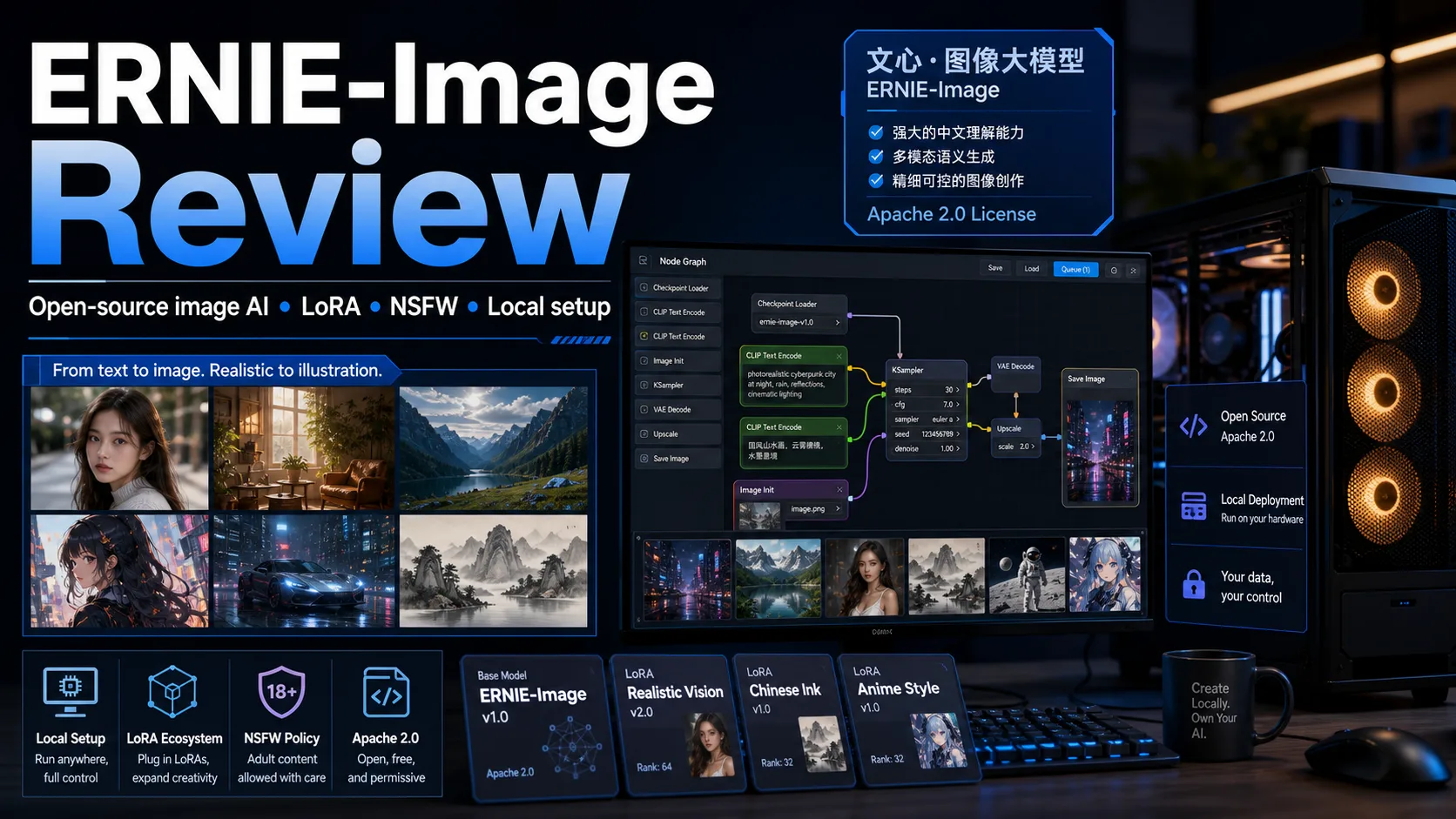

ERNIE-Image is one of the more interesting open-source image generation releases for users who care about controllability, text rendering, commercial design work and local deployment. It is not just another anime checkpoint or a closed web app: Baidu released an 8B Diffusion Transformer model under Apache 2.0, with a faster Turbo variant and growing support in Diffusers, ComfyUI and community quantization projects.
The practical conclusion is simple. If you want the newest photorealistic API-only results, Qwen-Image 3.0 or commercial tools may still be easier. If you want an open model that can run locally, has a permissive license, handles structured prompts well and already has Turbo/GGUF branches, ERNIE-Image deserves serious attention.
Its current weak spot is ecosystem maturity. Compared with FLUX, SDXL, Pony, Illustrious or Anima, ERNIE-Image has fewer LoRAs and fewer battle-tested community workflows. It is best treated as a strong open base model with room to grow, not as a fully settled creative ecosystem.
Table of Contents
Quick Verdict
| Item | ERNIE-Image Review |
|---|---|
| Best for | Local open-source image generation, posters, layouts, text-heavy images, commercial design experiments |
| Not ideal for | Users who need the largest LoRA ecosystem or one-click consumer workflows |
| Base model | 8B single-stream Diffusion Transformer with a prompt enhancer |
| License | Apache 2.0 |
| Turbo version | ERNIE-Image-Turbo, optimized for 8 inference steps |
| Recommended VRAM | Official model targets 24GB VRAM; GGUF/FP8/NVFP4 branches can lower the entry point |
| NSFW | Local model is more open than heavily moderated web services, but not an adult-specialized model |
For readers comparing open image models, this review pairs well with our Qwen Image review, Nucleus Image review, Z-Image review and Anima model review. ERNIE-Image sits closest to Qwen Image in intent: practical text-to-image generation with strong instruction following and structured layout control.
What Is ERNIE-Image?
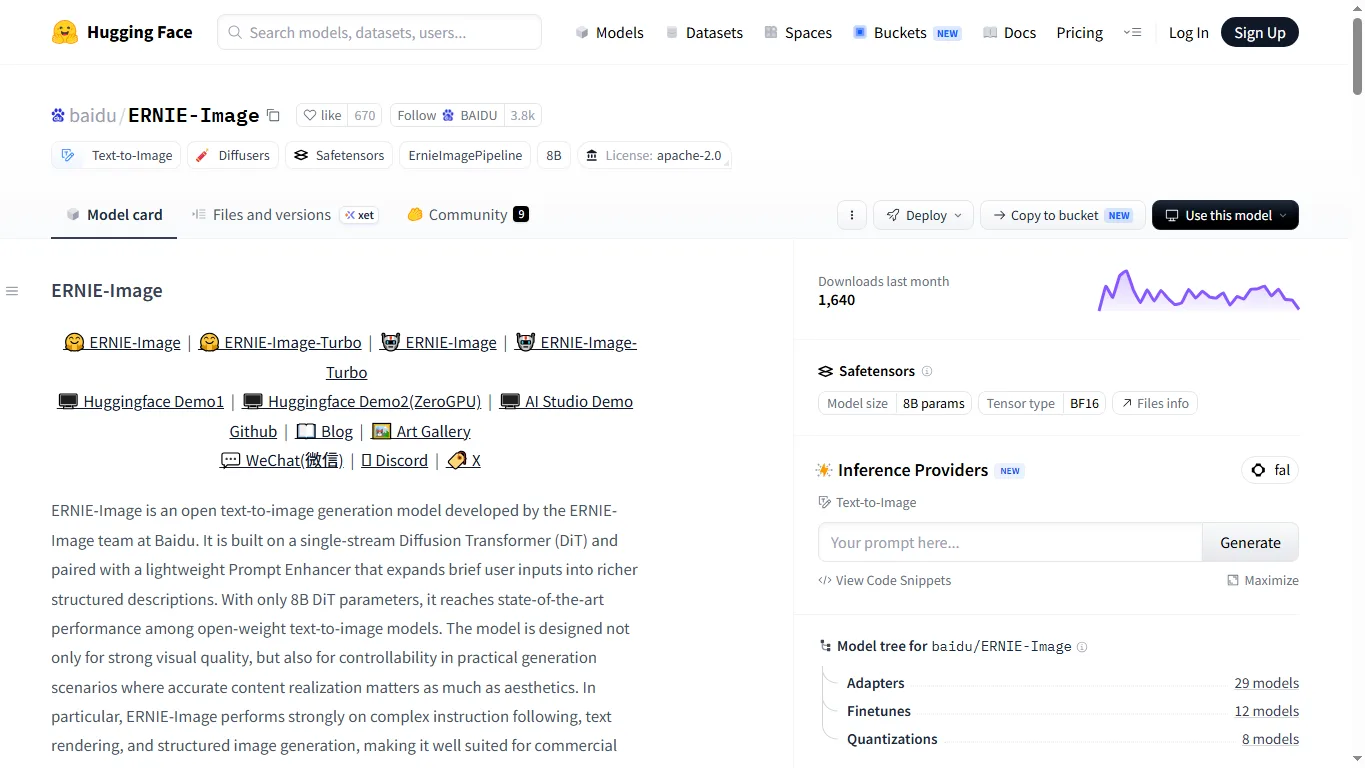
ERNIE-Image is an open text-to-image generation model from Baidu’s ERNIE-Image team. The official model card describes it as a single-stream Diffusion Transformer paired with a lightweight prompt enhancer. The model is designed for strong visual quality, controllability, complex instruction following, text rendering and structured generation such as posters, comics and multi-panel layouts.
That positioning is important. Many open image models are excellent at style or character aesthetics but become fragile when the user asks for dense layouts, multiple objects, text, signage, menus or commercial poster composition. ERNIE-Image tries to make those practical generation tasks a core strength.
Online Demo and Downloads
The main download page is baidu/ERNIE-Image on Hugging Face. The faster version is baidu/ERNIE-Image-Turbo. Baidu also links to a Hugging Face Space demo, a ZeroGPU demo, Baidu AI Studio demo, the GitHub repository and ModelScope downloads.
For most readers, the easiest first test is the online demo or an inference provider on Hugging Face. For serious local work, download the official safetensors or a ComfyUI/quantized community package after checking compatibility with your workflow.
| Resource | Link | Best use |
|---|---|---|
| Official base model | ERNIE-Image | Highest flexibility and LoRA/training experiments |
| Official Turbo model | ERNIE-Image-Turbo | Fast generation in about 8 steps |
| AI Studio demo | Baidu AI Studio | Browser-based trial |
| ComfyUI package | Comfy-Org/ERNIE-Image | Node-based local workflow |
| GGUF base | unsloth/ERNIE-Image-GGUF | Lower-memory local deployment |
| GGUF Turbo | unsloth/ERNIE-Image-Turbo-GGUF | Fast low-memory local experiments |
Local Setup and Hardware Requirements
The official model card says ERNIE-Image can run on consumer GPUs with 24GB VRAM. In practice, that means RTX 3090/4090-class cards are the comfortable baseline for the full model. On lower VRAM cards, community quantization matters: GGUF, FP8, NVFP4 and other compressed packages can make testing possible, but quality, speed, memory spikes and workflow compatibility vary.
For Diffusers, the official README points users to the latest Diffusers installation route. ComfyUI users can start from Comfy-Org/ERNIE-Image or a compatible custom workflow. Apple Silicon users may want to watch the ERNIE-Image-Turbo-MLX branch, although MLX ports often have their own tradeoffs in speed and feature parity.
| Hardware | Practical expectation |
|---|---|
| 24GB VRAM | Most realistic target for the official BF16-style local workflow |
| 16GB VRAM | Possible mainly through quantized workflows, lower resolution, CPU offload or memory-saving nodes |
| 12GB VRAM and below | Use GGUF/low-bit branches, expect slower speed and more troubleshooting |
| Apple Silicon | MLX ports are worth testing, but check current workflow support |
| No GPU | Use online demos/API or inference providers instead of local generation |
ERNIE-Image vs ERNIE-Image-Turbo
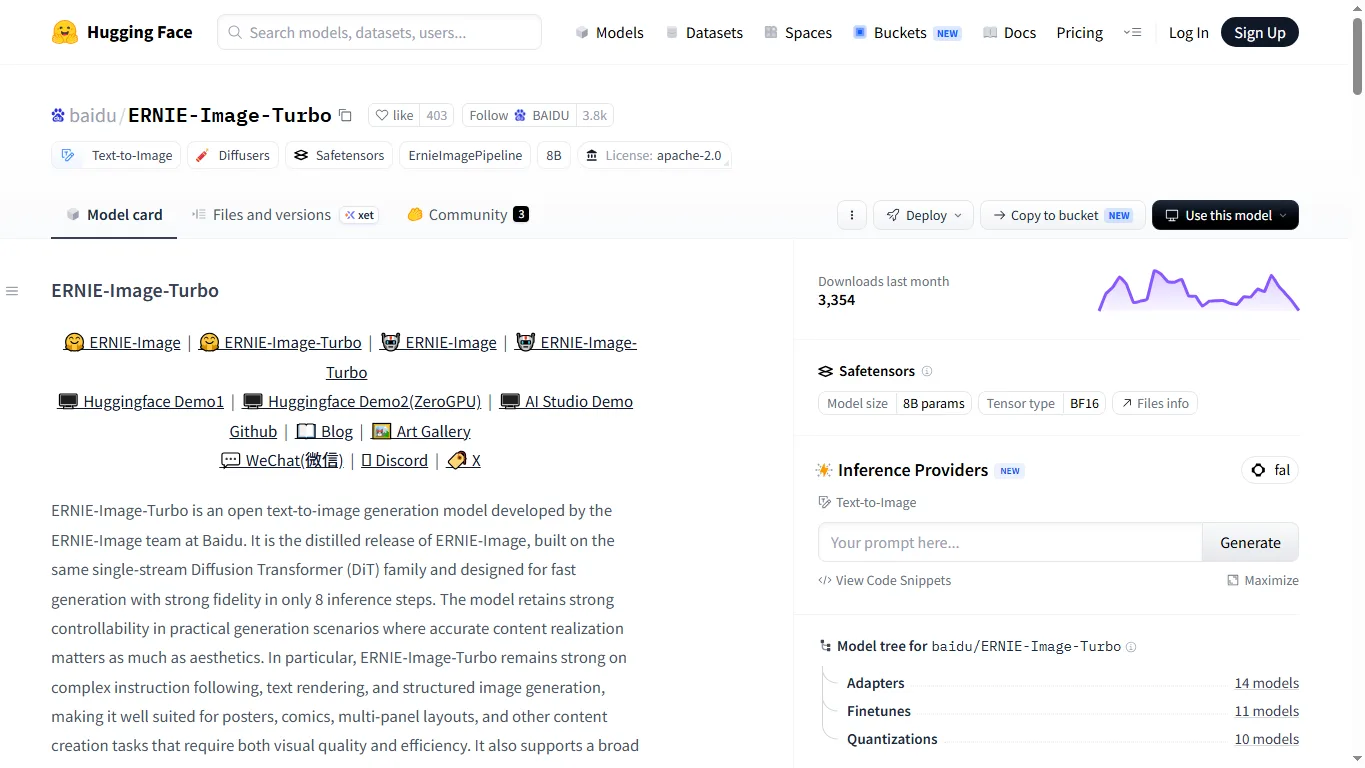
ERNIE-Image-Turbo is the distilled fast version. The official description says it is optimized by DMD and RL and is designed to keep strong fidelity in only 8 inference steps. That makes it more practical for iteration: testing prompt structure, comparing compositions, producing many drafts, and running on constrained hardware.
The base model remains more attractive when you want maximum flexibility, LoRA training experiments or careful quality tuning. The Turbo model is better when speed matters more than squeezing out the last bit of detail.
| Version | Strength | Tradeoff |
|---|---|---|
| ERNIE-Image | More flexible base model for quality tuning and adaptation | Slower and heavier |
| ERNIE-Image-Turbo | Much faster, practical for iteration and drafts | Distillation can reduce fine control in some cases |
| Prompt Enhancer | Helps short prompts become richer structured descriptions | Advanced users may prefer direct manual prompts for precise control |
Performance and Real-World Use
Official benchmark tables place ERNIE-Image-Turbo competitively against open image models such as Z-Image-Turbo, FLUX.1-dev and SD3.5-Medium on GenEval-style object composition, DPG-style prompt following and OneIG-style instruction generation. Those numbers are useful, but the real reason to test ERNIE-Image is practical controllability: text, layout, multi-object relationships and commercial-style compositions.
In real workflows, the model is most attractive for product visuals, posters, menu-like layouts, social images, comics panels, signage, packaging mockups and image drafts where prompt accuracy matters. For pure anime character LoRA abundance, Pony/Illustrious/Anima still feel more mature. For photorealistic API-only quality, Qwen-Image 3.0 and closed models may feel easier.
LoRA, GGUF and Community Resources
ERNIE-Image’s ecosystem is early but already moving. Hugging Face model tree data shows adapters, finetunes and quantizations for the official base and Turbo models. The most immediately useful community resources are not hundreds of character LoRAs yet, but practical deployment packages: ComfyUI single-file builds, Unsloth GGUF, FP8/NVFP4 variants and small experimental style LoRAs.
Recommended starting points include unsloth/ERNIE-Image-GGUF for base quantization, unsloth/ERNIE-Image-Turbo-GGUF for Turbo GGUF, Bedovyy/ERNIE-Image-Quantized for ComfyUI-oriented quantization, and Abiray/ERNIE-Image-Turbo-FP8-NVFP4 for mixed precision experiments.
For LoRA experiments, current public examples include ernie-image-elusarca-anime-style-lora, ernie-image-base-studio-ghibli-style-lora and ERNIE-Image-Turbo-LoRA. These are useful as signals that training support exists, but they should be tested before production. For broader browsing, use the Civitai ERNIE Image model search page and sort by rating/downloads as the ecosystem grows.
Comparison with Other Open Image Models
| Model | Best at | Weak point | Who should choose it |
|---|---|---|---|
| ERNIE-Image | Prompt following, text/layout tasks, open license, local deployment | LoRA ecosystem still young | Designers and local users who need structured image control |
| Qwen Image | Text rendering, dense layouts, latest API quality | Newest 3.0 weights are not fully open | Users who want strong multilingual text/layout generation |
| Nucleus Image | Sparse MoE efficiency and Apache 2.0 openness | Smaller community than SDXL/FLUX | Open-source experimenters who value architecture efficiency |
| Z-Image | Fast local image generation and active finetune scene | Model/version fragmentation | Users who enjoy local model tuning |
| FLUX.1-dev | Strong general image quality and mature ecosystem | License and hardware can be limiting | Creators who want a mature open workflow |
| Anima / Pony / Illustrious | Anime, characters, NSFW community resources | Less focused on commercial text/layout tasks | Anime and character-focused users |
NSFW Support and Policy
The official ERNIE-Image release is an open model, so local behavior depends on the weights, prompt, workflow and any safety layer you add. It is generally more controllable than a heavily moderated closed web tool, but it should not be described as an adult-specialized model. For explicit NSFW, dedicated anime or uncensored finetunes still tend to provide stronger prompt vocabulary and community recipes.
There are already community branches such as ponpoke/ERNIE-Image-Abliterated-GGUF that are explicitly positioned around uncensored/abliterated use. Treat these as third-party resources: check licenses, model cards, safety notes and legality before use. Online demos and hosted inference providers may still filter adult content, even when the local model itself is open.
Responsible use matters. Avoid non-consensual real-person sexualization, underage sexual content, harassment, impersonation, and illegal material. For commercial work, also check privacy, likeness rights, brand rights and the license of every finetune or LoRA you use.
FAQ
Is ERNIE-Image open source?
The official Hugging Face model is released under Apache 2.0, which is a permissive license. Still, always check the exact model card and any LoRA/finetune license before commercial use.
How much VRAM does ERNIE-Image need?
The official card mentions 24GB VRAM for practical consumer GPU deployment. Quantized GGUF/FP8/NVFP4 versions can reduce requirements, but they may need different nodes and careful settings.
Should I use ERNIE-Image or ERNIE-Image-Turbo?
Use the base model for quality tuning, adaptation and LoRA experiments. Use Turbo for fast drafts, repeated prompt testing and lower-cost iteration.
Can ERNIE-Image render text?
Text and structured layout are among its stated strengths. It is still not perfect, so use short text, clear layout descriptions and regenerate when exact typography matters.
Does ERNIE-Image have many LoRAs?
Not yet compared with SDXL, Pony or FLUX. The ecosystem is growing, and early LoRAs/quantized packages are already available, but production users should test compatibility carefully.
Is ERNIE-Image good for NSFW?
It is more open when run locally than many hosted tools, but it is not primarily an adult model. Dedicated NSFW finetunes and LoRAs remain more practical for that use case.
Reference Information
- baidu/ERNIE-Image on Hugging Face
- baidu/ERNIE-Image-Turbo on Hugging Face
- ERNIE-Image GitHub repository
- Baidu AI Studio demo
- ERNIE-Image on ModelScope
- Comfy-Org/ERNIE-Image
- unsloth/ERNIE-Image-GGUF
- unsloth/ERNIE-Image-Turbo-GGUF
- Civitai ERNIE Image search
Conclusion
ERNIE-Image is worth watching because it combines three things that do not always arrive together: a compact 8B image model, Apache 2.0 licensing and a serious focus on instruction following, text and structured layouts. For local creators, that makes it more practical than a pure research checkpoint.
It is not the safest one-click recommendation for every user. The LoRA ecosystem is still young, lower-VRAM workflows require testing, and closed models may still win on polish. But for people who care about open image generation, commercial flexibility, ComfyUI experiments, Turbo speed and local control, ERNIE-Image is already a strong candidate.
Related Reviews
5 Best PDF Enhancers in 2026

Best 5 Password Managers in 2026

Llama 4 Review: Scout, Maverick, Behemoth, Local Deployment and NSFW Policy
5 Best AI Flyer Generators in 2026: Features, Pros & Cons
GLM-5.3-Flash Review: Ox-Alpha, API Access, Benchmarks, and NSFW Limits
Canva Craft Review: 2K Images, Wide Formats, Text and Editing Limits