
AI Image Translator

Translate text in photos, screenshots and graphics into another language. Upload an image, choose a language and download a translated picture.

Image preview

Upload Image

Supports JPG, JPEG, PNG, BMP, WEBP, HEIC, JFIF · Up to 10 MB · 64–4096 px per side

Supports JPG, JPEG, PNG, BMP, WEBP, HEIC, JFIF · Up to 10 MB · 64–4096 px per side

Only upload images you have permission to edit. Avoid sensitive documents.

From a photo to a translated image

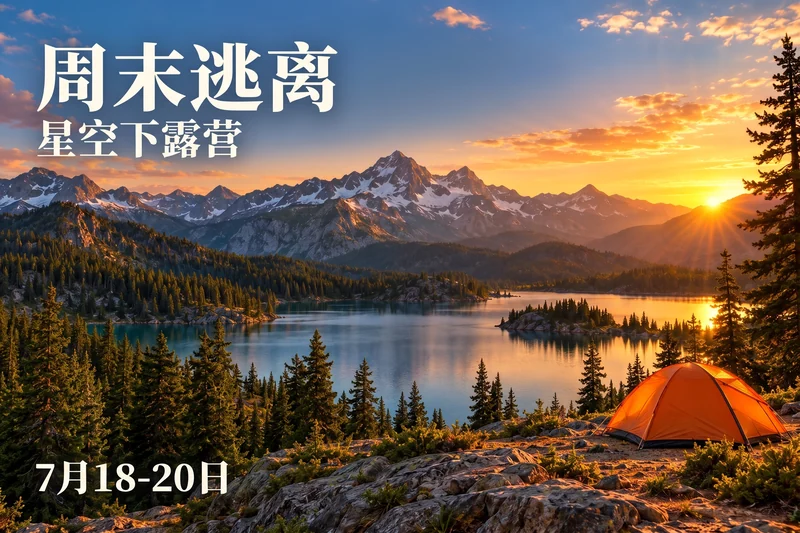
This camping poster was translated from English into Chinese with this tool. Drag the slider to compare its headline, event dates and landscape.

WEEKEND ESCAPE周末逃离

Real translation test using an AI-generated source illustration. Results vary; exact fonts, layout and background are not guaranteed.

Translated: 周末逃离
Original: WEEKEND ESCAPE
OriginalTranslated

How to translate an image

Start with a clear picture containing readable text. You can translate a screenshot or graphic without finding its original design file.

  1. Upload your image

    Choose one JPG, JPEG, PNG, BMP, WebP, HEIC or JFIF up to 10 MB, with each side between 64 and 4096 pixels. For clearer results, use the original image instead of a small thumbnail.

  2. Choose a language

    Select the language you want to read. The tool attempts to recognize and translate visible text throughout the image, without asking you to type each line or select an area.

  3. Review and download

    Compare the translated picture with the original. Check small captions, names, dates and prices. Download the result once reviewed, or choose a new image to start again.

Translate the message, review the picture

Image translation creates a new picture with translated lettering. It is useful for adapting readable visuals, but complex backgrounds and dense text need careful review.

Translate text across an image

Choose one target language for all readable text. This saves retyping individual headlines and labels. Short, clear text generally works better than tiny print, handwriting or crowded tables.

Example

A product graphic with several short feature labels can be adapted for another audience.

Keep the original in view

Compare both images before saving. The service aims to keep the composition and visual style, but it may leave source words, add bilingual text, reflow lines or alter nearby details.

Example

Check a translated menu’s prices and dish descriptions against the original.

Pictures you can translate

Use clear source images and review the result in context. Image translation is a starting point for localization, especially where wording and visual presentation both matter.

Menus and travel signs

Read dish descriptions, shop notices and signs. Confirm prices, opening times and allergy information independently when needed.

Products and marketing graphics

Adapt short feature labels, promotional headlines and captions. Review brand names, measurements and product details before publishing.

Screenshots and study material

Translate readable interface labels or study excerpts. Dense scanned pages and technical tables may lose detail; this tool does not produce an editable document.

Frequently asked questions

What does the image translator return?

It returns a new image with translated lettering, not a text document or editable text layers. You do not need to type the original words. It processes one image and one target language per task.

Will the layout and background stay identical?

No. The service aims to preserve the overall composition but can change fonts, line breaks, colors, image details or dimensions. It can also leave original words or produce bilingual lines. Compare the whole result before using it.

Which languages can I choose?

The selector includes English, Simplified and Traditional Chinese, Japanese, Korean, German, French, Spanish, Portuguese, Italian and other listed languages. Source language is detected automatically. Quality varies by language, lettering and image.

Which files can I upload?

Upload one JPG, JPEG, PNG, BMP, WEBP, HEIC or JFIF image up to 10 MB, with each side between 64 and 4096 pixels. BMP and HEIC files are converted before editing; the prepared image must also fit the 10 MB limit. If a HEIC file contains several images, only the first image is used.

When are credits used?

Sign-in is required. Each successful image uses 5 credits. Usage and the success count are recorded only after the server verifies an available result image. Failed or empty tasks do not count; repeated checks of the same completed task do not add another charge.

What should I avoid uploading?

Your image is uploaded for server-side AI processing, not edited entirely on your device. Avoid identity, financial or medical documents and other sensitive material. Edit only images you have permission to use. Do not alter evidence or misrepresent an original document.

Why are some words missing or left in the original language?

Tiny print, blurry text, unusual fonts, dense tables and busy backgrounds can affect recognition and replacement. Some results can contain both languages. Try a clearer source image and review every line; complete replacement is not guaranteed.

Can I translate PDFs or edit the translated text?

This page accepts single images, not PDF documents or batches. It does not provide text-box editing, font layers or manual region selection. Save your result before refreshing: a refresh resets this page, while already submitted work may continue in the background.

Sign In

OR

Create Account

Password must be 8-20 characters and contain letters and numbers

OR

Forgot Password

Password must be 8-20 characters and contain letters and numbers