Best 5 AI GIF Generators in 2026
Compare the best AI GIF generators in 2026 for prompt-based loops, image animation, product reveals, reactions, and social content.

Best 5 AI GIF Generators in 2026
GIFs remain one of the fastest ways to add motion to a blog post, product page, social post, or chat. An AI GIF generator can simplify the process by creating motion from a text prompt, image, or short video.
We compared five useful options for prompt control, image-to-GIF workflows, motion quality, editing tools, export flexibility, and ease of use.
Best AI GIF Generators at a Glance
| Tool | Best for | Starting input | Key strength |
|---|---|---|---|
| Moxion | Flexible GIF creation | Text or image | Dedicated GIF controls |
| GifGen | Reaction GIFs and loops | Text or image | Original generative motion |
| CapCut | Social and promotional content | Text, image, or video | AI generation plus editing |
| Rewind.ai | Quick text-to-GIF experiments | Text | Simple prompt workflow |
| Fotor | Beginner-friendly animation | Text or image | Fast image animation |
1. Moxion — Best Overall AI GIF Generator
Moxion is the strongest all-round option for creators who want to generate a GIF and still control the final output. Start with a text prompt or one reference image, describe the movement you want, and refine the result before exporting. This makes it useful for both quick experiments and polished visual content.
In testing, Moxion worked especially well for product reveals, animated illustrations, subtle camera moves, reaction loops, and short promotional graphics. You can try several motion directions from the same source instead of rebuilding the idea from scratch, which helps when you need a consistent visual style.

Key features
- Text-to-GIF and image-to-GIF generation
- Controls for frame rate, width, quality, speed, and playback
- Loop, reverse, and single-play options
- GIF, WebP, and APNG export support
- Multiple generation directions from one prompt or source image
Pros: Complete GIF-focused workflow, useful export controls, and good flexibility for both simple and branded animations.
Cons: The advanced settings take time to learn, and complex scenes may need several generations before the motion looks stable.
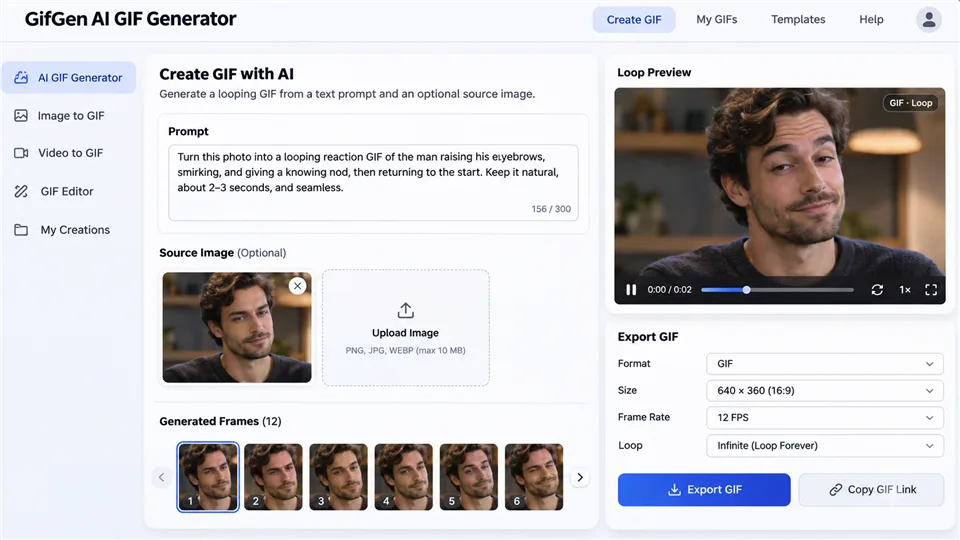
2. GifGen — Best for Fast Prompt-Based GIFs
GifGen is built for turning a short idea into an original animated GIF with minimal setup. Describe an action such as waving, blinking, dancing, or reacting, or use an image as the starting point, and the tool creates a compact loop that is easy to share.
It is a practical fit for chat reactions, memes, animated stickers, profile images, and quick social posts. GifGen performs best when the prompt focuses on one clear subject and one visible action; simpler scenes usually produce more coherent frame-to-frame movement.
Key features
- Prompt-driven GIF creation from a plain-language description
- Image-guided animation for turning still artwork into a loop
- Short, expressive motion presets for reactions and social content
- Quick variations when the first result is not quite right
- Simple output workflow for sharing or embedding
Pros: Fast idea-to-GIF workflow, expressive short loops, and a low learning curve for casual creators.
Cons: Fine details can change between frames, and busy scenes are harder to keep stable without additional iterations.
3. CapCut — Best for GIFs Within a Full Video Editor
CapCut is a strong choice when a GIF is only one part of a wider social or marketing workflow. You can animate an image or generate a short clip, then continue in the same editor to trim timing, add captions, place stickers, apply effects, and prepare the canvas for different platforms.
This makes CapCut useful for blog graphics, vertical social posts, product announcements, and short explainers. You can resize a project, add a branded overlay, and export a polished animation without switching between several apps. The trade-off is that its larger feature set makes the interface feel busier than a dedicated GIF tool.
Key features
- Text-to-video and image-to-video generation for animated source clips
- Timeline editing for trimming, timing, and loop preparation
- Captions, stickers, filters, transitions, and layered overlays
- Aspect-ratio presets for social, mobile, and widescreen formats
- One workspace for AI generation and manual finishing
Pros: Mature editor with many finishing tools, flexible input types, and a smooth path from AI generation to publish-ready content.
Cons: The interface can feel crowded, and AI-generated motion may still need manual cleanup before export.
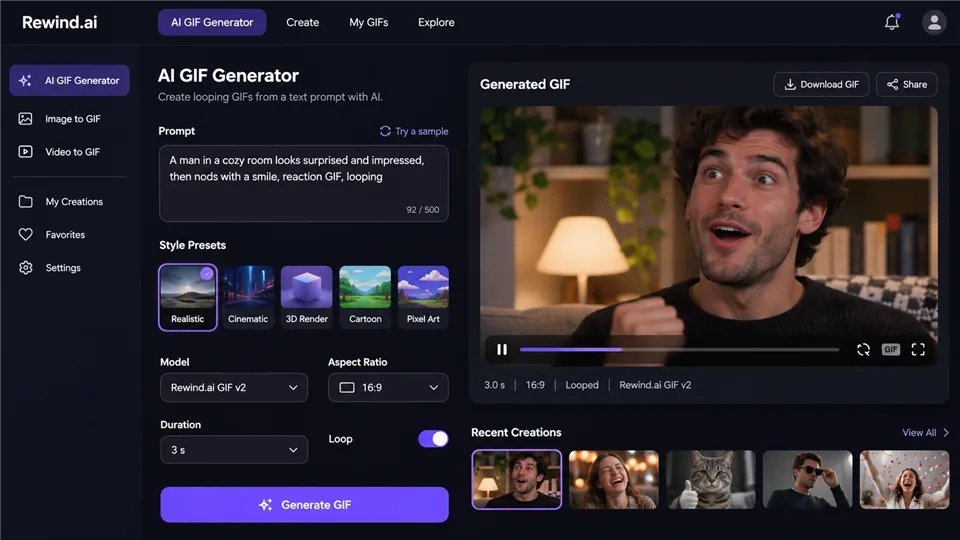
4. Rewind.ai — Best for a Simple Text-to-GIF Workflow
Rewind.ai takes a straightforward prompt-first approach: describe the scene and action, choose the general direction, and generate a short looping animation without managing a full timeline. It is designed for people who want a quick result rather than a large set of production controls.
That simplicity works well for lightweight blog graphics, simple reactions, and visual placeholders. It is also easy for first-time users to understand, although the reduced control means you may have less influence over exact timing, individual frames, or character consistency.
Key features
- Prompt-based generation from a short scene description
- Preset visual directions for quickly testing different looks
- Simple motion instructions for loops, reactions, and ambient movement
- Fast generation for short social or editorial animations
- Minimal workflow with no full video timeline required
Pros: Quick and approachable, with a clean workflow for users who do not need a full editor.
Cons: Frame-level control is limited, and character or object consistency can vary across generations.
5. Fotor — Best for Animating Photos and Illustrations
Fotor is a practical option when you already have a photo or illustration and want to add movement without learning a complex animation editor. Upload the image, select a motion or style direction, and generate a short GIF that can be used in social posts, lightweight marketing, or personal projects.
It is particularly suited to portraits, product images, illustrations, and simple promotional visuals. Subtle camera pushes, floating particles, hair movement, and gentle product rotation tend to work better than complicated multi-subject action, so the quality of the source image matters.

Key features
- Image-to-GIF animation for photos and artwork
- Text-guided motion prompts for specifying movement
- Style presets for portraits, products, and social graphics
- Quick output for short marketing and content loops
- Beginner-friendly controls with little setup
Pros: Approachable interface, quick results, and a convenient way to animate existing visual assets.
Cons: Complex motion is limited, and weak or low-resolution source images can produce less convincing results.
Which AI GIF Generator Should You Choose?
- For overall flexibility: Moxion.
- For reactions and memes: GifGen.
- For social and promotional workflows: CapCut.
- For quick text prompts: Rewind.ai.
- For simple photo animation: Fotor.
How to Create a Better AI GIF
- Keep the motion simple and describe one clear action.
- Use a sharp source image with a well-defined subject.
- Describe the loop and camera movement explicitly.
- Review frames for flicker, distorted details, and changing text.
- Optimize dimensions and frame rate before publishing.
FAQ
What is an AI GIF generator?
It creates a looping animation from a text prompt, image, or video. Some tools generate new frames, while others assist with editing and conversion.
Can AI create a GIF from text?
Yes. GifGen and Rewind.ai are designed for prompt-based GIF creation.
Can I animate my own photo?
Yes. Image-to-GIF tools can add movement to portraits, products, and illustrations.
What is the difference between AI GIF generation and video conversion?
A converter cuts existing footage into GIF frames, while an AI generator creates or invents motion from a prompt or still image.
Why does my AI GIF flicker?
Flicker often occurs when the model changes small details between frames. Simpler prompts and steadier source images can help.
Can AI-generated GIFs be used commercially?
Check the tool’s current terms, plan, model license, and source-material policy before using a GIF in advertising or paid work.
Final Verdict
Moxion is the strongest all-round choice, GifGen is ideal for original reactions, CapCut is best for social workflows, Rewind.ai is convenient for quick prompt experiments, and Fotor is a good starting point for animating still images.
Latest Reviews
5 Best AI PDF Editors in 2026: Edit, OCR & Rewrite PDFs

Best 5 AI Cartoon Generators in 2026

Best 5 AI 3D Model Generators in 2026
6 Best AI App Builders in 2026: From Prompt to Product
Best 5 PDF Editors in 2026: The Right Tool for Editing, Signing, and Managing PDFs
MOSS-Image LoRA Training: Fizgig, AI Toolkit, KohakuMossTrainer and sd-scripts