5 Best AI App Builders in 2026: From Prompt to Product
Compare the five best AI app builders for business tools, native mobile apps and full-stack products, with clear strengths, limits and use cases.


An AI app builder can now turn a plain-language brief into screens, data structures and working flows in minutes. That makes it much easier to test an idea, replace a spreadsheet or launch a small customer-facing product without starting with a development team.
The tools are not interchangeable, though. Some are designed for internal business apps, some can publish native mobile apps, and others provide the deeper logic needed for a serious web product. We compared five leading options by output quality, editing control, data handling, deployment and ease of use.
Table of Contents
- How We Evaluated the Best AI App Builders
- Best AI App Builders at a Glance
- 1. Julius AI App Builder
- 2. Jotform AI App Builder
- 3. Glide
- 4. Adalo
- 5. Bubble
- Which AI App Builder Should You Choose?
- How to Build an App with AI
- What to Check Before You Publish
- Frequently Asked Questions
- Final Verdict
How We Evaluated the Best AI App Builders
We looked at how quickly each platform turns a realistic prompt into a usable first version, then checked how easily the result can be refined. Our criteria included interface quality, workflows, database support, authentication, integrations, mobile options, publishing, collaboration and the learning curve.
AI can accelerate setup, but it does not replace product decisions. Permissions, payment flows, privacy rules and unusual business logic still need careful testing before an app goes live. Pricing and plan limits also change, so confirm current details on the vendor’s site.
Best AI App Builders at a Glance
| Tool | Best for | Output | Main limitation |
|---|---|---|---|
| Julius AI | Fast prompt-led prototypes and working web apps | Data-driven web apps | Less granular control than mature visual platforms |
| Jotform AI App Builder | Forms, portals and lightweight business apps | Responsive shareable apps | Less suitable for highly custom software |
| Glide | Internal tools connected to business data | Responsive web and mobile-friendly apps | Not aimed at consumer app-store products |
| Adalo | Native iOS and Android apps without code | Native mobile apps and responsive web apps | Advanced custom behavior can require workarounds |
| Bubble | Complex web apps and scalable product ideas | Full-stack web apps and native mobile apps | Steeper learning curve than simpler builders |
1. Julius AI
Best for: Data-driven web apps, dashboards and websites built from a prompt
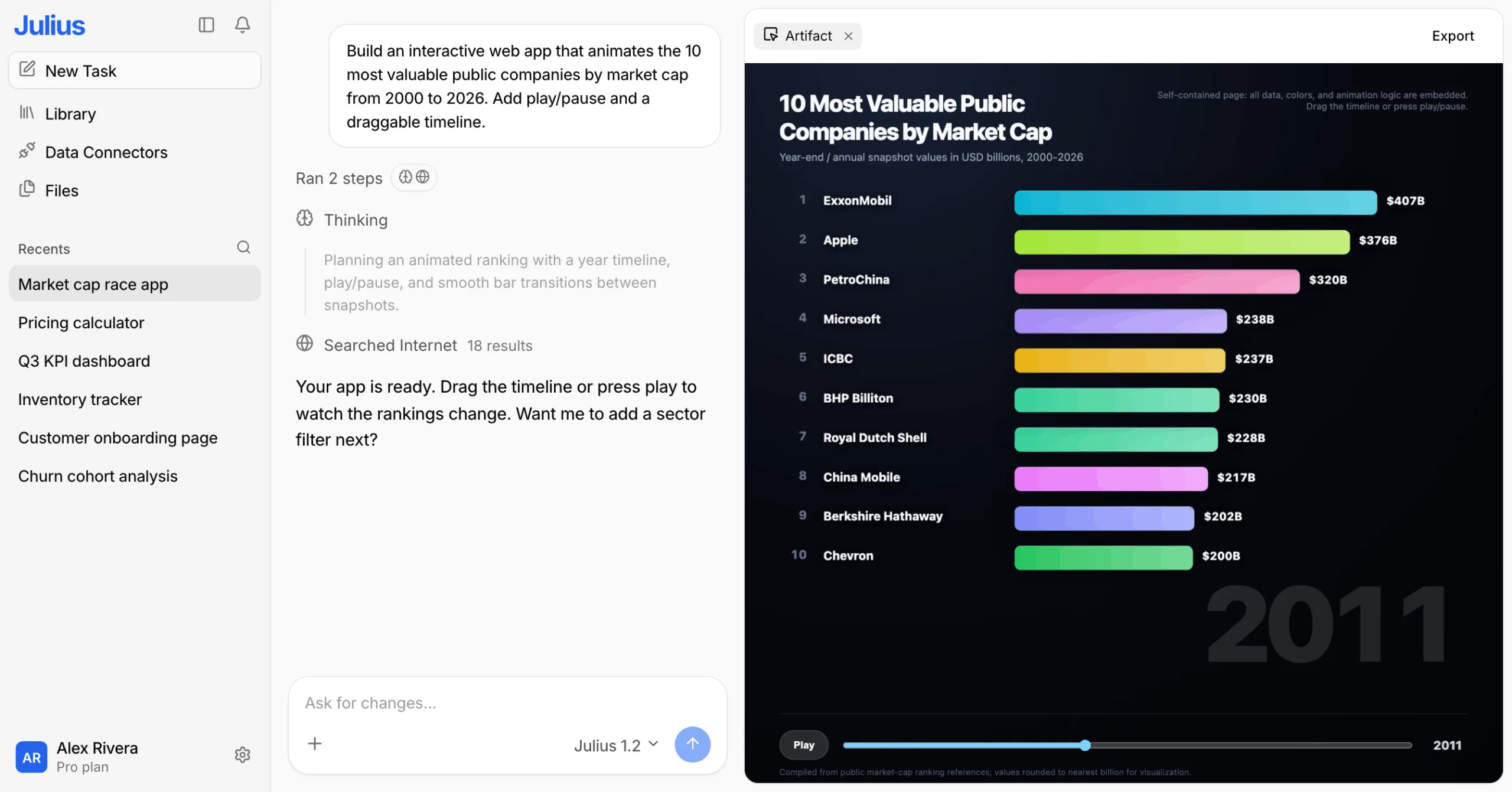
Julius AI turns a plain-language brief into a working web app inside a chat, with a live preview beside the conversation. Describe a pricing calculator, KPI dashboard, booking page or landing page and it generates a usable first version, then refines the copy, layout, styling and functionality as you ask.
What sets it apart is data. Julius began as an AI data analyst, so it can search the web, read spreadsheets and connect to business data before it builds, which suits dashboards, trackers and calculators that depend on real numbers. Finished apps publish to a shareable julius.site link or export as HTML. Teams that need user accounts, app-store distribution or deep backend logic may prefer a fuller platform.
Key features
- Prompt-to-app generation with a live preview
- Conversational editing of layout, styling and logic
- Web search, file uploads and data connectors
- One-click publishing to a shareable link, plus HTML export
Beyond building websites and web apps, Julius AI also supports other outputs, including presentations. Its AI Presentation Maker lets users turn ideas and data into structured slides, making it a versatile tool for both app development and business presentations.
2. Jotform AI App Builder
Best for: Forms, portals and lightweight business apps
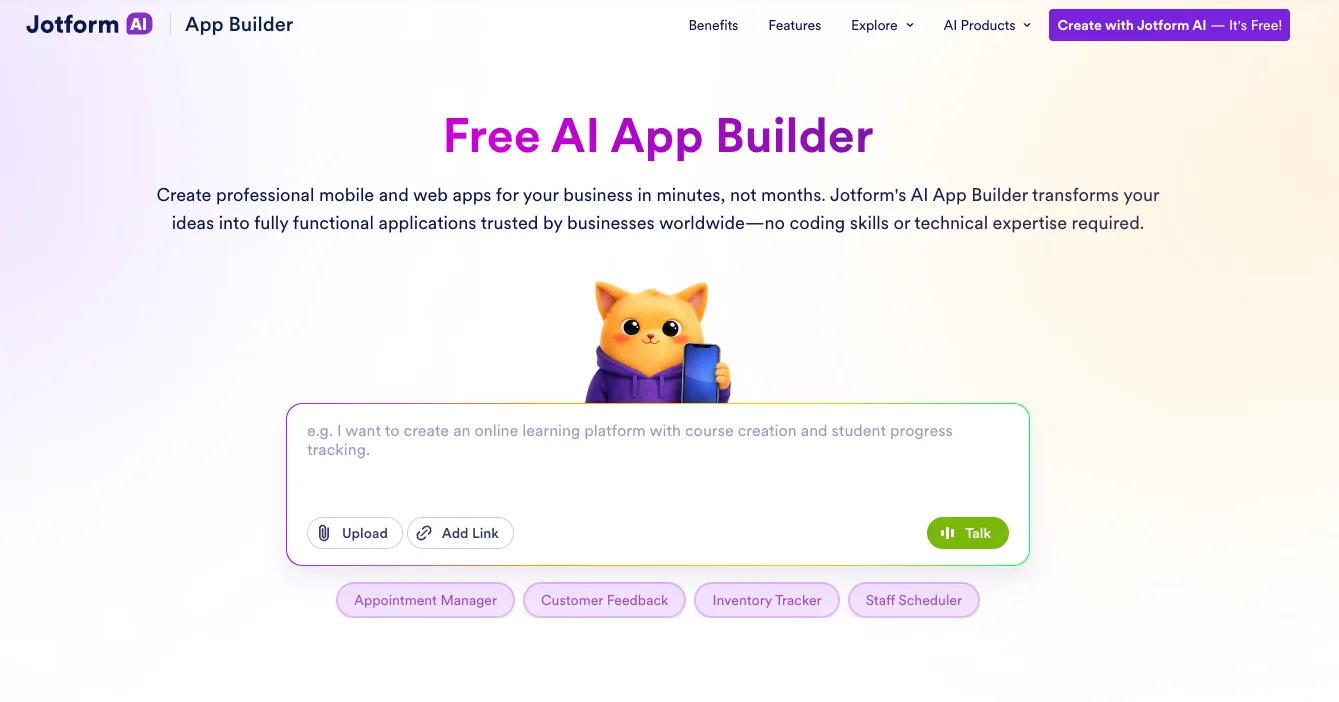
Jotform AI App Builder is the most approachable choice for a form-led business app. Describe a client portal, event app, directory or internal request system and it creates a responsive starting point with pages, navigation and data-collection elements.
You can continue editing through prompts or use the visual tools, then connect forms, tables, approvals, payments and other Jotform services. It is fast for operational workflows, but teams building an unusual product with deep custom logic may outgrow its structure.
Key features
- Prompt-based creation and conversational editing
- Forms, tables, payments and approval workflows
- Responsive sharing by link or QR code
- Widgets, access controls and team options
Pros
- Very easy for non-technical users
- Strong form and data-collection ecosystem
- Quick route from brief to shareable app
Cons
- Not intended for complex custom software
- Advanced security and branding may require higher plans
- Less control over code and infrastructure
Bottom line: Choose it for a portal or workflow app built around forms, submissions and business data.
3. Glide
Best for: Internal tools connected to business data

Glide is strongest when the app begins with data. It can turn a spreadsheet or connected business source into an inventory tool, CRM, operations dashboard, field app or customer portal. Glide Agent can generate the initial structure, layout and data model from a description.
After that, teams can add roles, calculated columns and automated workflows. Glide AI can also extract information from files, summarize text and process images or audio inside a workflow. It is polished for internal operations, although it offers less freedom than a general-purpose product builder.
Key features
- AI-generated apps and interface components
- Spreadsheet, SQL and business-data connections
- Roles, permissions and responsive layouts
- Workflow automation with AI processing steps
Pros
- Excellent for operational software
- Fast to build on existing data
- Clean interfaces across desktop and mobile
Cons
- Complex custom interactions can be restrictive
- AI and advanced data features depend on plan
- Not the first choice for native app-store distribution
Bottom line: Choose Glide for a secure internal tool, portal or field workflow that must stay connected to business data.
4. Adalo
Best for: Native iOS and Android apps without code

Adalo is the clearest option here when publishing to the Apple App Store or Google Play is central to the project. Its Ada builder can generate screens, navigation and a relational data structure from a prompt, while the visual canvas makes later changes understandable.
The same project can support iOS, Android and web delivery. Built-in components cover common features, and custom actions connect external APIs. Adalo is easier than traditional mobile development, but ambitious apps still require careful database planning and performance testing.
Key features
- AI generation for screens, data and navigation
- Visual multi-screen editor and built-in database
- Native iOS and Android builds plus web publishing
- Custom actions, components and external data connections
Pros
- Direct path to mobile app stores
- Visual editing remains accessible after generation
- Good balance of speed and mobile control
Cons
- Complex logic may need workarounds
- App-store submission still requires testing and compliance
- Large projects need disciplined data design
Bottom line: Choose Adalo when you need a genuine mobile app and want to refine it visually without maintaining source code.
5. Bubble
Best for: Complex web apps and scalable product ideas

Bubble offers the deepest visual development environment in this group. Its AI builder can create a working interface, database and logic from a prompt, while the editor exposes workflows, privacy rules and backend behavior for detailed customization.
That depth supports marketplaces, SaaS products and customer platforms that would be difficult in a lightweight builder. Bubble also supports native mobile development and shared backend workflows. The trade-off is complexity: serious projects take time to structure, test and optimize.
Key features
- Prompt-to-app generation for UI, logic and database
- Detailed visual workflows and backend tools
- Plugin ecosystem, APIs, hosting and security controls
- Web and native mobile development in one platform
Pros
- Most flexible option for complex no-code products
- Strong logic and data control
- Can grow beyond a simple prototype
Cons
- Longer learning curve
- Performance and privacy rules require attention
- Platform dependency can complicate migration
Bottom line: Choose Bubble for a serious, custom product when you want visual control over both front end and application logic.
Which AI App Builder Should You Choose?
| Need | Recommended tool |
|---|---|
| dashboards and websites built from a prompt | Julius AI |
| Forms, submissions and customer portals | Jotform AI App Builder |
| Internal tools built on company data | Glide |
| Native iOS and Android publishing | Adalo |
| Complex SaaS or marketplace product | Bubble |
Start with the destination, not the AI demo. A mobile app-store launch points toward Adalo or Bubble; a data-heavy internal workflow usually suits Glide; a submission-driven portal is easier in Jotform; and a rapid web concept is a natural Base44 project.
Before committing, rebuild one representative workflow in your top two choices. Test permissions, integrations, mobile behavior and export or migration constraints—not just the first generated screen.
How to Build an App with AI
- Write a brief that identifies the users, their main task, required data and the desired platform.
- Ask the builder for a small first version with one complete workflow.
- Replace sample content and check the database structure before adding more screens.
- Configure roles, permissions, integrations and error states.
- Test on real devices with several user accounts.
- Publish a limited pilot, collect feedback and iterate before a wider launch.
What to Check Before You Publish
- Confirm what each user role can view and edit.
- Test empty states, invalid entries and failed payments or automations.
- Review privacy, data retention and account-deletion flows.
- Measure performance with realistic records rather than sample data.
- Check vendor lock-in, backups and migration options.
- Keep a written specification so prompts do not become the only source of truth.
Frequently Asked Questions
What is an AI app builder?
It is a platform that converts natural-language instructions into app screens, data structures and workflows, usually with visual or conversational editing.
Can AI build a complete app?
It can produce a useful first version and, in some platforms, a production app. Security, business rules, testing and product decisions still require human review.
Which AI app builder is best for beginners?
Jotform is especially easy for form-led apps, while Julius AI offers a straightforward conversational workflow. The best choice depends on the type of app.
Which tool is best for native mobile apps?
Adalo is the most direct option in this list for publishing to iOS and Android. Bubble also supports native mobile apps with a shared backend.
Can I build an internal business tool with AI?
Yes. Glide is particularly strong for inventory, CRM, field operations and other apps connected to existing business data.
Do I own the generated code?
Ownership and export options vary. Some platforms host the application in their own runtime instead of providing portable source code, so check the current terms before choosing.
Are AI app builders secure?
They can provide authentication and security controls, but you remain responsible for correct permissions, privacy settings, integrations and testing.
Can I build an app for free?
Most platforms offer a free starting tier or trial, but custom domains, advanced data, collaboration and app-store publishing generally require a paid plan.
Final Verdict
There is no single best AI app builder for every project. Jotform wins for form-led business apps, Glide for data-connected operations, Adalo for native mobile publishing, Bubble for deep customization, and Julius AI for rapid conversational building.
Use AI to reach a testable version faster, then judge the platform by the work that follows: editing, data control, security, deployment and long-term maintenance.
Related Reviews
Best 5 Online Signature Generators in 2026

Best 5 CRM Software Tools Of 2026
Build a Cloud GPU AI Workstation: Images, Video, LLMs & NSFW Limits (2026)

Krea 2 Review: Is Krea's AI Image Model Worth Trying?
Qwen-Image-2.1 Review: Transparent Images, Editing, API Pricing and NSFW
Qwen Image Review: 3.0 vs 2.0, LoRA/GGUF, and NSFW Support