RustingStrata Review: Local AI Speed, RAM, Setup and NSFW Support
RustingStrata explained: supported GGUF models, real limits of its speed and RAM claims, Windows/Linux installation, local API setup and NSFW behavior.


RustingStrata brings a local chat page, model downloads and an API server into a compact Rust inference engine. Its strongest use case is running supported Qwen GGUF models with CPU and GPU working together when the whole model does not fit in graphics memory. It is particularly interesting for a shared workstation, but low process memory and high token speed do not make RAM, storage or setup requirements disappear.
RustingStrata official project and downloads
What RustingStrata does—and which models it runs
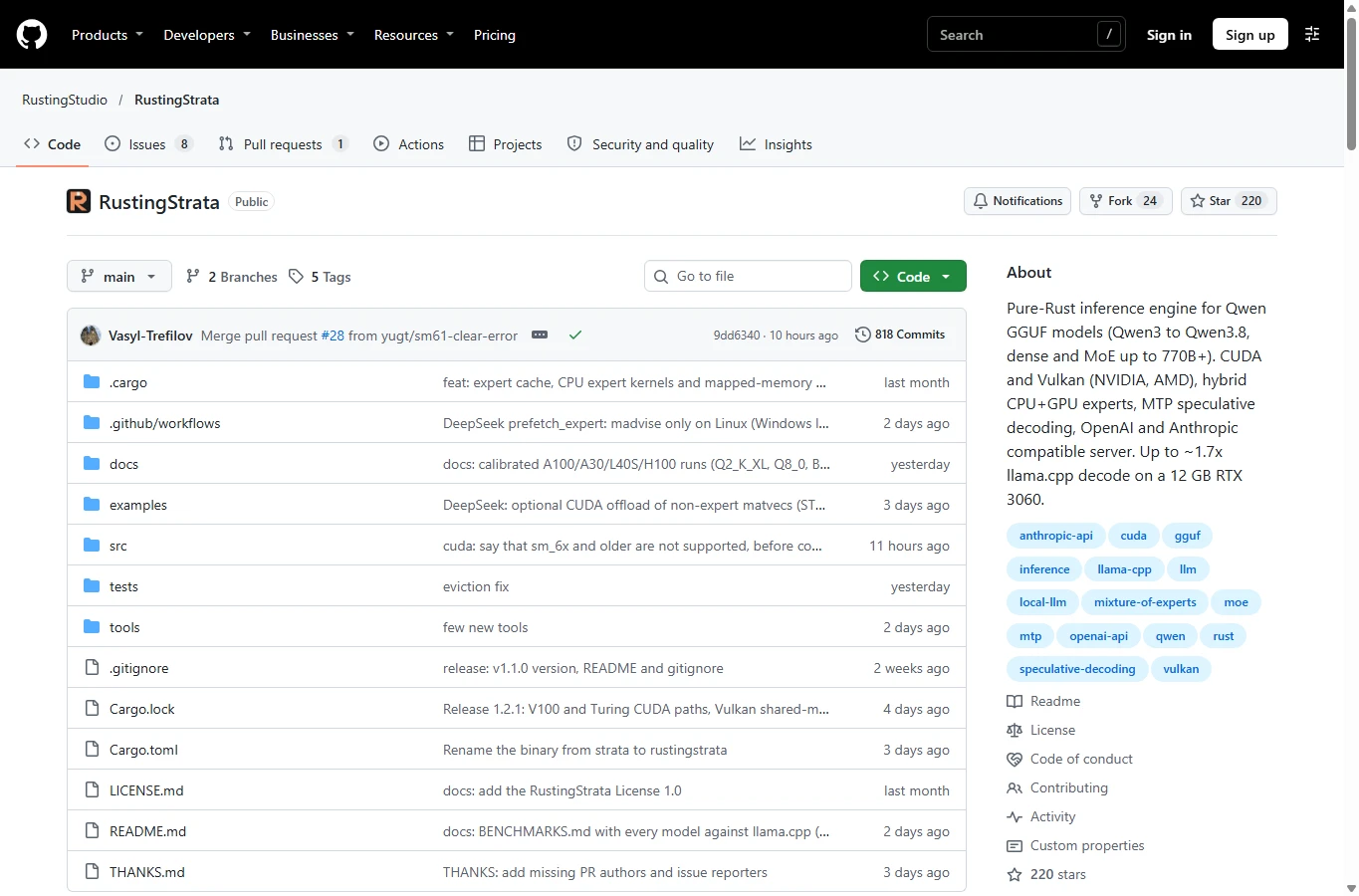
Developed by Vasyl Trefilov at RustingStudio, RustingStrata is an inference engine, not a new language model. You supply GGUF weights; they determine knowledge, writing style, languages and much of answer quality. Its CPU handles experts that do not fit in VRAM while frequently used experts move to the GPU. CUDA kernels compile at runtime with NVRTC; Vulkan is another backend. It is not simply a Rust wrapper around llama.cpp.
The November 8, 2026 v1.2.1 release supports Qwen3, Qwen3-Next, the Qwen3.5/3.6 hybrid family and Qwen3.8-Flash-Next. A GGUF extension alone does not establish compatibility. The current main branch also lists DeepSeek-V4.1-Flash and GLM-5.3-Flash; those additions should not be assumed to exist in the earlier downloadable v1.2.1 binary.
The built-in browser page downloads and switches models, retains chats in the browser and displays context, token speed and resource use. The server offers OpenAI-compatible chat completions and Anthropic-compatible Messages endpoints. It does not turn a text model into an image or video generator, and API compatibility does not mean every cloud-provider feature is implemented.
Speed, RAM and user feedback: what the evidence shows
The strongest reproducible-looking numbers currently come from the developer, not an independent laboratory. On an RTX 3060 12GB, Ryzen 5 7600X and 32GB RAM, Qwen3.6-35B-A3B UD-Q2_K_XL (11.7 GiB) decoded at 113.4 tokens/s after a 4K prompt, versus 66.5 for the developer’s tuned llama.cpp build 11876. However, 4K prompt processing was effectively tied: 2,216 versus about 2,236 tokens/s. “About 1.7× decode” is meaningful for that case; “everything is 1.7× faster” is not.
MTP speculative decoding reached up to 160 tokens/s on an easy short prompt, with gains depending on text. The project reports 98–99% greedy token agreement with llama.cpp on 20 prompts of 32 tokens; that is a narrow consistency check, not a broad coding, reasoning or factual-quality evaluation. Low-bit quantization is also a separate quality trade-off.
Community discussion adds an important counterexample: a user with much more RAM and two GPUs reported strong original-Strata results and challenged a blanket speed ranking. The developer acknowledged that the smaller comparison machine was streaming model data from disk. No controlled, broadly representative independent RAM or multitasking benchmark was found. Lower process allocation may help, but memory-mapped weights still use the OS page cache; compare total system memory, swap, cold starts and response latency, not one Task Manager number.
Community discussion and user counterexample
Hardware, model size and the cost of running locally
For a first trial, use a supported small Qwen model rather than a giant Flash-Next download. The Qwen3-4B-Instruct-2507 Q4_K_M example below is about 2.5GB on disk. That is the file size, not total RAM or VRAM consumption: context cache, buffers, the desktop and other apps need additional room. The developer’s 12GB reference card is a test configuration, not a universal minimum.
The release binaries target x86-64-v3/AVX2; Linux builds require glibc 2.35 or newer. CUDA needs a compatible NVIDIA driver and the NVRTC runtime library. A driver by itself may not supply NVRTC; install a matching CUDA toolkit/runtime if the loader cannot find it. V100 requires CUDA 12.x because CUDA 13 dropped Volta. Vulkan needs version 1.3 plus the project’s shaderFloat64 and integer/subgroup features; “supports Vulkan” alone is insufficient. Intel Arc lacks the required shaderFloat64 feature in the documented path.
Leave space for the model, download staging and compiler cache. If a model is split into shards, keep all shards together and select the first. Very large MoE files can still exceed system RAM and become storage-bound even when they technically run on a 12GB GPU. Local inference avoids a hosted per-token bill but still uses electricity, SSD space and your time.
Install on Windows or Linux without compiling
The easiest current route is prebuilt v1.2.1. Open the official project link above, choose Releases → v1.2.1 → Assets, then download strata-windows-x86_64.exe for Windows or strata-linux-x86_64 for Linux. Verify the source and, if needed, compare the download’s SHA-256 with GitHub’s asset digest. Keep the program in its own folder. The commands below rename it to rustingstrata for clarity; renaming does not change its features.
Windows: put the download in a folder such as C:\AI\RustingStrata, open PowerShell in that folder, rename it as shown, and launch it. Linux: run the corresponding rename/chmod commands in the download folder. The browser should open http://127.0.0.1:8080; if it does not, enter that address manually. Keep the terminal running and stop it with Ctrl+C when finished. Prebuilt users do not need Rust or Visual Studio Build Tools.
Windows: downloaded binary
Rename-Item .\strata-windows-x86_64.exe rustingstrata.exe
.\rustingstrata.exe
Linux: downloaded binary
mv strata-linux-x86_64 rustingstrata
chmod +x rustingstrata
./rustingstrata
Source build is an alternative for contributors or unreleased fixes. On Windows install Git, current stable Rust with the MSVC toolchain, and Visual Studio Build Tools with “Desktop development with C++,” MSVC and a Windows SDK. Reopen a Developer PowerShell after installation. The pinned v1.2.1 build below produces target\release\strata.exe; newer main sources rename the binary to rustingstrata. On Linux install the distribution’s C compiler/linker development tools first. Compiling from source still requires the GPU runtime when you actually run a GPU model.
Optional Windows source build (v1.2.1)
git clone --branch v1.2.1 --depth 1 https://github.com/RustingStudio/RustingStrata.git
cd RustingStrata
cargo build --release
Copy-Item .\target\release\strata.exe .\rustingstrata.exe
.\rustingstrata.exe
Download a small model and start your first chat
In “Models and settings,” use the Hugging Face repository unsloth/Qwen3-4B-Instruct-2507-GGUF and select Qwen3-4B-Instruct-2507-Q4_K_M.gguf. Wait for the download to complete, select the file and load it. The default model folder is %LOCALAPPDATA%\rusting_strata\models on Windows and ~/.local/share/rusting_strata/models on Linux. For this public repository no HF_TOKEN should be needed; gated repositories can require one.
If the browser downloader is unavailable, the PowerShell example downloads the same verified filename into a local models folder. This route is independent of the browser’s default folder. Stop the no-argument server with Ctrl+C first, then run calibration and chat from the executable folder. Linux users replace .\rustingstrata.exe with ./rustingstrata and use their actual model path.
Use a short neutral request first. Successful text generation confirms model loading and the selected backend, not the advertised peak speed. The first CUDA startup may compile kernels for roughly 15 seconds before caching them. Check the log for the backend; –gpu enables the Qwen GPU route, while omitting it uses a slow CPU reference path. Once the 4B example works, try a supported MoE model and repeat calibration for that model and machine.
Windows: model download, calibration and chat
New-Item -ItemType Directory -Force .\models | Out-Null
curl.exe -L --fail "https://huggingface.co/unsloth/Qwen3-4B-Instruct-2507-GGUF/resolve/main/Qwen3-4B-Instruct-2507-Q4_K_M.gguf" -o .\models\Qwen3-4B-Instruct-2507-Q4_K_M.gguf
$model = (Resolve-Path .\models\Qwen3-4B-Instruct-2507-Q4_K_M.gguf).Path
.\rustingstrata.exe calibrate --model $model
.\rustingstrata.exe chat --model $model --gpu --ctx 4096
Linux / Bash
mkdir -p models
curl -L --fail "https://huggingface.co/unsloth/Qwen3-4B-Instruct-2507-GGUF/resolve/main/Qwen3-4B-Instruct-2507-Q4_K_M.gguf" -o models/Qwen3-4B-Instruct-2507-Q4_K_M.gguf
MODEL="$PWD/models/Qwen3-4B-Instruct-2507-Q4_K_M.gguf"
./rustingstrata calibrate --model "$MODEL"
./rustingstrata chat --model "$MODEL" --gpu --ctx 4096
Connect other apps, manage memory and benchmark fairly
To share one loaded model with a chat frontend or code tool, start the local server using the command below and set the client’s OpenAI-compatible base URL to http://127.0.0.1:8080/v1. Put the same secret into the client’s API-key field. GET /v1/models returns the actual model ID; the PowerShell request uses that ID instead of guessing it. A successful choices[0].message.content response completes the API check. Anthropic-style clients use /v1/messages and x-api-key; this does not give them a hosted Claude model.
Multiple open apps are different from simultaneous generation. The default server processes one request at a time; –parallel N enables GPU concurrency, sharing compute and increasing memory pressure. Repeated conversation prefixes can be cached, while a different conversation parks state in host RAM; –cache-ram defaults to 4096MB. That helps agent side requests but means the engine can still occupy several gigabytes during multitasking.
Start with –ctx 4096. If another GPU app must remain open, increase –vram-margin, whose unit is MB, for example 1024 or 2048; treat that as a starting point, not a reservation guaranteed against every peak. Reduce context or use –kv q8 if cache memory is the bottleneck. MTP helps only supported draft heads, and multi-GPU splitting improves capacity rather than doubling one request’s speed.
For a fair local comparison, keep the exact GGUF, quantization, context, prompt and generation length fixed. Measure cold and warm runs separately with the bench command below, then test your own longer writing or coding request. Record prompt-processing speed and decode speed separately, along with RAM, VRAM and competing apps.
Windows: start an authenticated local API
$model = (Resolve-Path .\models\Qwen3-4B-Instruct-2507-Q4_K_M.gguf).Path
$env:STRATA_API_KEY = "replace-with-your-own-local-secret"
.\rustingstrata.exe serve --model $model --gpu --ctx 4096 --addr 127.0.0.1:8080
Windows: test the API in a second PowerShell window
$headers = @{ Authorization = "Bearer replace-with-your-own-local-secret" }
$models = Invoke-RestMethod -Uri "http://127.0.0.1:8080/v1/models" -Headers $headers
$body = @{
 model = $models.data[0].id
 messages = @(@{ role = "user"; content = "Explain the difference between RAM and VRAM in three short sentences." })
 max_tokens = 128
 temperature = 0.7
} | ConvertTo-Json -Depth 6
$reply = Invoke-RestMethod -Uri "http://127.0.0.1:8080/v1/chat/completions" -Method Post -Headers $headers -ContentType "application/json; charset=utf-8" -Body ([Text.Encoding]::UTF8.GetBytes($body))
$reply.choices[0].message.content
Measure cold and warm runs
$model = (Resolve-Path .\models\Qwen3-4B-Instruct-2507-Q4_K_M.gguf).Path
.\rustingstrata.exe bench --model $model --gpu --pp 512,4096 --tg 128 --reps 3 --ctx 4224
Linux / Bash
MODEL="$PWD/models/Qwen3-4B-Instruct-2507-Q4_K_M.gguf"
export STRATA_API_KEY="replace-with-your-own-local-secret"
./rustingstrata serve --model "$MODEL" --gpu --ctx 4096 --addr 127.0.0.1:8080
Common problems and how to resolve them
link.exe or C compiler missing: this is a source-build issue. Install the C++ workload and Windows SDK, reopen Developer PowerShell and confirm rustc, cargo and the compiler are available. Do not add build tools merely to run the prebuilt executable.
NVRTC/CUDA library error: check the GPU driver, runtime version and runtime library search path, then restart the terminal. If the hardware meets the Vulkan requirements, try –backend vulkan together with –gpu. An illegal-instruction crash can indicate that the prebuilt AVX2 CPU requirement is not met; a source build on the target machine is a separate compatibility investigation.
Out of memory or desktop stutter: stop the model, reduce –ctx, select a smaller quantized model, increase the VRAM margin and close another GPU workload. If first-token delay grows while disk activity stays high, investigate RAM/page-cache pressure and model size before blaming the GPU.
Unsupported architecture or tensor error: verify the model family and all shard files. Updating main may add support, but it changes the version under test. Port 8080 in use: stop the earlier process or choose –addr 127.0.0.1:8081 and update the browser/client address. Repeated or malformed roleplay replies can come from the model’s chat template or sampling settings, not a broken installation.
NSFW, privacy and commercial use
NSFW support belongs primarily to the loaded model. RustingStrata is a local text-inference and API layer; its published material does not establish a universal “uncensored” mode. A supported roleplay fine-tune may allow adult fictional conversation, while an aligned Qwen model may refuse it. Client system prompts, chat templates and the model’s own license matter too. No hands-on NSFW output test was performed for this review, so explicit success rates and claims of unrestricted output would be misleading. It is not an NSFW image/video-generation tool.
Local operation gives control over where inference runs, but it is not an automatic privacy guarantee. The built-in page keeps chats in browser storage; extensions, connected clients, logs and backups can retain data. Downloading models still contacts Hugging Face. Bind to 127.0.0.1 for personal use, set an API key when connecting clients, and do not expose an unauthenticated port to the internet. Delete chats in the browser and in any connected client when you want to remove local history.
The custom RustingStrata License 1.0 allows personal and commercial use, including paid applications or chat/API services that use the engine. It restricts resale or charging for the engine itself and requires attribution and preservation of notices when distributing it. It is not an MIT/Apache grant. Model weights retain separate licenses; a compatible GGUF does not automatically permit commercial redistribution or every use case.
Who should use RustingStrata?
RustingStrata is a promising fit for technically curious Windows/Linux users who want supported Qwen models, a built-in chat page and a local API, especially when some experts need to stay outside VRAM. Prebuilt downloads remove much of the initial compilation burden. Start with a small model, establish a working API and then measure the actual workload before replacing a stable setup.
Its present limits are narrower model coverage than an all-purpose inference ecosystem, GPU/runtime details, resource competition and limited independent benchmarking. Keep another engine available if it has a model family or feature you rely on. “Lighter” is a hypothesis worth testing on your computer; “free RAM and instant giant models” is not an evidence-based expectation.
Checked November 12, 2026 against the official v1.2.1 release, versioned README, current usage/hosting/GPU/benchmark documentation, model-file listing and public discussion. This is a documentation-based review, not an AirMore hardware benchmark or NSFW test. New main-branch features are distinguished from the release. The cover is AI-generated editorial artwork.
Related Reviews
Best 8 Free Stock Photo Sites in 2026

8 Platforms Leading Agentic AI for Software Development Teams

Best 6 Free QR Code Generators in 2026

Tsubaki.3 Review: Anime, Manga, Pricing & NSFW (2026)
5 Best PDF Enhancer Tools to Improve PDF Quality in 2026
HiDream O1 Review: Open Image AI, LoRA, Local Setup and NSFW Policy