Disk Drill Review 2026: Is It Worth Using for Data Recovery?
Read our Disk Drill review for 2026 to learn how its recovery tools work, what the free version includes, its pricing, limitations, pros and cons.

Disk Drill is a data recovery application for Windows and macOS that can search for deleted files, scan formatted drives, locate lost partitions and recover photos or videos from memory cards. Disk Drill 6.3 combines these tools with file previews and byte-to-byte disk imaging in a polished interface that is accessible to non-technical users.
It cannot recover data that has been overwritten, securely erased or cleared by SSD TRIM, and its free recovery allowance is limited. This Disk Drill review examines its recovery capabilities, features, pricing and practical limitations to determine whether Disk Drill PRO is worth buying in 2026.
Table of Contents
- Disk Drill Review: Quick Verdict
- What Is Disk Drill?
- How We Evaluated Disk Drill
- Recovery Performance by Scenario
- Disk Drill’s Main Features
- Ease of Use
- Disk Drill for Windows vs Mac
- Disk Drill Pricing
- Pros and Cons
- How to Recover Files with Disk Drill
- Frequently Asked Questions
- Final Verdict
Disk Drill Review: Quick Verdict
| Product | Disk Drill 6.3 |
|---|---|
| Developer | CleverFiles |
| Platforms | Windows and macOS |
| Best for | Deleted files, formatted removable drives, SD cards and lost partitions |
| Free recovery | Windows: up to 100 MB; macOS: limited recovery scenarios |
| PRO pricing | $89 per year or $149 for a lifetime license |
| Main strength | Clear workflow, strong preview tools and broad storage support |
| Main limitation | The free edition is better for evaluating results than completing a large recovery |
| Verdict | Recommended when the free scan can preview the files you need |
Disk Drill is a strong choice for home users, photographers and small businesses that want a guided recovery process. It does an especially good job of bringing several scanning methods into one uncomplicated workflow. You can scan and preview files before paying, which is important because no recovery application can guarantee success.
The buying decision is less attractive if you need to recover only a few megabytes on macOS, want unlimited recovery at no cost or need forensic-level control. A physically failing drive should also go to a professional recovery service instead of being subjected to repeated software scans.
What Is Disk Drill?
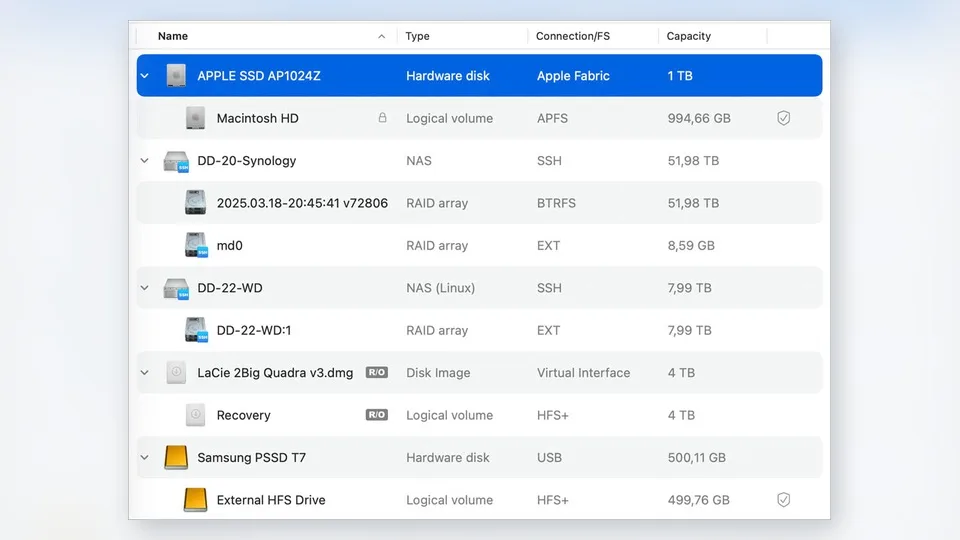
Disk Drill is a do-it-yourself data recovery application developed by CleverFiles. It can search for deleted or inaccessible files on internal and external hard drives, SSDs, USB flash drives, SD and CF cards, disk images, virtual disks and selected RAID or network storage configurations.
Its recovery engine uses several approaches. When file-system metadata survives, Disk Drill can often restore original names, folders and timestamps. When that metadata is gone, its signature scanner reads the device sector by sector and looks for recognizable patterns belonging to more than 400 file formats. Signature recovery can find data after formatting or serious file-system damage, but the recovered files may have generic names and no original folder structure.
Disk Drill also includes tools that are useful before recovery starts. A byte-to-byte backup can copy a questionable drive into an image file, allowing you to scan the image instead of repeatedly stressing the original device. Windows users receive Recovery Vault, while macOS users can enable Guaranteed Recovery for additional protection against future deletion.
How We Evaluated Disk Drill
A single recovery percentage would be misleading. Results change according to the storage technology, file system, deletion method, time since deletion and whether new data has overwritten the old sectors. SSD TRIM can make a recently deleted file unrecoverable even when the same file would remain available on a conventional hard drive.
For that reason, this review evaluates Disk Drill against the recovery situations readers are most likely to face:
- recently deleted files on a healthy drive;
- files removed after emptying Recycle Bin or Trash;
- a quick-formatted USB drive or memory card;
- a deleted or damaged partition;
- photos, RAW images and fragmented video from camera media;
- an unreadable drive that should be imaged before scanning.
The most important evaluation criteria are whether the files can be previewed, whether recovered files open correctly, how much original metadata survives, how clearly the app separates deleted files from existing data and whether it encourages recovery to a different storage device. Scan speed matters, but a fast result is not valuable if the files are incomplete.
Recovery Performance by Scenario
| Recovery Scenario | Expected Strength | Likely Limitation | What to Check |
|---|---|---|---|
| Recently deleted files | Strong when sectors have not been reused | SSD TRIM may remove data quickly | Preview, original name and folder path |
| Formatted USB drive | Deep and signature scans can locate surviving data | Names and folders may be lost | Whether complete files open after recovery |
| SD card photos and video | Good format support and camera-specific recovery | Fragmented video is harder than still images | Playback, duration and missing frames |
| Lost partition | Can reconstruct partitions when metadata remains | Severe structural damage may force signature recovery | Volume structure and file-system detection |
| Physically unstable drive | Byte-to-byte imaging reduces repeated access | Software cannot repair mechanical damage | Drive health, read errors and imaging progress |
Deleted File Recovery
Recently deleted files on an HDD, USB drive or memory card are the most favorable case. If their sectors have not been overwritten, Disk Drill can use surviving file-system records to identify the original file name, location and metadata. Its grouped results, search field and filters make it practical to locate one document among thousands of entries.
The preview is more useful than a “high recovery chance” label. If a photo renders correctly, a document opens in full or a video can be played from beginning to end in the preview, that is meaningful evidence that the file content is intact. A file that cannot be previewed may still be recoverable, but buying a license for it involves more risk.
Formatted USB Drive Recovery
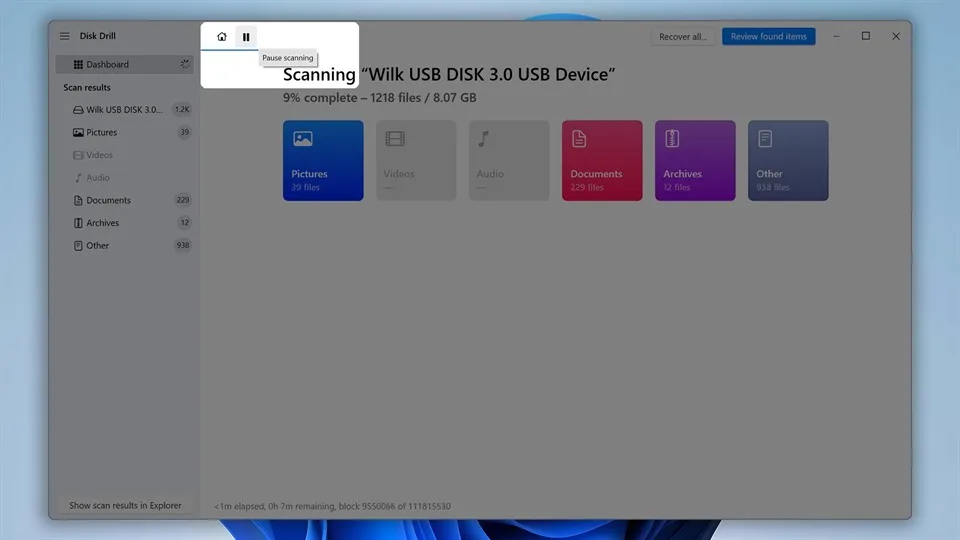
A quick format often removes file-system references without immediately erasing every data sector. Disk Drill combines file-system analysis with signature scanning to find what remains. When sufficient metadata survives, folders and names may be reconstructed. When only the raw file content remains, the app can still identify familiar formats, but it must assign generated names and sort the results by file type.
This is where the interface helps. You can filter by documents, pictures, videos, audio or archives instead of browsing one enormous list. The tradeoff is scan time: a large formatted drive can require a lengthy sector-by-sector pass, and the computer should remain connected to stable power throughout the process.
SD Card Photo and Video Recovery
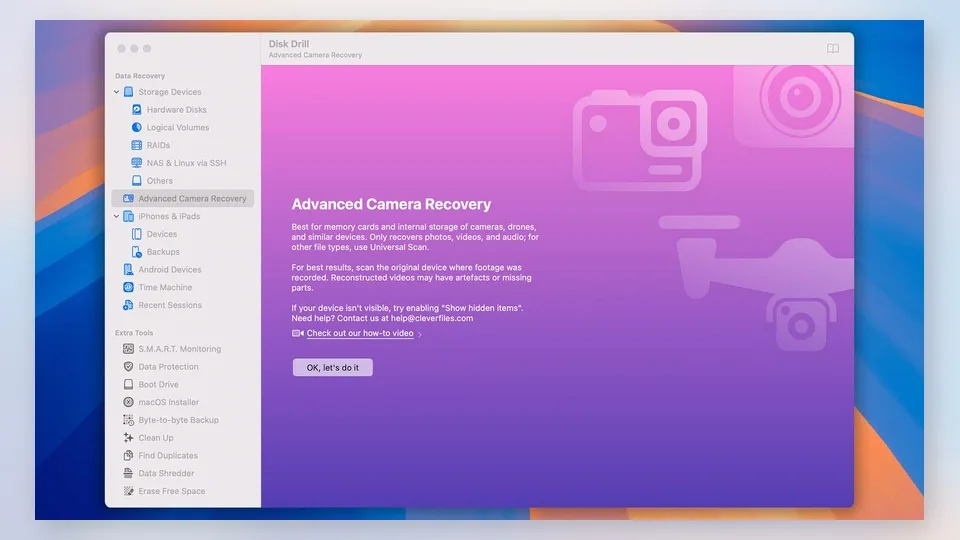
Disk Drill is particularly relevant to photographers and video creators. Standard scanning handles common image and RAW formats, while Advanced Camera Recovery is designed for fragmented video produced by devices such as action cameras, drones and digital cameras. This matters because large video files are frequently split across non-contiguous areas of a card and cannot always be rebuilt through a simple MP4 signature.
Still images are generally easier to validate because each recovered photo can be previewed. Video requires closer inspection. Check the complete duration, audio synchronization, seek behavior and the final seconds of every important clip. A playable thumbnail or opening frame does not prove that the entire recording is intact.
Lost Partition Recovery
Disk Drill can search a physical disk for recognizable partition boundaries and mount the results virtually for further scanning. If enough NTFS, ExFAT, APFS, HFS+ or other supported metadata remains, the reconstructed volume can preserve much of the original organization. If the partition table and file system are badly damaged, recovery may fall back to signatures and lose that structure.
The feature is valuable, but it should not be confused with repairing the original partition in place. The safe objective is to copy files to another healthy disk, not to write changes back to the damaged source.
SSD Recovery and TRIM
Disk Drill cannot bypass the basic behavior of an SSD. When TRIM is enabled, deleting a file tells the drive that its blocks are no longer needed. Garbage collection may then erase them internally, leaving no content for any recovery program to reconstruct.
If a deleted SSD file does not appear, or appears as an empty or corrupted record, another scan is unlikely to recreate data that the hardware has already cleared. Stop using the computer immediately, check backups and cloud version history, and consider a professional service when the value of the data justifies it.
Disk Drill’s Main Features
Combined Recovery Scan
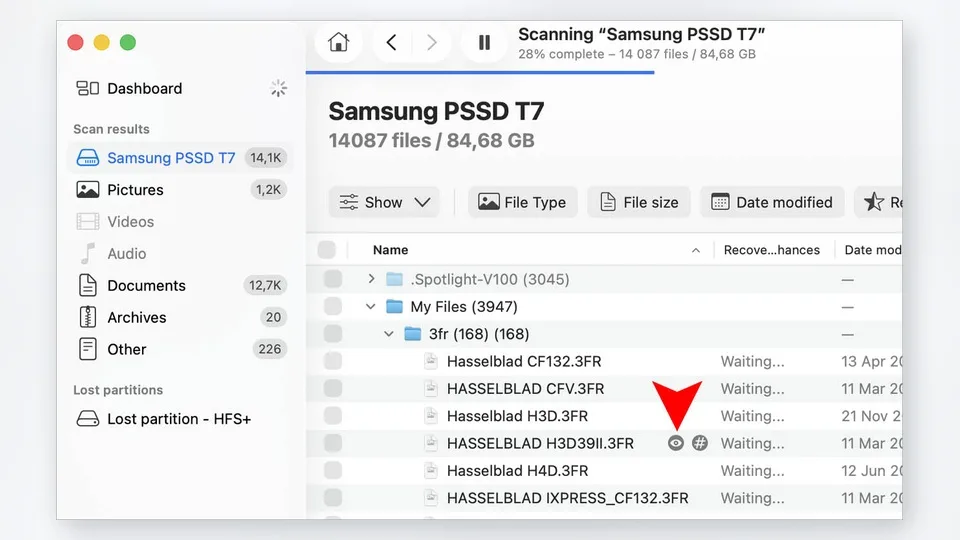
The main “Search for lost data” action runs the relevant recovery methods without forcing a new user to understand which algorithm fits the problem. Disk Drill can inspect available file-system data, search for deleted records, locate lost partitions and perform signature-based scanning. Advanced users can still review how each result was found.
File Preview, Search and Filters
Results can be narrowed by category, size, modification date and recovery status. A search box helps locate known names, while the preview panel lets you inspect supported files before recovery. Scan sessions can be saved and resumed, which is useful when a large disk takes hours to process.
Advanced Camera Recovery
Advanced Camera Recovery attempts to reconstruct fragmented video streams rather than treating every detected signature as a complete file. It is one of Disk Drill 6’s most practical specialist features and gives photographers a reason to try the program even if they already have a basic undelete utility.
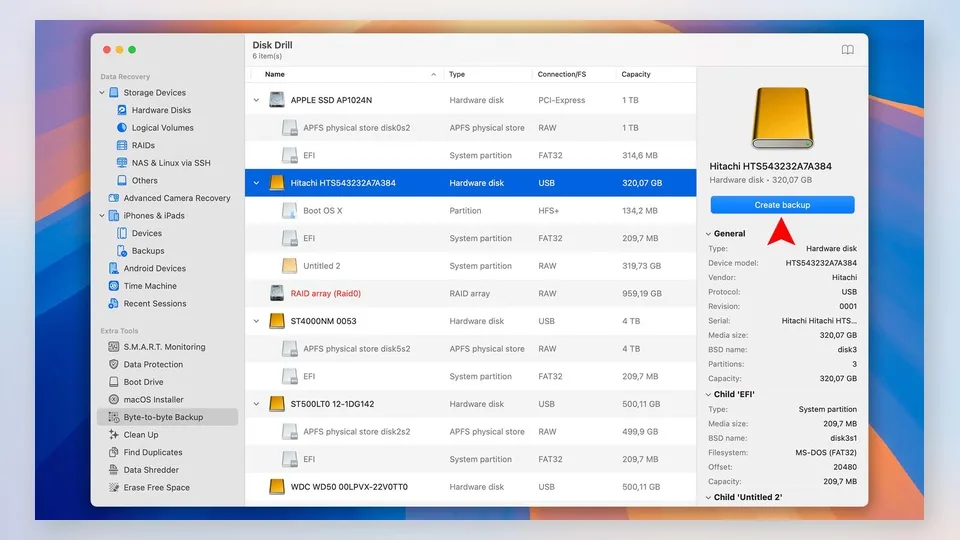
Byte-to-Byte Backup
This free tool creates a sector-level image of a storage device. It is the right first step when a drive is unstable but still readable, because subsequent scans can work from the image. It does not cure physical damage, and a drive that clicks, repeatedly disconnects or disappears from the operating system should be powered down and assessed professionally.
RAID, NAS and Disk Images
Disk Drill can work with selected software RAID configurations, Windows Storage Spaces, network storage accessed through SSH and common disk-image or virtual-disk formats. These capabilities broaden its usefulness, but complex RAID failure is not a beginner recovery project. Incorrect drive order, missing members or hardware faults can require specialist knowledge.
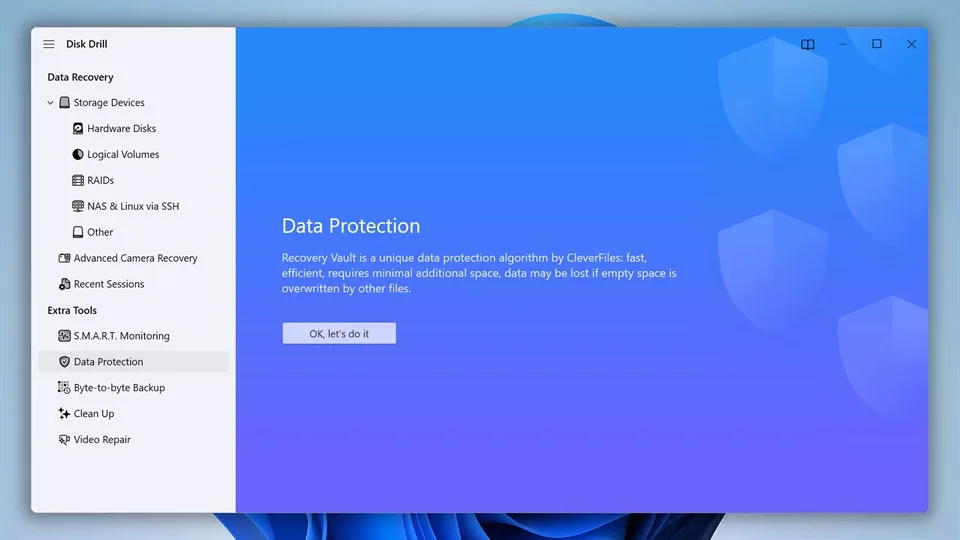
Recovery Vault and Guaranteed Recovery
Recovery Vault on Windows stores metadata that can improve future recovery of protected files. It does not keep a complete backup of every file. Guaranteed Recovery on macOS creates protective hard links for files in the Trash or selected folders, making later restoration more reliable at the cost of additional disk space. Both features must be enabled before data loss occurs.
Ease of Use
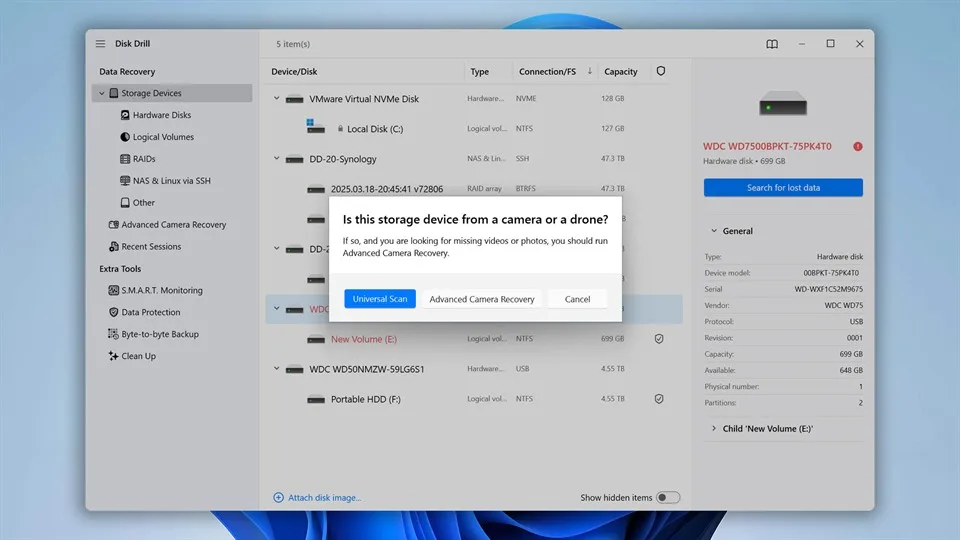
Usability is one of Disk Drill’s clearest advantages. The start screen lists physical disks, volumes and connected storage devices without overwhelming the user with technical settings. In most cases, selecting the device and clicking “Search for lost data” is enough to begin.
Results remain browsable while the scan is running. Categories and filters reduce clutter, and previewing a file does not require committing to recovery. The interface also warns users to choose a different destination for recovered data, which helps prevent the source drive from being overwritten.
The macOS edition requires Full Disk Access and may request additional low-level permissions. These prompts can look intimidating, but they are needed for the app to inspect protected storage areas. Disk Drill explains the setup more clearly than many technical recovery utilities, although first-time Mac users should still follow the permission instructions carefully.
Disk Drill for Windows vs Mac
| Feature | Windows | macOS |
|---|---|---|
| Free scan and preview | Yes | Yes |
| General free recovery | Up to 100 MB | Limited to specific eligible results |
| Data protection | Recovery Vault | Guaranteed Recovery |
| Advanced Camera Recovery | Yes | Yes |
| Lost partition search | Yes | Yes |
| iPhone/iPad recovery | Available in beta according to current documentation | Supported |
| Android internal recovery | Not supported | Supported in eligible rooted-device workflows |
| License | One PRO license covers both platforms, for one user and up to three activations | |
The core disk-recovery experience is now similar across platforms, but the free allowances and mobile-device features differ. Windows users can recover up to 100 MB without paying. Mac users can scan and preview freely, but general deleted-file recovery normally requires PRO; free restoration is limited to results eligible under features such as Guaranteed Recovery or Allocate Existing Data.
Disk Drill Pricing
| Plan | Price | Best For | Main Limit |
|---|---|---|---|
| Disk Drill Basic | Free | Scanning, previewing and testing whether files are recoverable | 100 MB recovery on Windows; more restricted recovery on Mac |
| PRO Annual Subscription | $89 per year | One-time or short-term personal recovery needs | Renews annually unless canceled |
| PRO Lifetime License | $149 | Long-term use across Windows and Mac | Higher upfront price |
| Enterprise | Custom pricing | Business and commercial recovery | Requires a business quote |
Prices were checked in September 2026 and may vary with taxes, location or promotions.
The free edition should be treated as a diagnostic tool first. On Windows, 100 MB is enough for a few documents or small photos, but not for a modern video or a large photo collection. On macOS, the ability to scan and preview is valuable, but many ordinary recovery cases require an upgrade before files can be saved.
The annual PRO plan is reasonable if you need Disk Drill for a single incident and remember to cancel renewal. The lifetime license is easier to justify for photographers, IT support users or households with several computers. Both PRO options cover Windows and macOS for one user with up to three activations, and the 2026 lifetime license includes future Disk Drill updates.
CleverFiles generally treats software purchases as final once the activation code is delivered, except where consumer law requires otherwise. That makes the free scan and complete file preview especially important: verify the files you care about before paying.
Disk Drill Pros and Cons
Pros
- Clear interface suitable for non-technical users
- Free scanning and unlimited preview of supported files
- Multiple recovery methods combined into one workflow
- Broad support for drives, memory cards, file systems and disk images
- Advanced Camera Recovery for fragmented video
- Free byte-to-byte disk imaging
- Useful filtering, search and resumable scan sessions
- One PRO license covers Windows and macOS
Cons
- Windows free recovery is limited to 100 MB
- General recovery in the Mac edition usually requires PRO
- Deep scans of large drives can take a long time
- Signature recovery may lose original names and folders
- No software can recover overwritten or TRIM-erased data
- Complex RAID and physically damaged drives may need a specialist
- Annual subscriptions renew automatically unless canceled
How to Recover Files with Disk Drill
- Stop writing to the source device. Disconnect removable media until you are ready to scan.
- Install Disk Drill elsewhere. Never install it on the partition that contained the lost files.
- Connect the affected drive. If it is unstable but readable, create a byte-to-byte backup and work from the image.
- Select the physical disk or volume. Choose the entire device when a partition is missing.
- Click “Search for lost data.” Let the combined scan run, or inspect results while it continues.
- Filter the results. Use file type, size, date, search terms and recovery status to narrow the list.
- Preview important files. Check complete documents and play important videos as far as the preview allows.
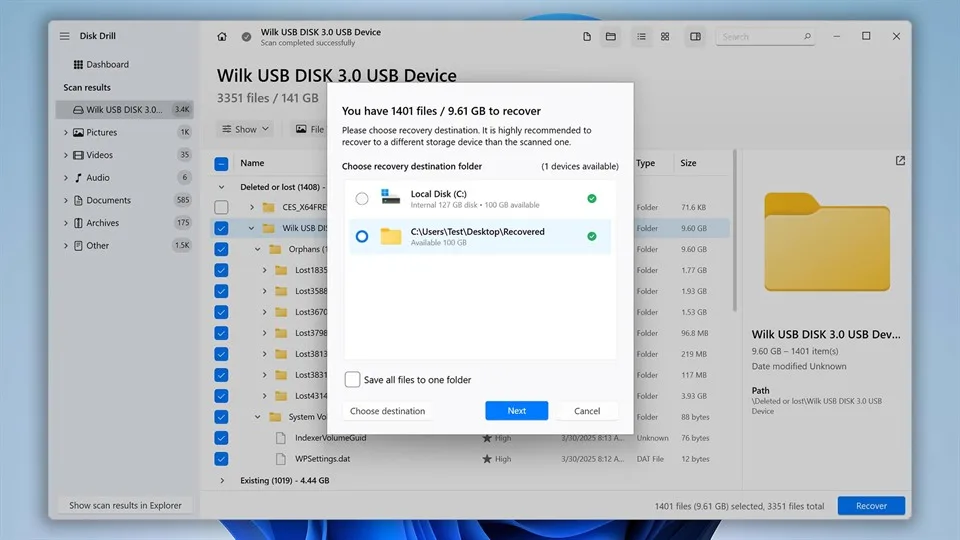
- Select a different destination. Save recovered files to another drive, not the source.
- Verify the output. Open recovered files and confirm their contents before reformatting or retiring the original device.
Frequently Asked Questions
Is Disk Drill really free?
Disk Drill Basic is free to download, scan and preview recoverable files. The Windows edition can save up to 100 MB without payment. The Mac edition offers free recovery only in specific eligible situations, such as files covered by its protection features or found through Allocate Existing Data.
Is Disk Drill safe to use?
Yes, when downloaded from the official website and used correctly. Install it on a different disk, avoid writing to the affected device and save recovered files elsewhere.
Can Disk Drill recover permanently deleted files?
It can recover deleted files when their content still exists on the storage device. It cannot restore data that has been overwritten, securely erased or cleared by SSD TRIM.
Can Disk Drill recover a formatted drive?
It can often find data after a quick format, especially when little or no new data has been written. Original names and folders depend on how much file-system metadata survives.
Can Disk Drill recover files from an SSD?
Sometimes. Recovery is possible if the relevant blocks have not been erased. On an SSD with active TRIM, deleted data may disappear rapidly and become unrecoverable by any software.
Does Disk Drill restore original file names?
It can preserve names and folder paths when file-system records remain intact. Files found only through signature scanning normally receive generated names and are organized by type.
Can Disk Drill recover photos and videos from an SD card?
Yes. It supports common image, RAW and video formats, and Advanced Camera Recovery is designed to improve reconstruction of fragmented camera video.
Does one license cover Windows and Mac?
Yes. Current PRO subscription and lifetime licenses cover both platforms for one user, with up to three activations.
Why can Disk Drill find a file but not preview it?
The directory record may survive even when some file content has been overwritten or damaged. An unsupported preview format is another possibility. A file that cannot be fully previewed has a less certain recovery outcome.
Is Disk Drill PRO worth buying?
It is worth considering when the free scan can fully preview important files and their value exceeds the license cost. It is harder to justify when the files cannot be previewed, the drive is physically damaged or you need only a very small Windows recovery within the free allowance.
Final Verdict
Disk Drill 6.3 succeeds because it makes a technically difficult process understandable. Its combined scan, clear result filters, previews, camera recovery and disk-imaging tools cover most recovery situations a home user is equipped to handle. The same license working across Windows and macOS also makes the paid edition more flexible than a platform-specific purchase.
The limits are just as important. Disk Drill cannot reverse overwritten data, defeat SSD TRIM or repair mechanical hardware. Its free edition is mainly a way to discover whether recovery is promising, particularly on macOS. Buyers should preview every critical file before upgrading and understand that software purchases are generally final.
Our recommendation: download Disk Drill Basic, scan the affected device or—preferably—a byte-to-byte image, and inspect the files you actually need. If they preview correctly and the original names or content are intact, Disk Drill PRO is a sensible, user-friendly way to complete the recovery. If they do not, paying for the software will not make missing data reappear.
Related Reviews
5 Best AI PDF Editors in 2026: Edit, OCR & Rewrite PDFs

From PDF to Editable Documents: A Practical Guide to Modern PDF Workflows
Krea 2 Review: Is Krea's AI Image Model Worth Trying?
5 Best Project Tracking Software Tools in 2026

Step 5 Preview Review: Pricing, API Access, Open Weights and NSFW Limits
5 Best PDF Enhancer Tools to Improve PDF Quality in 2026