5 Best Project Tracking Software Tools in 2026
Compare the best project tracking and project management software of 2026 for planning, collaboration, reporting, automation, and team visibility.

Projects rarely fall behind because teams do not work hard enough. More often, the problem is fragmented information: deadlines live in a spreadsheet, decisions are buried in chat, and nobody has a reliable view of what is blocked. The right project tracking software brings those moving parts together so that owners, due dates, dependencies, and progress remain visible.
For this guide, we compared five leading project management software platforms based on day-to-day usability, planning depth, collaboration, reporting, automation, scalability, and value. The goal is not to name one universal winner. It is to help you choose a tool that fits the way your team actually works.
Our Top Picks
- Best overall: monday work management
- Best all-in-one workspace: ClickUp
- Best for clear cross-functional coordination: Asana
- Best for agencies and complex workflows: Wrike
- Best value for growing teams: Zoho Projects
What Is Project Tracking Software?
Project tracking software is a shared system for monitoring tasks, deadlines, responsibilities, milestones, and risks from the start of a project through delivery. At a minimum, it answers four practical questions: What needs to be done? Who owns it? When is it due? What is preventing it from moving forward?
The terms project tracking software and project management software overlap, but they are not always identical. Tracking tools focus on status and visibility. Full project management platforms add planning, resource allocation, budgeting, workload management, automations, forms, dashboards, document collaboration, and portfolio-level reporting.
A small team may only need a Kanban board and due-date reminders. A department running dozens of concurrent initiatives may need dependencies, time tracking, workload views, approval workflows, and executive dashboards. Buying the largest feature set is not automatically the best decision; the best platform is the one your team can maintain consistently.
How We Evaluated the Best Project Management Software
We evaluated each platform as a working system rather than a checklist of isolated features. The most important question was whether a team could turn a loosely defined initiative into an organized, trackable workflow without creating unnecessary administrative work.
- Setup and usability: How quickly can a new team create a useful project and understand the interface?
- Planning: Are list, board, calendar, timeline, Gantt, milestone, and dependency tools available where needed?
- Progress visibility: Can managers see late work, bottlenecks, workload, risks, and overall project health?
- Collaboration: Do comments, mentions, approvals, files, documents, and notifications keep discussion connected to the work?
- Automation and AI: Can the platform reduce repetitive updates, summarize activity, or create useful workflows?
- Customization: Can teams adapt fields, statuses, templates, dashboards, and permissions without rebuilding the system?
- Integrations: Does it connect sensibly with common communication, storage, development, and business applications?
- Scalability and administration: Can it support multiple teams, portfolios, access rules, and standardized processes?
- Value: Are the most useful features available at a reasonable tier, and is the free plan genuinely usable?
Prices and plan limits change frequently, so the figures below are practical reference points rather than permanent quotes. Check the vendor’s current billing page before purchasing, especially if you need AI credits, advanced reporting, guests, or enterprise controls.
Best Project Tracking Software at a Glance
| Software | Best For | Standout Strength | Free Option | Paid Plans From* | Main Limitation |
|---|---|---|---|---|---|
| monday work management | Most teams seeking a flexible visual system | Custom boards, dashboards, and automations | Yes, for up to 2 seats | About $9 per seat/month, billed annually | Useful features are spread across higher tiers |
| ClickUp | Teams consolidating tasks, docs, chat, and goals | Broad feature set and many project views | Yes | About $7 per user/month, billed annually | Density and customization can feel overwhelming |
| Asana | Cross-functional teams that value clarity | Clean task relationships and workflow coordination | Yes, limited to small teams | About $10.99 per user/month, billed annually | Advanced portfolio and workload tools cost more |
| Wrike | Agencies, professional services, and complex operations | Request forms, proofing, workload, and reporting | Yes | About $10 per user/month | Configuration and pricing can be complex |
| Zoho Projects | Budget-conscious teams and Zoho customers | Strong scheduling and time tracking for the price | Yes, up to 3 projects | About $5 per user/month, billed annually | Interface is less polished than some rivals |
*Starting prices are indicative and may vary by region, billing cycle, seat minimum, and current packaging.
1. monday work management — Best Overall Project Tracking Software
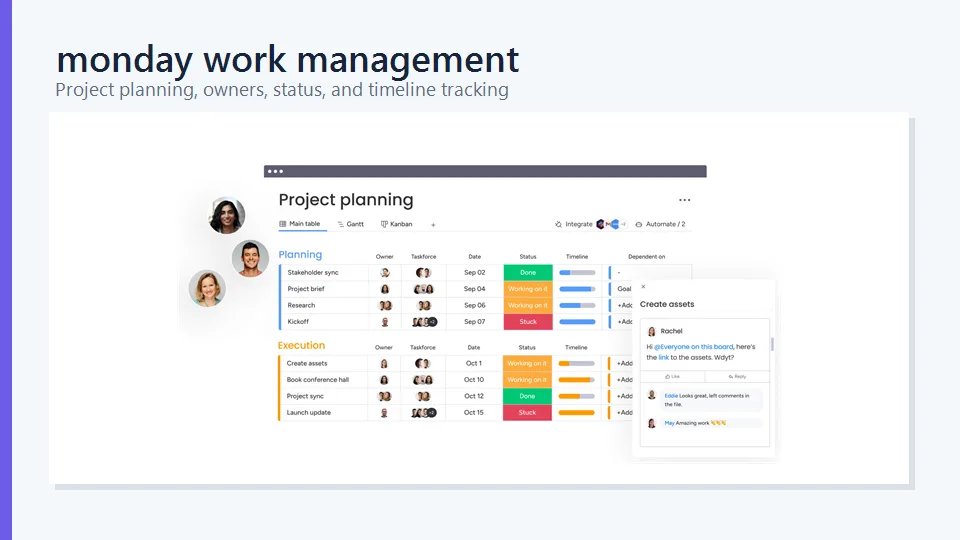
Why we picked it: monday work management offers one of the best balances between approachable visual organization and serious workflow customization. A team can begin with a simple table-like board, then add statuses, owners, dates, dependencies, formulas, automations, forms, and dashboards as its process matures.
The colorful interface makes project status easy to scan. The same underlying data can appear in table, Kanban, calendar, timeline, chart, or workload-style views, depending on the plan. This is especially helpful when contributors want a straightforward task list but managers need a broader operational dashboard.
monday.com is also effective for repeatable work. Templates and automations can create handoff rules such as notifying a reviewer when an item changes status or assigning a task when a form is submitted. Its flexibility extends beyond traditional projects to campaign calendars, product roadmaps, onboarding, service requests, and lightweight operations management.
Key Features
- Customizable boards, columns, statuses, and project templates
- Kanban, calendar, timeline, Gantt, dashboard, and workload views on eligible plans
- No-code automations and cross-board connections
- Forms for collecting requests and project information
- Dashboards that combine data from multiple boards
- AI-assisted work features and a large integration marketplace
Pros
- Highly visual and relatively easy to understand
- Flexible enough for many departments and workflow types
- Good balance of task-level detail and executive visibility
- Strong templates, integrations, and automation options
Cons
- The free plan is limited to two seats
- Timeline, time tracking, advanced reporting, and automation allowances depend on the tier
- Seat-based pricing and minimum seat bundles can increase the real cost for small teams
Best for: Small and midsize teams that want a flexible visual platform without committing to a rigid project methodology.
2. ClickUp — Best All-in-One Project Management Workspace
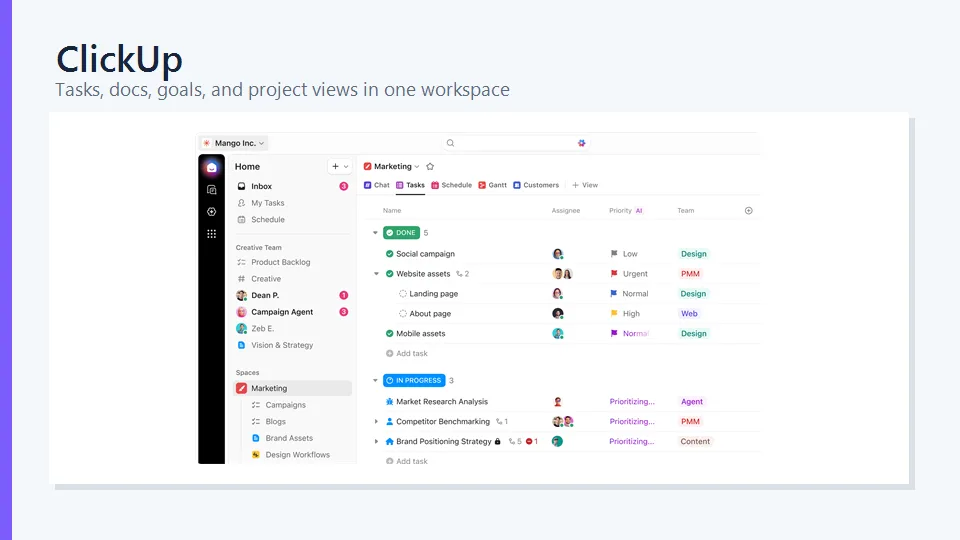
Why we picked it: ClickUp tries to reduce the number of separate tools a team uses. Tasks, documents, whiteboards, goals, dashboards, time tracking, forms, chat, and automation can live in the same workspace. For teams that currently jump between a task manager, notes app, internal wiki, and messaging tool, that consolidation is compelling.
Its hierarchy of workspaces, spaces, folders, lists, tasks, and subtasks can accommodate everything from a small content calendar to a multi-department operation. Teams can switch among list, board, calendar, Gantt, timeline, workload, and other views. Custom fields and statuses make the platform adaptable to software development, marketing, client delivery, and operational workflows.
ClickUp’s breadth is both its advantage and its biggest challenge. A carefully designed workspace can become a powerful operating system. An ungoverned one can accumulate too many views, custom fields, notifications, and duplicated workflows. Teams should start with a narrow template and add features only when there is a clear use case.
Key Features
- Tasks, Docs, Whiteboards, Chat, Goals, and Dashboards
- More than ten work views, including list, board, calendar, and Gantt
- Custom fields, statuses, task relationships, and dependencies
- Built-in time tracking and estimates
- Automations, forms, templates, and recurring tasks
- AI tools for summaries, writing, search, planning, and routine actions
Pros
- Very broad feature set at competitive prices
- Free plan is useful for individuals and small teams
- Strong customization and multiple ways to visualize work
- Can replace several standalone productivity tools
Cons
- Interface can feel busy, especially for new users
- Workspace design requires discipline to remain consistent
- Some advanced AI and capacity features require additional or higher-tier access
Best for: Teams willing to invest in setup in exchange for one highly configurable workspace for projects, knowledge, and collaboration.
3. Asana — Best for Clear Cross-Functional Coordination
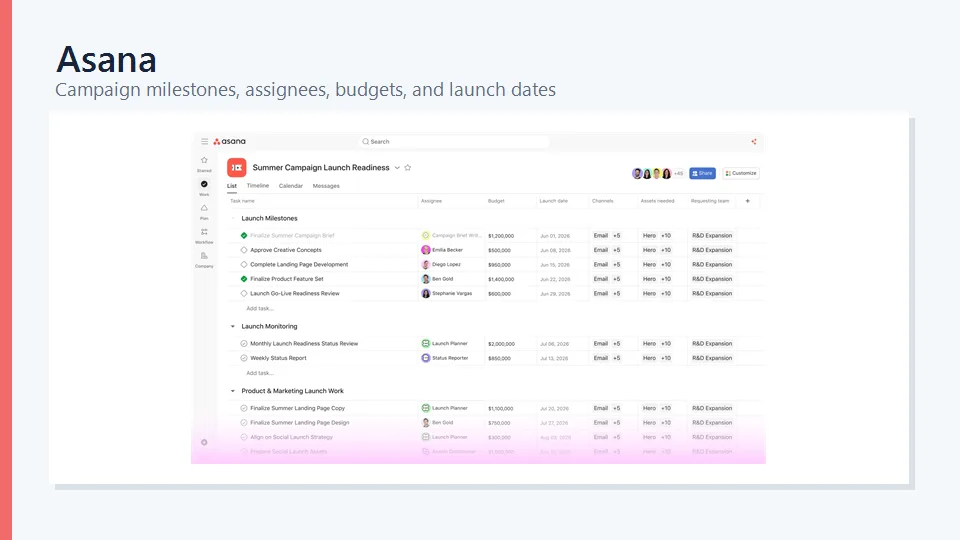
Why we picked it: Asana makes complex work feel unusually clear. Tasks can have owners, due dates, subtasks, dependencies, milestones, fields, comments, and attachments without turning every project into a dense database. Its interface encourages teams to define responsibility explicitly, which is essential when work moves across marketing, design, operations, product, and leadership.
Projects can be viewed as lists, boards, calendars, or timelines, and rules automate routine handoffs. Forms turn incoming requests into structured tasks. On higher tiers, portfolios, goals, workload, and advanced reporting give leaders visibility across multiple projects rather than forcing them to inspect individual boards.
Asana is particularly good for processes with approvals and dependencies, such as campaign production or product launches. The tradeoff is price: small teams may find the free tier restrictive, while capabilities such as portfolio oversight and more advanced resource planning sit above the entry paid plan.
Key Features
- List, board, calendar, timeline, and project overview views
- Task dependencies, milestones, custom fields, and reusable templates
- Forms, rules, approvals, proofing, and recurring tasks
- Portfolios, goals, workload, and capacity tools on eligible plans
- AI-assisted project creation, summaries, status updates, and workflow building
- Integrations with common communication, file, development, and business tools
Pros
- Clean, logical interface with strong task ownership
- Excellent for coordinating work across departments
- Powerful rules and templates without excessive technical setup
- Strong portfolio visibility for larger organizations
Cons
- Free collaboration is designed for very small teams
- Advanced reporting, workload, and portfolio features require costlier plans
- Not intended to replace a full chat or document-authoring suite
Best for: Cross-functional teams that prioritize accountability, clean workflows, and dependable project status over maximum customization.
4. Wrike — Best for Agencies and Complex Workflows
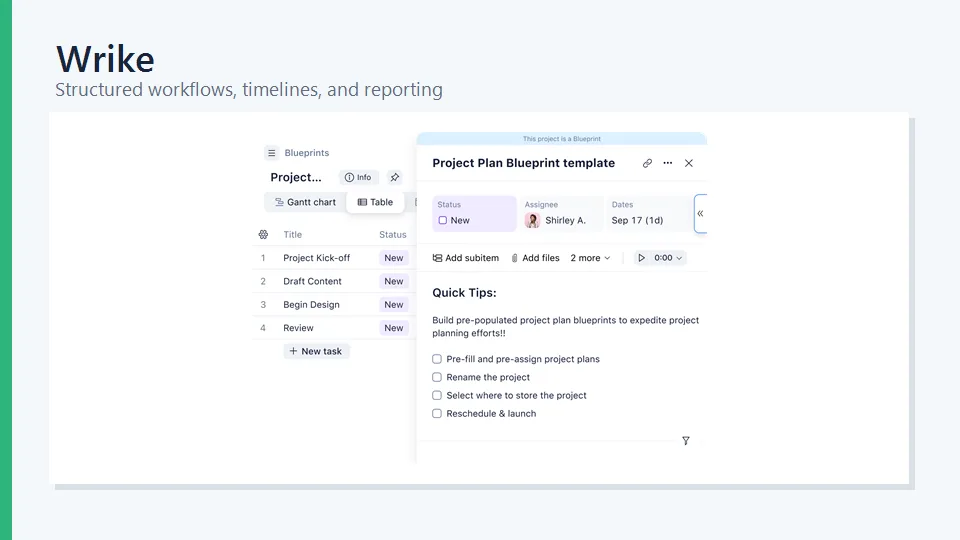
Why we picked it: Wrike is built for teams that manage a high volume of requests, reviews, client deliverables, and overlapping schedules. It combines project planning with request forms, custom workflows, proofing, workload visibility, time tracking, and detailed reporting. Those capabilities make it especially relevant to agencies, creative teams, marketing operations, and professional services.
Dynamic request forms can route new work into the right project with the correct fields and assignees. Teams can then follow the work through custom statuses, dependencies, approvals, and proofing. Managers can use dashboards, reports, calendars, and resource views to identify capacity problems before deadlines slip.
Wrike is more structured than lightweight task trackers, and that structure can be valuable when governance matters. However, it also means implementation deserves careful planning. Naming conventions, request forms, folder structures, workflows, and permission rules should be agreed on before broad rollout.
Key Features
- List, board, table, calendar, and Gantt-style views
- Dynamic request forms and custom workflow automation
- Proofing, approvals, versioning, and shared team calendars
- Time tracking, workload planning, dashboards, and reports
- Cross-tagging and flexible organization of work
- AI-supported summaries, content assistance, risk insights, and automation
Pros
- Strong intake-to-delivery workflow for client and creative work
- Detailed reporting and resource visibility
- Flexible permissions and enterprise administration
- Useful proofing and approval capabilities
Cons
- More setup and training than simpler tools require
- Many attractive features are reserved for higher tiers or add-ons
- Pricing structure can be harder to estimate for a growing organization
Best for: Agencies and operational teams that need formal request intake, approvals, workload planning, and detailed reporting.
5. Zoho Projects — Best Value for Growing Teams
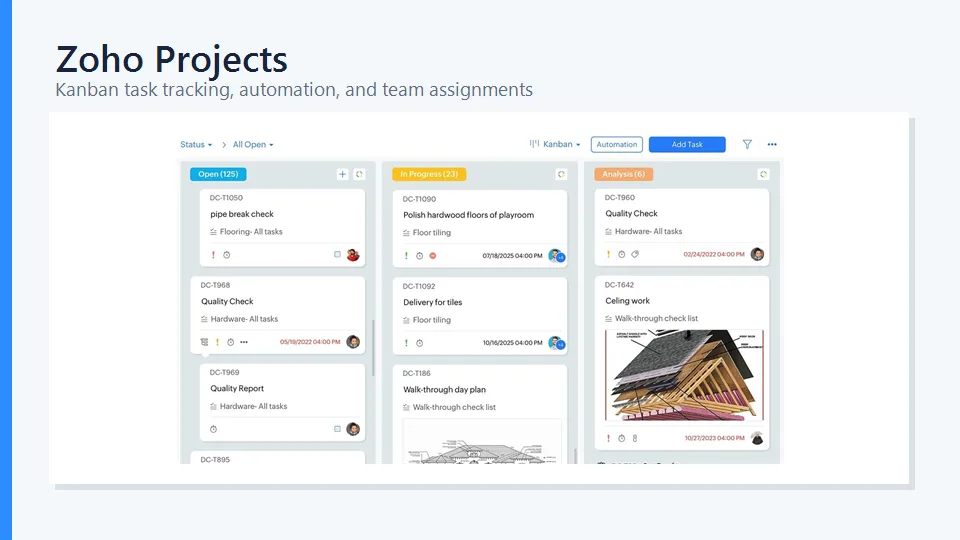
Why we picked it: Zoho Projects covers a surprising amount of traditional project management at a comparatively accessible price. It includes tasks, milestones, Gantt charts, dependencies, time sheets, issue tracking, reports, automation, and project budgeting capabilities. Teams already using Zoho CRM, Books, Desk, or other Zoho applications gain additional value from the shared ecosystem.
The platform is well suited to teams that need structured schedules rather than only visual task boards. Gantt planning and dependency controls help map sequences of work, while time logs and billing-related options are useful for service organizations. Blueprints and workflow rules can standardize how tasks move through recurring processes.
Zoho Projects is not as visually refined as monday.com or as immediately approachable as Asana. Navigation and configuration take time to learn. Nevertheless, its functional depth makes it one of the strongest options for budget-conscious organizations that are willing to accept a more utilitarian interface.
Key Features
- Tasks, subtasks, milestones, dependencies, and Gantt charts
- Time sheets, timers, planned-versus-actual tracking, and budgets
- Issue tracking for bugs and operational problems
- Custom fields, layouts, workflow rules, webhooks, and Blueprints
- Reports, dashboards, workload views, and project templates
- Zia AI features and integrations across the wider Zoho ecosystem
Pros
- Excellent feature-to-price ratio
- Strong scheduling, dependency, time, and issue tracking
- Useful integration with Zoho’s business applications
- Free plan supports up to three projects
Cons
- Interface can feel dated or crowded in some areas
- Initial configuration is less intuitive than in simpler products
- Best ecosystem benefits are most relevant to existing Zoho users
Best for: Small and midsize organizations that need capable scheduling and time tracking without paying premium-platform prices.
How to Choose the Right Project Tracking Software
Start With the Workflow, Not the Feature List
Map one real project before comparing products. Identify how requests enter the team, who approves them, where handoffs occur, what managers need to report, and which delays happen repeatedly. This reveals whether you need simple task visibility or more advanced capabilities such as dependencies, proofing, budgeting, and workload planning.
Decide Which Views Matter
Kanban boards are useful for stage-based work, while Gantt charts make dependencies and schedule changes easier to understand. Calendars help editorial and campaign teams. Workload views help managers balance assignments. Do not pay for every view merely because it exists; prioritize the ones that support actual decisions.
Calculate the Real Cost
The advertised starting price rarely tells the whole story. Check seat minimums, annual billing requirements, guest policies, automation limits, storage, AI credits, time tracking, portfolio reporting, and paid add-ons. Model the cost at your expected team size one year from now, not only at today’s headcount.
Test Adoption, Not Just Administration
A project manager may appreciate extensive customization, but contributors must update tasks consistently for the data to remain useful. During a trial, ask several typical users to complete routine actions without training. If updating a status or finding an assignment feels difficult, reporting quality will eventually suffer.
Review Governance and Security
For larger teams, examine permissions, private projects, audit logs, single sign-on, data residency, retention, export, and administrative controls. Also decide who can create custom fields, automations, templates, and spaces. Too much uncontrolled customization can make reporting as fragmented as the spreadsheets the software was meant to replace.
Quick Recommendations by Use Case
- Choose monday work management if you want the best overall balance of visual simplicity, customization, automation, and reporting.
- Choose ClickUp if you want tasks, documents, goals, chat, whiteboards, and dashboards in one highly configurable workspace.
- Choose Asana if cross-functional clarity, ownership, dependencies, and predictable adoption matter more than endless customization.
- Choose Wrike if your team handles client requests, creative reviews, approvals, capacity planning, and complex reporting.
- Choose Zoho Projects if price, Gantt planning, time tracking, and integration with other Zoho applications are your priorities.
For a small team, start with the free versions of ClickUp, Asana, Zoho Projects, or Wrike and run the same two-week pilot in each. If you need a more polished visual system and can work within a two-seat free plan, include monday.com in the comparison. The best trial uses real work, real contributors, and a short list of measurable outcomes.
Frequently Asked Questions
What is the best project tracking software?
monday work management is the strongest general-purpose choice for many teams because it combines a visual interface with flexible boards, automations, dashboards, and multiple project views. ClickUp is better for teams seeking an all-in-one workspace, while Asana is particularly good for clean cross-functional coordination.
What is the difference between project tracking software and project management software?
Project tracking software focuses on tasks, owners, due dates, statuses, and progress. Project management software usually includes tracking plus planning, dependencies, workload, budgets, time, risk, reporting, automation, and portfolio oversight. Many modern products serve both purposes.
Is there free project management software?
Yes. ClickUp, Asana, Wrike, monday.com, and Zoho Projects all offer free options, but their limits differ. Check the number of users and projects, storage, automation quotas, available views, and whether advanced reporting is included before selecting one.
Which project management tool is easiest to use?
Asana is one of the easiest tools for teams that want clear task ownership and structured collaboration. monday.com is also approachable because of its visual boards. The easiest option ultimately depends on whether your team naturally thinks in lists, boards, timelines, or more formal schedules.
Which software is best for a small business?
Zoho Projects offers strong value when a small business needs Gantt charts, time tracking, and structured project controls. ClickUp is attractive when a business wants a broad free or affordable workspace. monday.com may be the better choice when ease of customization and visual reporting are more important than the lowest price.
Can project management software replace spreadsheets?
For active project coordination, usually yes. Dedicated software handles ownership, reminders, dependencies, comments, notifications, and live dashboards better than a static spreadsheet. Spreadsheets can still be useful for one-time analysis, financial modeling, or importing and exporting structured data.
Does project management software include time tracking?
Some platforms include native time tracking, while others restrict it to certain plans or rely on integrations. ClickUp, Wrike, and Zoho Projects provide time-related capabilities, and monday.com offers time tracking on eligible tiers. Verify plan details if billable hours are essential.
How long does it take to implement project tracking software?
A small team can launch a basic workflow in a day, but reliable adoption usually takes several weeks. Larger organizations may need a phased rollout for templates, permissions, integrations, data migration, governance, and training. Starting with one repeatable workflow reduces implementation risk.
Final Verdict
There is no single project management platform that fits every team. monday work management is our best overall choice because it combines approachable visual tracking with room to build sophisticated workflows. ClickUp offers the broadest all-in-one workspace, while Asana excels at clear coordination across teams. Wrike is the strongest specialist choice for agencies and complex approval-driven work, and Zoho Projects delivers excellent value for teams that need traditional scheduling and time tracking.
Before committing, run a pilot with a real project and the people who will update it every day. The best project tracking software is not the one with the longest feature list; it is the one that gives your team accurate visibility without making progress harder to record.
Related Reviews
Best 5 Free PDF Editors in 2026

From PDF to Editable Documents: A Practical Guide to Modern PDF Workflows

Step 5 Preview Review: Pricing, API Access, Open Weights and NSFW Limits
5 Best AI PDF Editors in 2026: Edit, OCR & Rewrite PDFs
8 Best AI Presentation Makers in 2026
5 Best PDF Enhancer Tools to Improve PDF Quality in 2026