5 Best AI Headshot Generators in 2026
Compare the five best AI headshot generators for realistic portraits, LinkedIn photos, team headshots, 4K output, editing, and fast delivery.
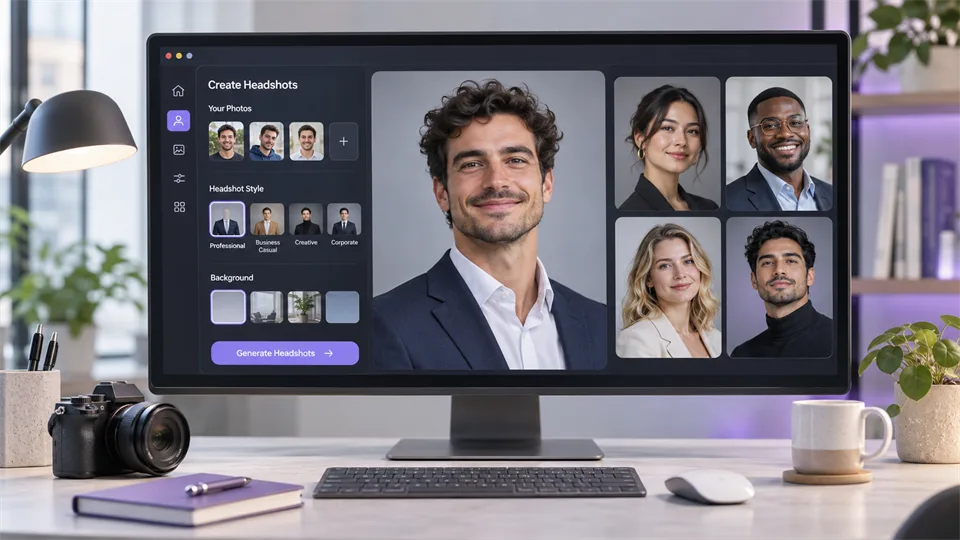

A professional headshot no longer requires a studio appointment, a photographer, or several days of editing. A good AI headshot generator can turn ordinary selfies into polished portraits for LinkedIn, company websites, resumes, speaker profiles, and press kits.
The difficult part is choosing a service that keeps you looking like yourself. Some tools prioritize speed, while others focus on 4K files, style variety, team management, or hands-on retouching. This guide compares five of the strongest options available in 2026 and explains which one makes the most sense for each type of user.
Table of Contents
- What Is an AI Headshot Generator?
- How We Chose the Best AI Headshot Generators
- Best AI Headshot Generators at a Glance
- 1. HeadshotPro — Best Overall
- 2. Aragon AI — Best for Fast, Customizable Results
- 3. BetterPic — Best for 4K Output and Editing
- 4. Dreamwave — Best for Executives and Teams
- 5. Secta AI — Best for Large Galleries
- Which AI Headshot Generator Should You Choose?
- How to Get Better AI Headshots
- Frequently Asked Questions
- Final Verdict
What Is an AI Headshot Generator?
An AI headshot generator creates professional-looking portraits from one or more photos you already have. You upload selfies or casual pictures, choose a style, background, outfit, or level of formality, and the service generates a gallery of new portraits.
The best tools do more than place your face on a suit. They try to preserve your facial structure, skin texture, hairstyle, age, and expression while improving lighting, framing, clothing, and background. Most services return multiple options because not every generated image will look equally natural.
AI headshots work well for everyday professional use, but they are not a perfect replacement for a photographer. A traditional photo session is still the safer option when you need art direction, exact brand control, a specific location, or a portrait intended for large-format advertising.
How We Chose the Best AI Headshot Generators
This comparison is based on the current product workflows, published packages, official output examples, editing options, privacy information, team features, and practical value of each service. Prices and promotional offers can change, so check the final checkout page before purchasing.
- Likeness: the result should still resemble the person in the uploaded photos.
- Realism: skin, hair, teeth, glasses, clothing, and backgrounds should not look excessively smooth or artificial.
- Input requirements: fewer uploads are convenient, but a varied photo set can help the model understand your appearance.
- Style control: useful options include professional outfits, backgrounds, poses, crops, and levels of formality.
- Editing: the ability to adjust a background, clothing, framing, or small visual problem can rescue an otherwise strong image.
- Resolution: high-resolution files are important for company pages, speaking profiles, press kits, and print.
- Team features: administrators may need invitations, shared styles, progress tracking, bulk downloads, and brand consistency.
- Privacy: facial photos are sensitive data, so deletion policies, security practices, and user control matter.
Best AI Headshot Generators at a Glance
| Tool | Best for | Starting price* | Typical output | Standout feature |
|---|---|---|---|---|
| HeadshotPro | Individuals and company teams | From $29 | 30–70 headshots, depending on package | Strong balance of realism, value, and team controls |
| Aragon AI | Fast generation and customization | From $35 | 40–100 headshots | Short turnaround and post-generation editing tools |
| BetterPic | 4K files and further editing | From $35 | 20–120 headshots | 4K output, AI edits, and human retouching options |
| Dreamwave | Executives and distributed teams | From $35 | 40–100 individual headshots | Professional styling with team and enterprise workflows |
| Secta AI | Large galleries and style variety | From $49 during current promotion | 100+ HD headshots | High image count plus remix and customization tools |
*Prices shown are the starting prices published when this guide was prepared. Packages, discounts, turnaround times, and image counts may change.
1. HeadshotPro — Best Overall AI Headshot Generator
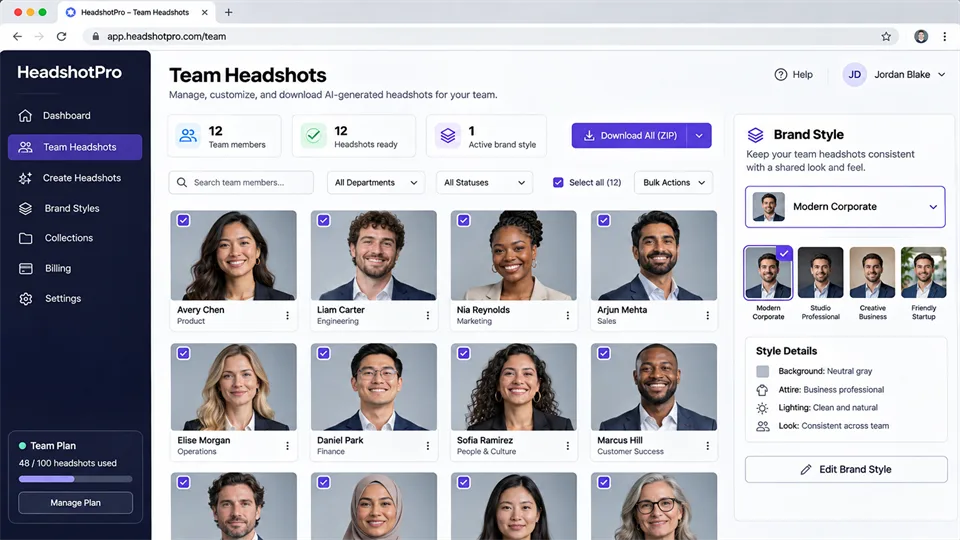
HeadshotPro offers the best overall balance of price, output volume, professional styling, and team support. The service is designed specifically for business portraits rather than general AI art, so the available backgrounds, outfits, crops, and poses are appropriate for LinkedIn profiles, resumes, company directories, and sales pages.
The individual workflow is straightforward: upload a set of selfies, select the visual direction, and wait for the generated gallery. Current packages start at $29 and include 30 headshots, while higher tiers add more images and 4K upscaling. Results are typically delivered within the same session or a short processing window, although exact timing depends on the package and demand.
HeadshotPro is also one of the stronger options for organizations. Team administrators can purchase credits, choose a shared style, invite employees to upload their own photos, and manage the rollout without collecting everyone’s selfies manually. This is useful for remote companies that want a consistent staff page without arranging photo sessions in multiple cities.
Key features
- Professional headshots for individuals and teams.
- Multiple business outfits, backgrounds, and portrait styles.
- Team invitations, centralized style choices, and volume pricing.
- 4K upscaling on selected packages.
- Published policy stating that input photos are not used to train its models and are automatically deleted after 30 days.
Pros
- Good mix of affordability and professional output.
- Clear one-time pricing with no required subscription.
- Works equally well for a single profile photo or a large company rollout.
- Business-focused styles reduce the amount of filtering needed.
Cons
- You may still need to sort through several images to find the most accurate likeness.
- 4K output is not included in every entry-level package.
- Fine control is more limited than a directed studio session.
Pricing: One-time individual packages currently start at $29. Team pricing uses credits and volume discounts.
2. Aragon AI — Best for Fast, Customizable Results
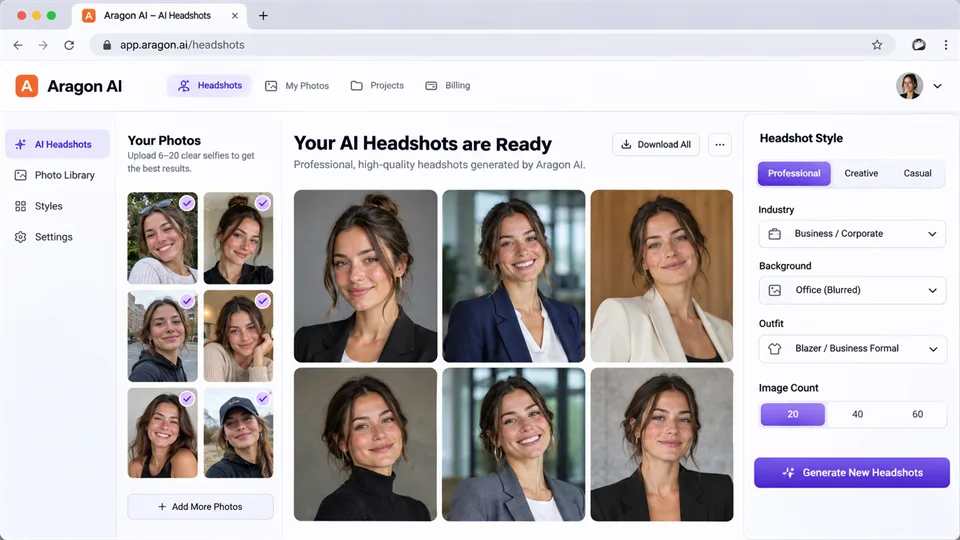
Aragon AI is a strong choice when you need a polished headshot quickly but still want room to customize the result. Its individual packages currently generate between 40 and 100 portraits, with published processing times ranging from roughly 15 to 45 minutes depending on the plan.
The service asks for several source photos and then lets you choose attire and background options. After generation, its related editing tools can help change a background, adjust clothing, improve sharpness, correct color, or remove unwanted text. These controls make Aragon more flexible than services that simply deliver a fixed gallery.
Aragon suits job seekers, consultants, founders, creators, and speakers who need several versions of the same professional image for different platforms. The faster premium packages are also helpful when a profile, conference page, or press request has a tight deadline.
Key features
- Fast processing across multiple price tiers.
- Choice of business attire and background combinations.
- Related editing tools for backgrounds, clothing, color, sharpening, and cleanup.
- Individual and team packages.
- Enhanced-resolution output on the premium tier.
Pros
- Among the faster premium AI headshot services.
- Useful customization after the initial gallery is generated.
- Large number of outputs provides more chances to find a convincing portrait.
- Simple enough for users with no photo-editing experience.
Cons
- The lowest tier limits clothing and background choices.
- Enhanced resolution is reserved for the higher package.
- Promotional pricing can make the long-term price less obvious.
Pricing: Current promotional plans start around $35 for 40 headshots. Higher tiers add more images, faster processing, more outfits, more backgrounds, and enhanced resolution.
3. BetterPic — Best for 4K Output and Post-Generation Editing
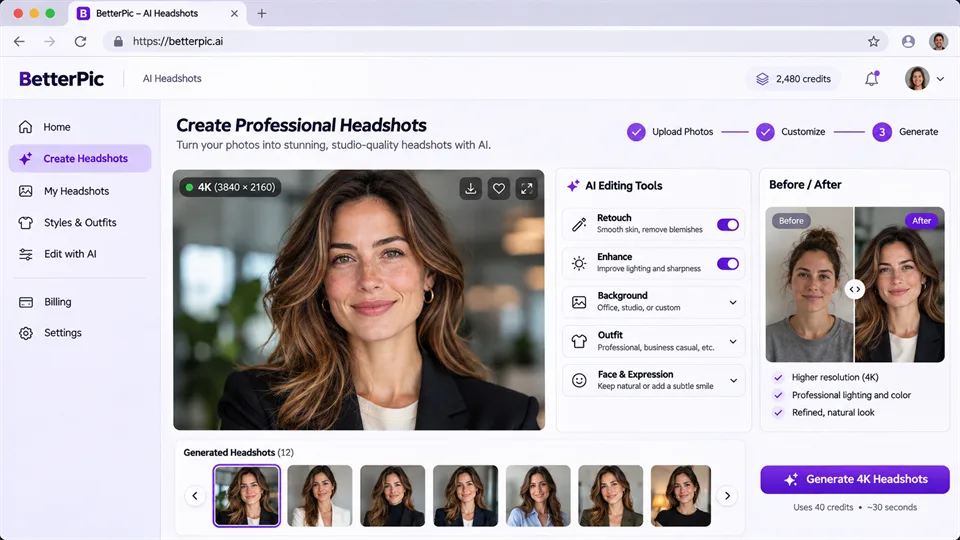
BetterPic is the most appealing option here for users who care about file resolution and want a way to improve an almost-perfect result. Every published individual plan includes 4K headshots and a commercial license, while the higher tiers add more styles, more AI edits, a redo option, and access to human retouching.
The service produces a gallery rather than a single portrait. Its Basic plan currently includes 20 headshots in one style, while Pro increases that to 60 images across three styles. Expert offers 120 images across six styles and includes additional editing support. This tiered structure makes it easier to pay for the amount of variety you actually need.
BetterPic is particularly useful when the image may appear in high-resolution company pages, printed materials, conference programs, or press kits. It is also a practical choice for people who prefer having editing options instead of accepting the first AI output as final.
Key features
- 4K output on all published individual packages.
- Between 20 and 120 headshots, depending on the tier.
- AI editing credits for refining selected results.
- Human retouching and a redo option on selected plans.
- Commercial license included in individual packages.
Pros
- High-resolution files without requiring the most expensive plan.
- Editing tools can fix a good image instead of forcing a full regeneration.
- Clear differences between Basic, Pro, and Expert packages.
- Useful team dashboard and style controls for organizations.
Cons
- The Basic plan offers only one style.
- Human editing and redo options are limited to higher tiers.
- Users who need only one profile image may receive more files than necessary.
Pricing: Basic currently starts at $35 for 20 4K headshots. Pro and Expert add more styles, images, edits, and support.
4. Dreamwave — Best for Executives and Team Headshots
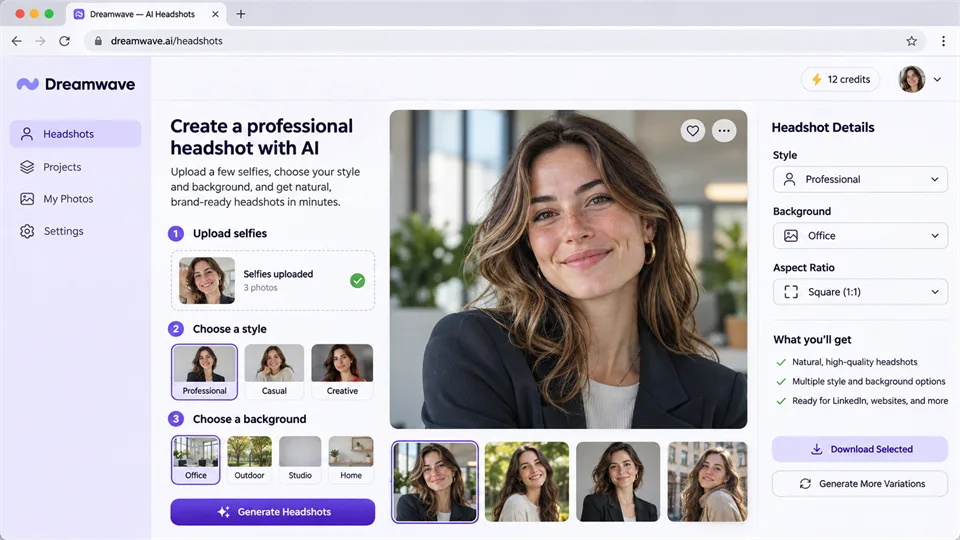
Dreamwave focuses on natural-looking professional portraits and a low-friction upload process. Its current individual plans can begin with one selfie, making it one of the easiest services to try when you do not have a large collection of suitable source photos.
The Starter package currently includes 40 images, while higher plans increase the gallery size and add redo or human-touchup options. Users can choose from business-formal, business-casual, and more relaxed visual directions, with different backgrounds, expressions, and clothing combinations.
Where Dreamwave becomes especially interesting is team use. Its business workflow supports bulk invitations, new-hire onboarding, reminders, shared standards, and enterprise support. That makes it suitable for executive teams, law firms, healthcare organizations, financial services, and other settings where portraits need to feel polished and consistent.
Key features
- Can start from a single suitable selfie.
- Professional, business-casual, and executive portrait styles.
- Individual packages with 40 to 100 images.
- Redo and human-touchup options on selected tiers.
- Bulk team invitations, reminders, and enterprise support.
Pros
- Minimal source-photo requirement compared with many competitors.
- Good fit for conservative, credibility-focused professional use.
- Team tools reduce the work of coordinating remote employees.
- Higher package includes human touchups for selected images.
Cons
- The Starter plan does not include a redo or human retouching.
- Users seeking highly creative or experimental styles may prefer a broader style library.
- Final quality still depends heavily on the clarity of the uploaded selfie.
Pricing: Individual packages currently start at $35 for 40 photos. Higher tiers add more images, redos, and human touchups; team pricing is separate.
5. Secta AI — Best for Large Galleries and Style Variety
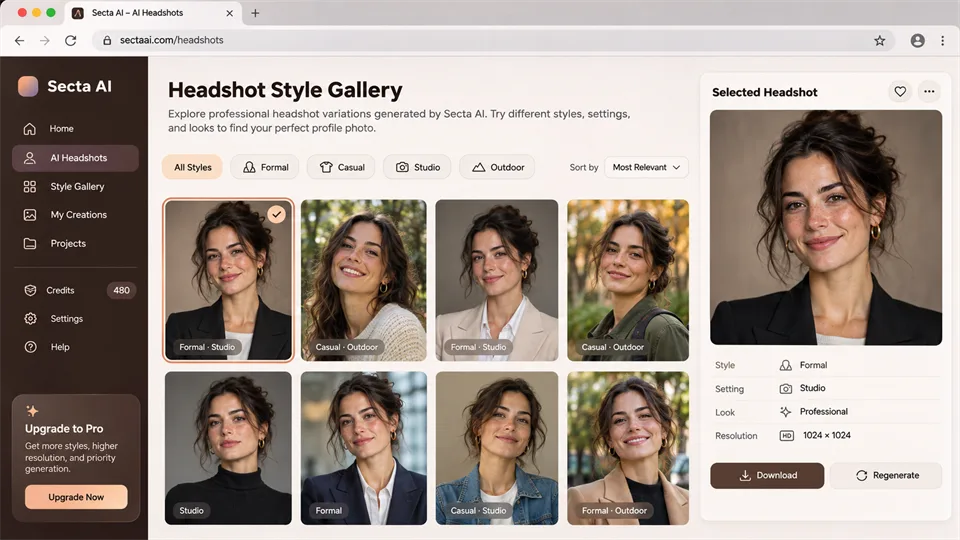
Secta AI is designed for users who want a large number of choices rather than a tightly limited gallery. Its current Professional package advertises more than 100 HD portraits across seven selected styles, usually delivered in less than two hours.
The advantage of this high-volume approach is flexibility. A single session can provide a formal LinkedIn portrait, a more relaxed founder image, a speaker headshot, and alternative crops for social profiles. Secta also includes remix tools for changing elements of a selected image without starting the entire shoot again.
The trade-off is review time. A gallery with more than 100 images takes longer to sort, and the largest output count does not automatically mean the largest number of usable photos. Secta makes the most sense for users who genuinely need several looks or enjoy comparing many variations.
Key features
- More than 100 HD professional headshots.
- Choice of seven styles in the current professional package.
- Background, clothing, crop, expression, and pose variety.
- Remix tools for modifying selected results.
- One-time purchase rather than a required subscription.
Pros
- One of the largest output galleries in this comparison.
- Useful variety for people who need different portraits for different channels.
- Remix features extend the value of a strong generated image.
- Published turnaround is under two hours.
Cons
- Costs more than the entry plans from several competitors.
- Sorting a very large gallery takes time.
- Many variations may be unnecessary if you only need one LinkedIn photo.
Pricing: The Professional package is currently promoted at $49 as a one-time purchase, with more than 100 HD photos. Standard pricing may be higher when the promotion ends.
Which AI Headshot Generator Should You Choose?
- Choose HeadshotPro if you want the best balance of price, professional styles, privacy details, and team administration.
- Choose Aragon AI if speed and post-generation customization are your priorities.
- Choose BetterPic if you need 4K files or want AI and human editing options.
- Choose Dreamwave if you want a simple upload process or need polished executive and team portraits.
- Choose Secta AI if you want a large gallery covering several professional looks.
For most individuals, HeadshotPro or BetterPic is the easiest place to start. HeadshotPro offers stronger all-round value, while BetterPic is more attractive when resolution and editing matter. Aragon is ideal for a tight deadline, Dreamwave is well suited to conservative professional branding, and Secta is best when variety matters more than the lowest price.
How to Get Better AI Headshots
- Use recent photos. Old images can cause the model to mix different ages, hairstyles, or facial features.
- Include several angles. Use front-facing images along with slight left and right angles, but avoid extreme profiles.
- Choose even lighting. Bright window light or soft indoor light works better than harsh shadows and colored lighting.
- Keep your face unobstructed. Avoid sunglasses, large hats, heavy filters, hands covering the face, and hair across the eyes.
- Mix expressions carefully. Include neutral and natural smiling photos so the generator can reproduce both.
- Follow the upload guide. Each service has different rules for photo count, framing, group shots, and image quality.
- Review small details. Check teeth, ears, glasses, jewelry, hairlines, collars, fingers, and background text before using an image publicly.
- Match the image to its purpose. A formal law-firm portrait and a relaxed startup profile require different clothing and backgrounds.
Frequently Asked Questions
What is the best AI headshot generator in 2026?
HeadshotPro is the best all-round option for most users because it combines reasonable one-time pricing, professional styles, individual packages, and team management. BetterPic is stronger for 4K output and editing, while Aragon is a better fit when speed matters most.
Can I create an AI headshot for free?
Some companies offer a limited free generator, demo, or test image, but a complete professional gallery usually requires payment. Free tools are useful for checking the basic workflow, although they often provide fewer styles, lower resolution, slower processing, or less control.
How many photos do I need to upload?
The requirement varies by service. Some newer workflows can begin with one suitable selfie, while others request several images from different angles. More photos do not automatically guarantee a better result; clear, recent, varied images are more important than uploading many similar selfies.
Do AI headshots look professional?
The best results can work well for LinkedIn, resumes, company pages, speaker profiles, and internal directories. However, quality varies within the same generated gallery. Always inspect facial details, clothing, glasses, jewelry, and the background before publishing.
Can an AI headshot generator change my clothes and background?
Yes. Most dedicated tools offer business outfits and studio-style backgrounds. Some also let you edit clothing or replace the background after generation. The available choices depend on the package.
Are AI headshots safe to use?
They can be safe when the provider has a clear privacy policy, explains how photos are stored, and lets users delete their data. Because facial images are sensitive, read the provider’s current privacy and deletion terms before uploading.
Can I use AI headshots for LinkedIn or a resume?
Yes, provided the image still represents your real appearance. Avoid results that significantly change your age, facial structure, skin tone, hair, or body. A professional image should improve presentation without misleading recruiters or clients.
Is an AI headshot better than hiring a photographer?
An AI generator is faster and less expensive, and it gives you many variations. A photographer offers precise direction, reliable likeness, controlled lighting, exact brand requirements, and professional retouching. AI is ideal for everyday profile needs; photography remains better for high-value campaigns and situations where every detail must be controlled.
Final Verdict
HeadshotPro is our top overall choice because it serves both individual professionals and teams without making the workflow complicated. Aragon AI stands out for speed and editing flexibility, BetterPic for 4K files and refinement options, Dreamwave for polished executive and team portraits, and Secta AI for users who want the widest gallery.
Whichever AI headshot generator you choose, the quality of your source photos matters. Upload clear, recent images, choose a style that matches your profession, and inspect every detail before publishing. The best AI headshot should look polished, but it should still look unmistakably like you.
Latest Reviews
Best 5 AI Anime Generators in 2026

5 Best AI Avatar Generators in 2026

Best 5 AI Meme Generators in 2026
Best 5 AI GIF Generators in 2026
5 Best AI PDF Editors in 2026: Edit, OCR & Rewrite PDFs
Best 5 AI Cartoon Generators in 2026
