
Want to save a Bilibili tutorial for a flight, keep a copy of your own upload, or download a creator-authorized video? The first choice is whether you need offline playback inside an app or a separate video file. Those are different jobs, and the best tool depends on the link you have.
This guide covers six practical routes, from a download button to free command-line tools. Use them for your own videos or material you have permission to download, and respect the video’s access conditions.
Bilibili international: check the link before downloading
Bilibili’s current Google Play listing promotes its global community and AI dubbing. That app uses the package com.bilibili.app.in and links to bilibili.com. It is separate from the BiliBili / Bstation app associated with bilibili.tv. App availability and features vary by region.
Copy the video’s share link and open it in a browser. A bilibili.com/video/BV… address belongs to the main video platform; bilibili.tv/en/video/… or /play/… belongs to the other service. A short b23.tv link should first resolve to its full destination. The word “international” on an app alone does not tell you which downloader will work.
A tool that saves a .com video does not automatically support .tv, the global app’s AI-dubbed audio, or every subtitle language. For bilibili.tv, first check the app’s offline option; yt-dlp also includes a dedicated international extractor, whose success depends on the current video and access rules.
Compare 6 Bilibili download methods
| Method | Best use | Cost / limits | Link or app scope |
|---|---|---|---|
| Official app | Watch offline on a phone | Free app; content or quality may require payment | Only eligible videos in your installed app |
| 4K Video Downloader Plus | Desktop video files | Limited free tier; paid licenses | bilibili.com; .tv not confirmed here |
| Locoloader | Occasional browser-based saving | 2 free extractions per 6 hours; subscription | bilibili.com |
| yutto-uiya | A visual queue and settings | Free, open source | bilibili.com; Windows / Apple Silicon Mac |
| yutto | Batch jobs and danmaku | Free, open source | bilibili.com; Python + FFmpeg |
| yt-dlp | Formats, subtitles, automation | Free, open source | Separate .com and .tv extractors |
1. Official Bilibili app: easiest for offline viewing
Start with the official app if your goal is to watch a video without a connection. When the video offers a download or cache button, the app manages the offline copy for you. You do not need a separate desktop utility just to replay a lesson on the same phone.
Treat the result as app-managed offline content, rather than an exported MP4 for your file manager or editor. A download button can be absent because of the app version, video permissions or region; a paid title may also depend on an active entitlement. Check the actual video’s menu before purchasing a subscription for offline use.
How to use it
- Open the video in the official app available in your region, and sign in if required.
- Look below the player or in its menu for Download, Cache or Offline. If the option is absent, that app/video combination does not offer this route.
- Select an available quality and wait for completion. Open the app’s downloads area and check playback before going offline.
2. 4K Video Downloader Plus: a familiar desktop workflow
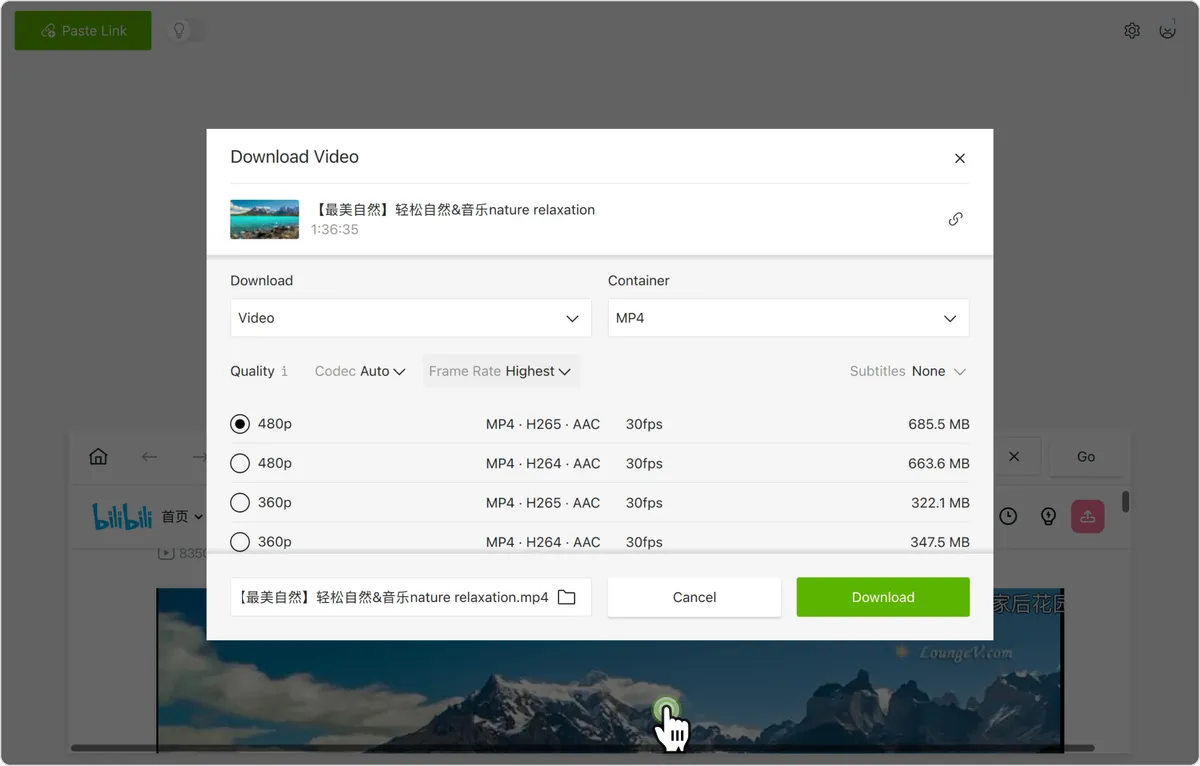
4K Video Downloader Plus offers a desktop interface with quality and folder controls. Its built-in browser is useful when the source page needs your Bilibili login. There is a permanent free tier with quantity restrictions, plus paid licenses; supported systems include Windows, macOS and Ubuntu.
For a one-off download, review the detected quality instead of blindly applying a saved preset. Higher resolution is useful for small text in a tutorial, but takes more space. The product’s maximum advertised resolution is not a promise that every Bilibili video will provide that stream. Try your actual link before upgrading.
How to use it
- Install the current version from the developer and copy the full Bilibili video URL.
- Choose Paste Link. If the video requires your account, open it through the built-in browser and sign in on the Bilibili page.
- Select an available video format, quality and destination folder, then download. Play the saved file to check both picture and sound.
3. Locoloader: try a link in your browser
Locoloader provides a Bilibili-specific page where you paste a URL and request download links. It suits occasional use when you prefer to begin in a browser. Its example link is from bilibili.com; do not assume that an international .tv link has the same support.
The free allowance is two extractions every six hours, and extracting the same URL again uses another allowance. The service retrieves links rather than hosting or processing the media. Inspect the returned items carefully: a video-only stream is not the same thing as a finished file with audio.
How to use it
- Copy the full video-page URL and paste it into Locoloader’s Bilibili field.
- Select Extract and review the available results, format and size.
- Save the appropriate media link. If separate video and audio are returned, use a desktop tool with merging support rather than assuming one link contains both.
4. yutto-uiya: a visual download queue for Bilibili
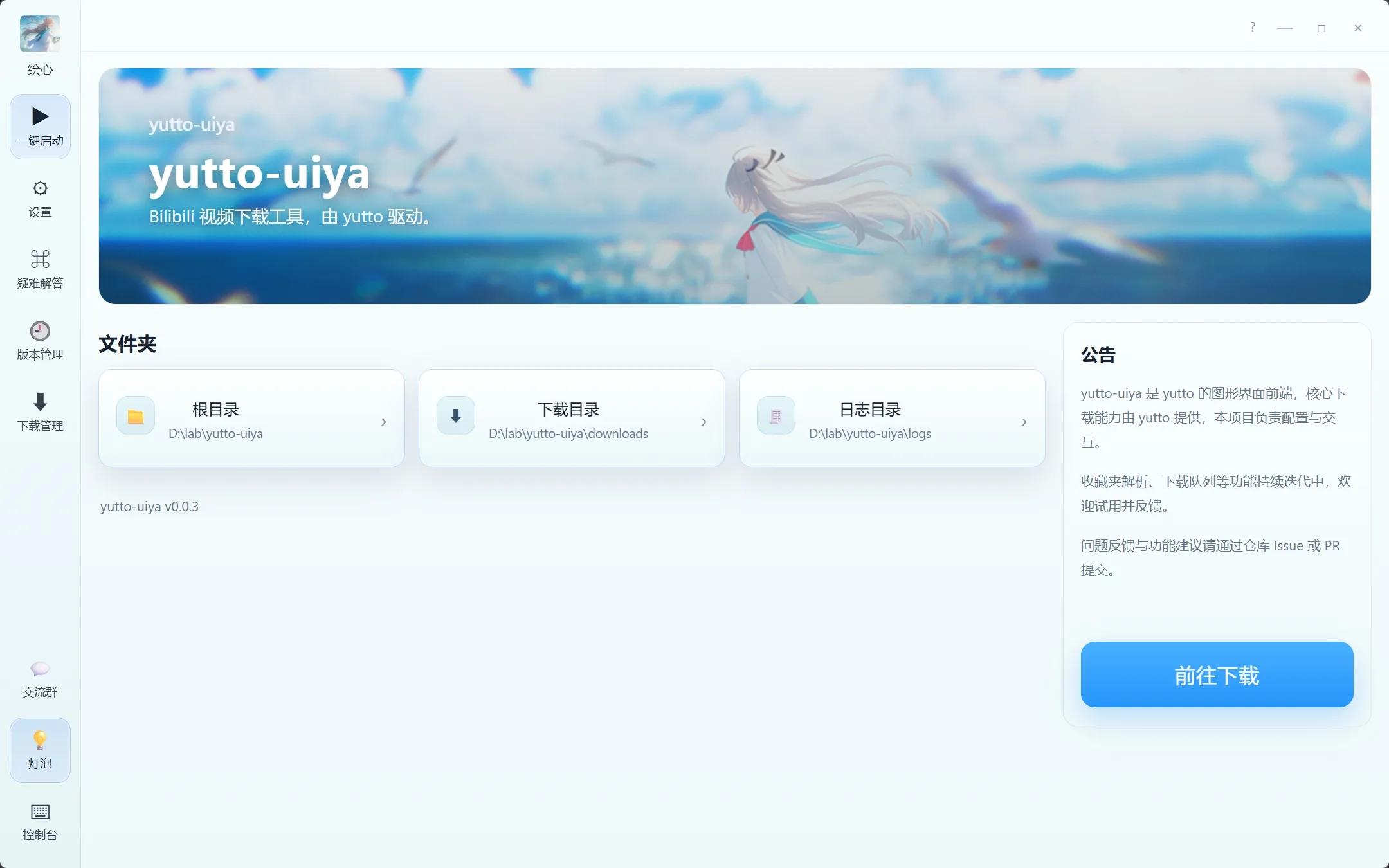
yutto-uiya puts a graphical interface around the yutto download engine. Its project documentation describes previews, selection of multiple items, quality settings and a download queue. This is useful when a command line feels cumbersome but you want to organize several authorized Bilibili videos.
The portable packages bundle the runtime and FFmpeg. The project lists Windows x86_64 and Apple Silicon macOS packages, but explicitly warns that the Mac package has not been tested on physical hardware. Its interface is mainly Chinese. Because it uses yutto underneath, treat it as a different workflow, not an independent backup when that engine has a parsing problem.
How to use it
- Get the package matching your system from the project’s Releases page and extract it completely.
- Open the app, paste the video or collection link, and select the items you actually need.
- Set quality and output options, start the queue, then open the completed file’s folder. Use account login only when your own accessible video requires it.
5. yutto: batch downloads and danmaku controls
yutto is a free Bilibili-focused command-line tool. Its documentation highlights batch work, resume support and ASS danmaku generation. It is a good fit for organizing your own uploads or a set of creator-approved lessons where you want repeatable settings.
It takes more preparation than a paste-link website: the current installation instructions require Python 3.11 or newer and FFmpeg. Danmaku is an overlay of viewer comments, not a translation subtitle track. Keep that distinction in mind if your real goal is studying a video in another language.
How to use it
- Install the required Python and FFmpeg environment, then install yutto using the project’s instructions; for example, pipx install yutto if pipx is already available.
- Open a terminal in your desired output directory. Replace VIDEO_URL below with the full URL of your video.
- Run yutto “VIDEO_URL”. For an authorized multi-part job, consult yutto -h before using –batch, then check the generated files.
yutto "VIDEO_URL"6. yt-dlp: flexible downloads, including international URLs
yt-dlp is the most flexible option here for readers comfortable with a terminal. Its extractor list includes both BiliBili and BiliIntl, and the international extractor handles bilibili.tv addresses. Included support can still break when a website changes.
The useful advantage is control: list the available formats or subtitle tracks before downloading, then choose what you need. FFmpeg handles merging separate audio and video streams. Use the actual resolved share URL, including a .tv URL where applicable, instead of converting its domain by hand.
How to use it
- Install yt-dlp from its official installation guide and make FFmpeg available. On Windows, a binary in the current folder may need .yt-dlp.exe instead of yt-dlp.
- Replace VIDEO_URL in the commands below. Run -F to see the formats the current link exposes; –list-subs lists available subtitle tracks.
- Run the download command with FFmpeg installed. The MKV merge target accommodates many stream combinations; it does not transcode codecs or guarantee MP4 output.
yt-dlp -F "VIDEO_URL" yt-dlp --list-subs "VIDEO_URL" yt-dlp --merge-output-format mkv "VIDEO_URL"Fix common Bilibili download problems
Only low resolution appears
Check the available formats, your login state and the original video’s quality first. An account or membership may be needed for some streams. Paying for a downloader does not purchase Bilibili content access.
The video has no sound
Bilibili can serve picture and audio separately. Let a tool with FFmpeg finish merging both streams; do not stop when the video file alone appears. Also try a player that supports the saved audio codec.
An error such as HTTP 412 appears
Update the tool, confirm that the video plays normally in your own browser, and reduce repeated requests. If the error persists, check the project’s current issue tracker rather than retrying in a tight loop.
An old tutorial points to a missing download
Maintenance status matters. The original BBDown repository is archived, while the original BiliTools and DownKyi repositories announce discontinued maintenance. Old download buttons and third-party repackaged installers should not be treated as current official releases.
Frequently asked questions
Can I download videos from the new international Bilibili app?
First open its share link and inspect the destination. A .com link needs .com support; a .tv link needs international-service support. An app’s language or icon does not establish file-download compatibility.
Can I save Bilibili videos on iPhone or Android?
For offline watching, check the official app first. A browser downloader may save a supported media file into Downloads or Files, but that is separate from saving into Photos. Confirm the file format and sound before moving it between apps.
Can I keep the AI-dubbed English audio?
The global app advertises AI dubbing, but that does not establish that third-party downloaders expose the same audio. Inspect the available tracks. If the translated track is absent, an ordinary download may contain only the original audio.
Does MP4 mean 1080p and subtitles are included?
No. MP4 describes a container, not resolution, audio completeness or subtitle availability. Check each independently. A visible subtitle may be burned into the picture, while another subtitle may exist as a separate selectable track.
Which options are free?
yutto, yutto-uiya and yt-dlp are open-source tools without a software subscription. Locoloader has a small free extraction allowance, and 4K Video Downloader Plus has a limited free tier. Content subscriptions, connectivity and storage are separate costs.
Should I paste account cookies into an online downloader?
Avoid giving a website your session cookies. A session can provide account access. If authentication is needed, prefer the official app or a trusted local tool with documented account handling, and keep login data out of screenshots or shared commands.
Which method should you choose?
For a commute or flight, start with the official app’s offline option. For a desktop file, 4K Video Downloader Plus offers a straightforward visual workflow; Locoloader is convenient for an occasional supported link. If you need queues or repeatable jobs, choose yutto-uiya or yutto according to your comfort with a terminal.
For international .tv links and detailed format inspection, yt-dlp is the most relevant advanced option in this list. Whichever route you use, begin with one short authorized video and check its resolution, audio and subtitles before processing a larger set.
Related
8 Best Free Movie and TV Show Websites in 2026: Where to Watch Online

How to Save Twitch VODs and Clips on PC, iPhone and Android

How to Download X (Twitter) Videos When There’s No Save Button
How to Download Netflix for Offline Viewing: Steps, Limits and Fixes
How to Save YouTube Videos on iPhone and Android
How to Save Instagram Videos and Reels on Mobile and PC