
To download an X (Twitter) video, open the video and look for Download video in its three-dot menu. If the option is missing, check the official eligibility rules first. For your own or creator-authorized public videos, a browser downloader is another route: copy the post link, choose a video file, and save it to your phone.
For a public video link, start with AirMore X / Twitter Video Downloader: paste the individual post URL, analyze it, and choose a format actually supplied by the source. The first tool section below explains the steps and limits.
The last step matters as much as the download button. A video saved through Safari may be in Files, not Photos; on Android, start with Chrome’s downloads list or your file manager. A bookmark, a page preview and an actual offline video file are three different things.
Why is there no Download video button on X?
X’s official video help describes post-video downloads as a Premium subscriber feature for eligible posts. Videos posted before July 25, 2023 are excluded from this official option. The uploader can also turn off download permission.
For uploaders under 18, X automatically disables their video-download permission and does not let them change it. This is a setting governing videos they share, not a reason to assume every missing button is an age check on the viewer.
| What to check | What it means |
|---|---|
| Your X account and plan | Do not assume a free account has the official download feature. Check the current Premium feature details. |
| When the video was posted | The July 25, 2023 cutoff applies to X’s official download option, not a universal technical rule for every MP4. |
| Uploader permission | A video can play normally while its official download option is disabled. |
| Which menu you opened | Open the video itself; the post menu and the player menu are not interchangeable. |
Use X’s official download option first
- Open the original post in the current X app and tap its video.
- Open the video’s three-dot menu, then choose Download video if it is present.
- Follow any save prompt. Wait for completion, then locate and play the saved item. If the option is absent, check the conditions above before repeatedly reinstalling the app.
A Premium subscription does not override the uploader’s settings. Check the current Premium information before paying just to save a particular clip.
Three browser tools for public X videos
The following websites handle a public post URL without asking you to install an app. Use a link to the specific post, such as https://x.com/USERNAME/status/POST_ID, rather than a profile, search page or screenshot. Public visibility alone does not give permission to reuse someone else’s footage.
| Website | Useful difference | Cost / account | Limits |
|---|---|---|---|
| AirMore X / Twitter | Public video links; source-provided formats | Free web tool | Public, free-to-view videos only |
| SSSTwitter | A direct paste-link workflow; Japanese interface also available | No payment or login was required for the sample download | Ad-supported pages; quality depends on the source |
| Twitsave | A preview and MP4 quality menu help identify the right clip | No payment or login was required for the sample download | English interface; not a private-post or DM downloader |
1. AirMore: download public X (Twitter) videos in your browser
AirMore offers a free web tool for public X (Twitter) videos that can be viewed without logging in. It works in a modern mobile or desktop browser without installing software. The page lists the usable formats and qualities supplied by the source, making it a convenient first option when you want to choose from the available files.
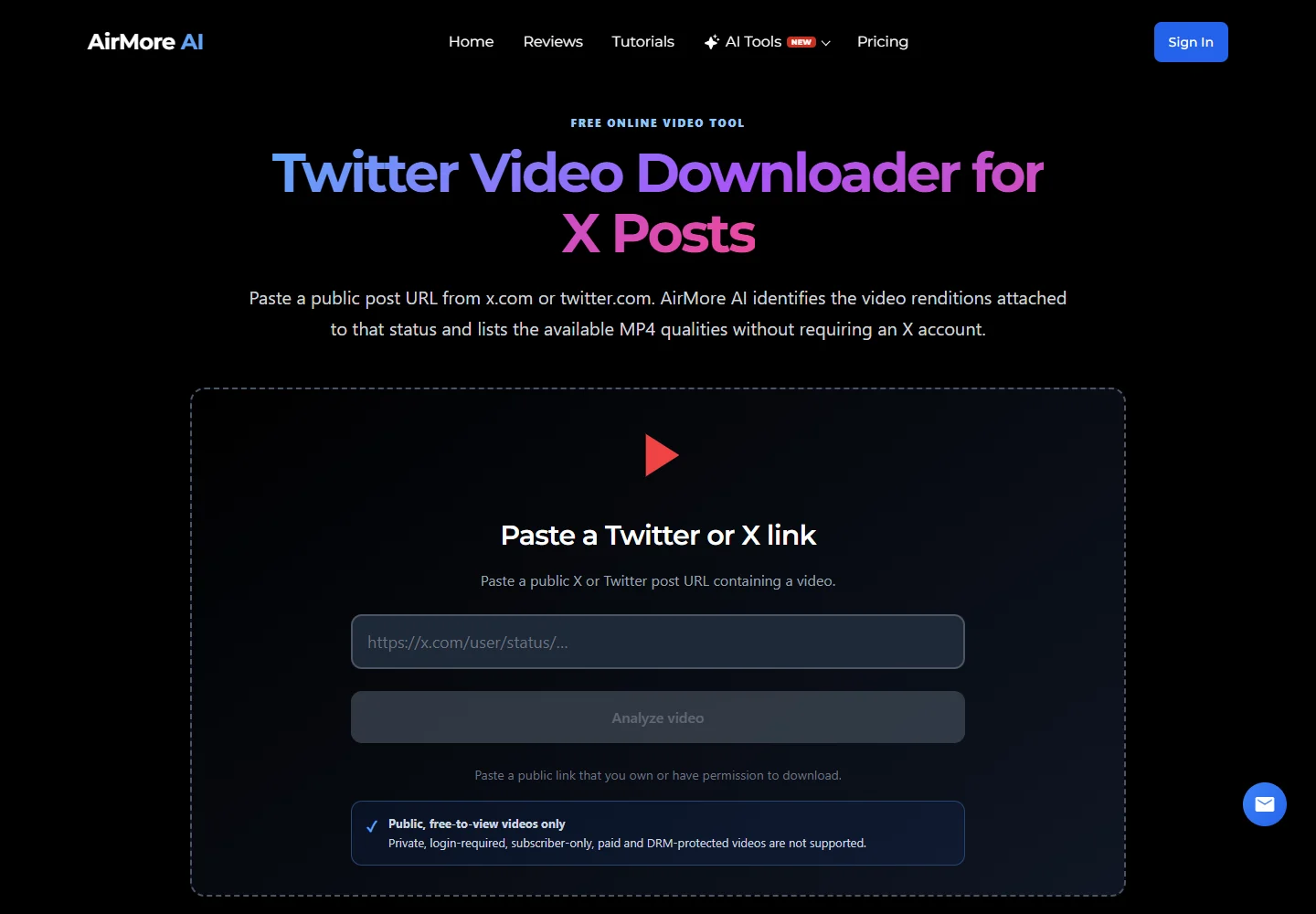
- Open the public X (Twitter) video post and copy its full link.
- Open AirMore, paste the link into the X (Twitter) video URL field, and select Analyze video.
- If formats are returned, choose an available quality or format and use its download option before the temporary link expires. Then check your browser’s Downloads list and play the file.
Both x.com and twitter.com status links are supported. Copy the individual video post rather than a profile or timeline. When the source supplies several MP4 renditions, compare the available qualities; analyze the original status again if a temporary link expires.
2. SSSTwitter: a straightforward paste-and-download option
SSSTwitter is convenient for an occasional public clip when you want to stay in your browser. Its main page has a link field and Download button; the results offer available video choices. Choose a normal MP4/video option if you need both picture and sound, rather than an audio-only item.
The site contains advertising, so distinguish the result for your clip from banners and unrelated installation prompts. A high-resolution label is only useful when that rendition exists in the source. Keep the original post URL so you can request a fresh result if a media link expires.
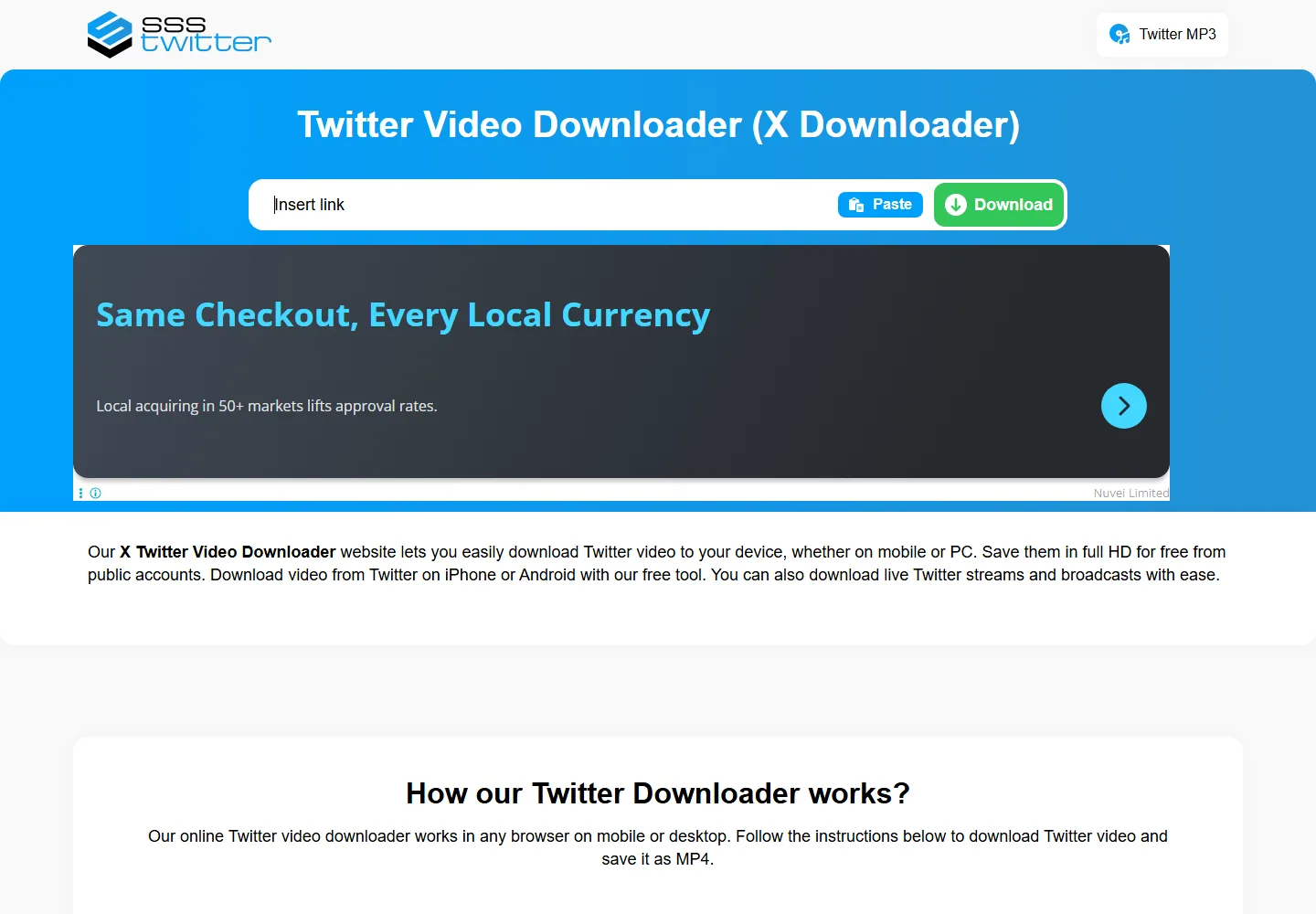
- In X, use the post’s Share menu to copy its link.
- Open SSSTwitter in Safari or Chrome, paste the URL and choose Download.
- Select an available video result and confirm the browser’s download. Use the iPhone or Android instructions below to locate the file.
3. Twitsave: check the preview before choosing a file
Twitsave presents the detected post and a video preview before its download choices. That makes it useful when you have copied a link from a thread and want to confirm which clip the service found. The result page includes an MP4 entry and a Download Video menu.
The sample result offered several resolutions, up to 1920 × 1080, but the successfully downloaded file below was the smaller 480 × 270 option. Do not mistake a listed resolution for a download we have tested. Pick a larger available rendition for small text; choose a smaller one when storage or mobile data matters.
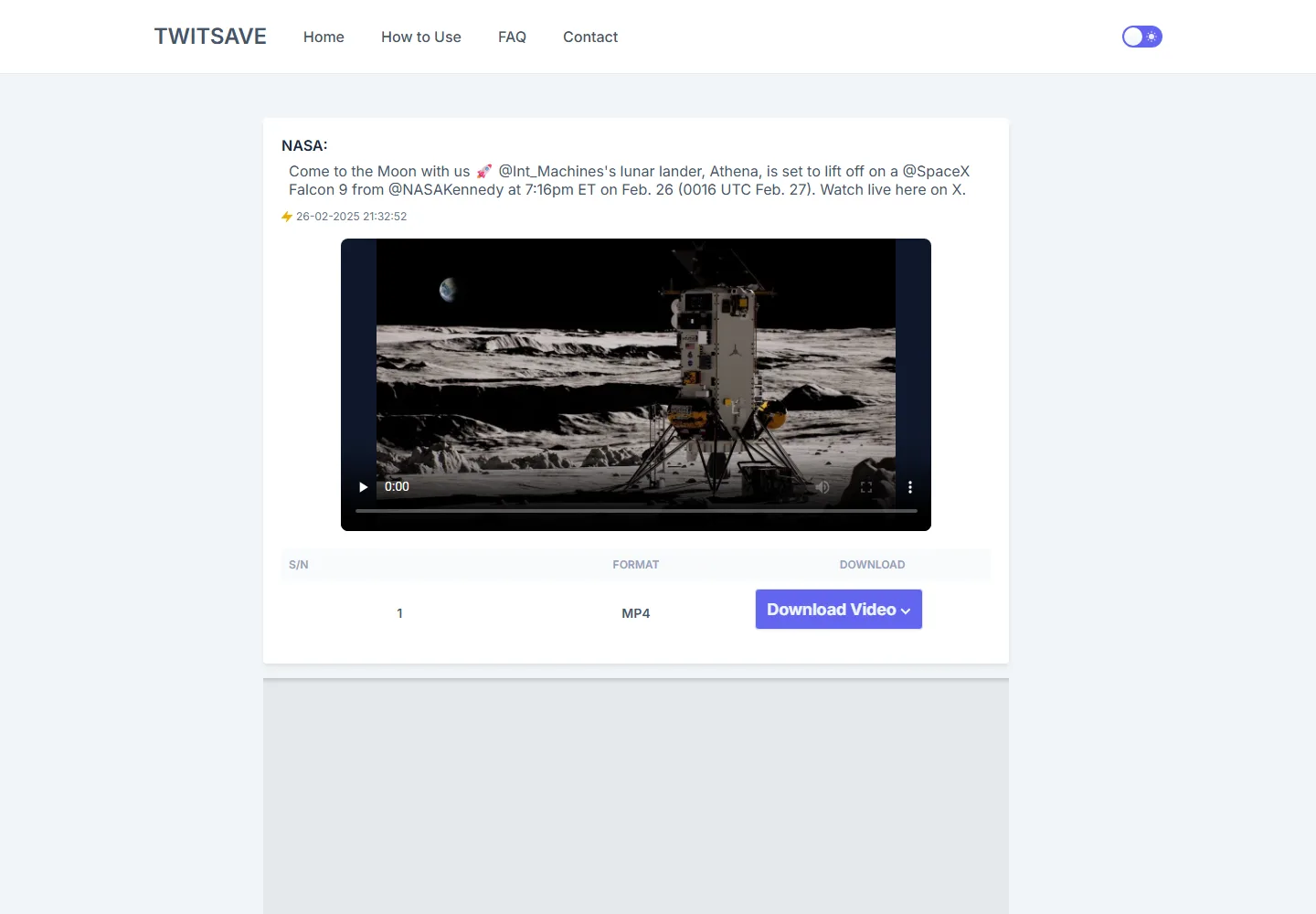
- Paste the original public post link into Twitsave and submit it.
- Check the detected author, post text and preview against the video you meant to save.
- Open Download Video, choose an available quality and save the file. If it plays in a browser tab instead, use the browser’s download or share/save control.
Download check — September 16, 2026: both websites returned a playable MP4 from this public NASA post: 40.17 seconds, 480 × 270, H.264 video with AAC audio, 703,325 bytes. Both complete files decoded without errors. This confirms that sample through the websites; it does not establish support for every post, live broadcast, resolution or phone model. The clip is a short teaser, not the full launch broadcast.
Save an X video on iPhone
- In X, open the post’s Share menu and copy its link.
- Open Safari directly, visit one of the websites above, and paste the link. Avoid staying inside an in-app browser if it does not offer a file-save control.
- Choose the video result and confirm Download. If a video player opens, check its share controls for Save to Files; available labels depend on the page and iOS version.
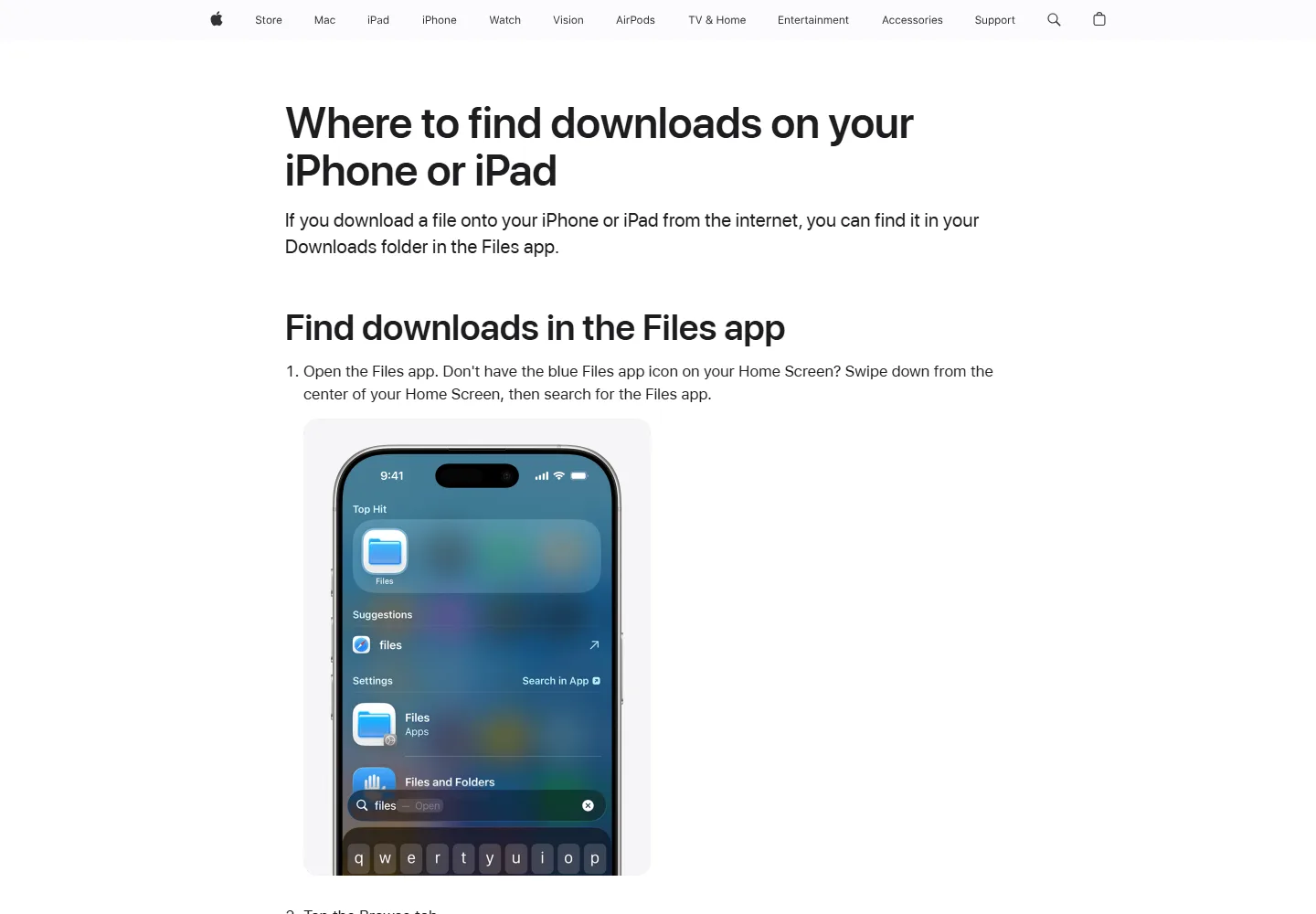
- Open Safari’s downloads list or the Files app. Look in Downloads under iCloud Drive or On My iPhone, depending on your Safari download setting.
- Play the file. To add a compatible video to Photos, open the file’s Share menu and choose Save Video if offered, then check Photos. Saving to Files alone does not add it to Photos.
Apple’s official download-location guide identifies the Downloads folder in Files as the place to look for internet downloads. If you selected a different destination, use that folder. Check that the file is fully downloaded before trying to move or share it.
Save an X video on Android
- Copy the X post’s link using Share.
- Open Chrome, visit SSSTwitter or Twitsave, paste the link and request the video results.
- Select the desired MP4. Confirm the destination or download prompt if Chrome shows one. For a direct file link, long-pressing it may offer Download link.
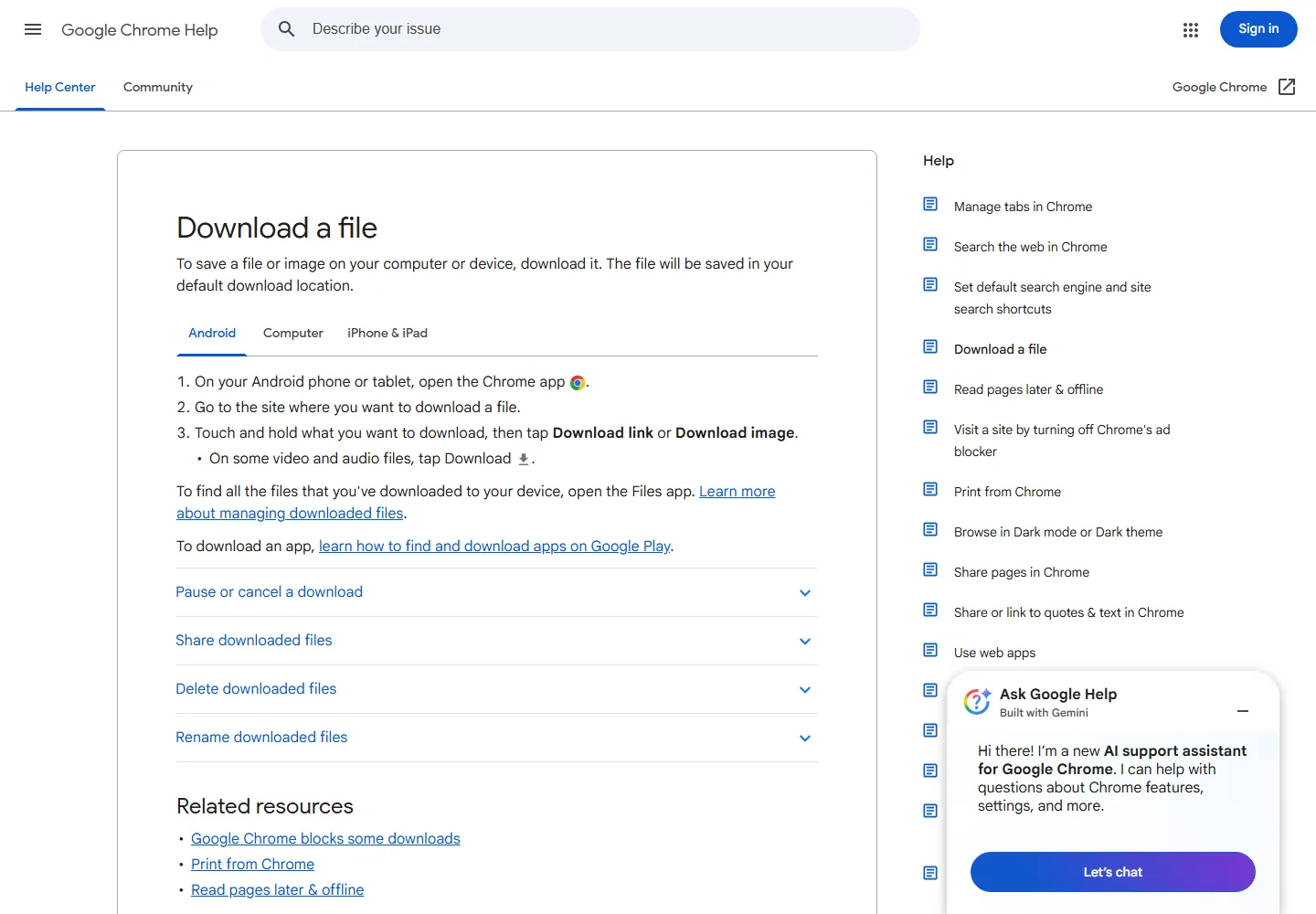
- Open Chrome’s menu and Downloads, or open the phone’s Files app and its Downloads area. Wait until the item has finished.
- Play the saved video with sound. If you want it in a gallery app, check that app’s device folders rather than downloading it repeatedly.
Google’s Chrome for Android instructions explain downloading a link or media file and finding downloads through Files. A gallery’s main feed is not a reliable list of every file on your phone; folder visibility varies between apps and devices.
Where did the downloaded video go?
| How you saved it | First place to look | If you cannot see it |
|---|---|---|
| Safari download on iPhone | Files → Downloads in the configured location | Check both iCloud Drive and On My iPhone, or Safari’s selected download folder. |
| Save Video on iPhone | Photos | Confirm the save finished and the video format is supported. Check relevant photo-access permission if prompted. |
| Chrome download on Android | Chrome → Downloads; Files → Downloads | Sort by date and inspect the filename and size. |
| X’s own Download video option | The destination shown by the app or system prompt | Check Photos/Gallery and recent files; do not assume every app version uses the browser’s folder. |
| X bookmark | X’s Bookmarks | This is a saved reference to the post, not an offline MP4. |
Fix common download problems
| Problem | Likely cause | What to try |
|---|---|---|
| No official save button | Post eligibility, plan, uploader permission or wrong menu | Open the player menu and check official conditions. For an authorized public clip, try a browser method. |
| Downloader finds no video | Wrong post link, deleted/restricted post or a temporary parsing failure | Open the original post, confirm playback, copy the exact URL again, then try the other website. |
| A download link worked earlier but now fails | The returned media link may have expired | Submit the original post URL again instead of reusing an old result link. |
| Tapping Download opens an ad | The control was an advertisement or a redirect | Close the unrelated tab and return to the video result. Do not install an app just to complete this browser workflow. |
| A video plays instead of downloading | The browser opened the media directly | Use an available download/share control or long-press the direct link where supported. |
| The file is missing, tiny or unplayable | Incomplete transfer, storage shortage or a saved webpage | Inspect size and extension, free space and download again. Renaming an HTML page to .mp4 does not turn it into video. |
| Picture but no sound | Muted playback, an audio-only/video-only choice or a source with no sound | Unmute and test the source, then select an MP4 with audio. A higher resolution alone will not restore sound. |
| The clip is blurry | A low-resolution rendition was selected | Try a higher available quality; downloaders cannot recover detail absent from the uploaded source. |
Frequently asked questions
Do I need X Premium for these websites?
The official X post-download feature and third-party browser tools are separate. Neither website required an X login or payment for the public sample above. That does not change the creator’s permissions or guarantee future availability.
Can I download a private post or a DM this way?
Do not paste private links, passwords or account cookies into public download sites. For an eligible DM video, X documents a separate long-press download action; the sender’s setting and sending-app version matter. Ask the sender for a file if the option is unavailable.
Why is my saved video not in iPhone Photos?
Safari normally saves a downloaded file through Files. Open the finished video there and use Share → Save Video if that action is available. If it is absent, check the file type and whether it actually finished downloading.
Does bookmarking a post save its video offline?
No. A bookmark keeps a reference inside X. For offline use, confirm you have a complete local file and can play it without loading the post again.
Can I download a live stream or all videos in a thread?
Do not infer that from a successful single-clip download. Live broadcasts and multi-video posts may use different delivery formats. Check the exact result and duration; copying one thread link does not necessarily retrieve every attached video.
Is a download permission also permission to repost?
Treat saving and republication as different decisions. Use your own footage or material the creator has authorized for your purpose, and keep credits and any relevant license information. Ask the creator when the intended reuse is unclear.
Choose the shortest route to a usable video
For an eligible post, X’s own Download video option is the shortest path. When it is absent and you have permission to save the public clip, start with SSSTwitter; Twitsave is a useful alternative when a preview and quality menu make the choice clearer.
Before closing the page, check three things: the file is on your device, the duration matches the clip, and both picture and sound work. On iPhone, decide whether you need it in Files or Photos; on Android, find it in Downloads before assuming the transfer failed.
Related
6 Best Ways to Download Bilibili Videos in 2026

How to Save YouTube Videos on iPhone and Android
How to Save Twitch VODs and Clips on PC, iPhone and Android
Where Do Telegram Downloads Go? Save Videos on iPhone, Android and PC
8 Best Free Movie and TV Show Websites in 2026: Where to Watch Online

5 Free Anime Websites in 2026: Where to Watch, Ads and Regional Limits