Onepage Review 2026: Is This AI Website and Funnel Builder Worth It?
Read our Onepage review for 2026 to compare its AI website builder, landing pages, funnels, CRM, pricing, strengths, limitations, and best alternatives.
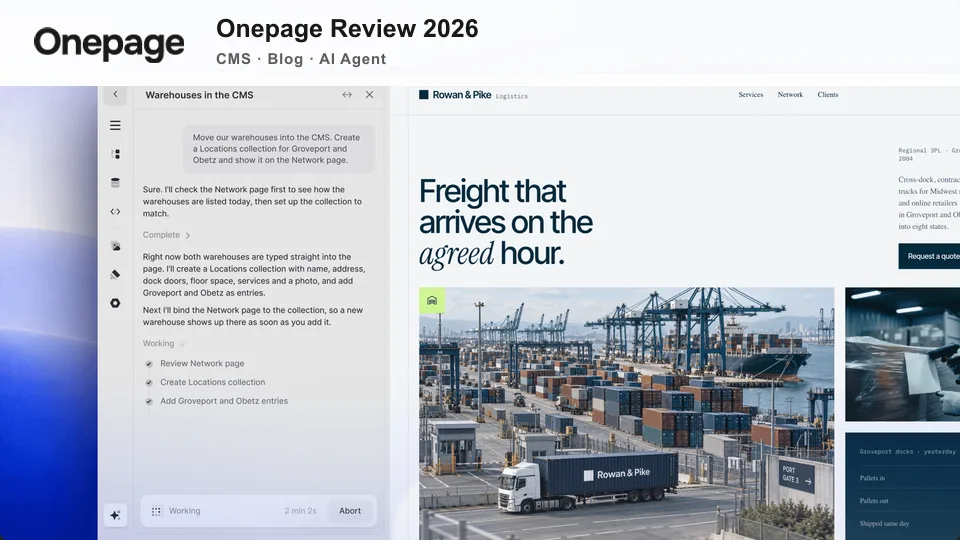

Building a business website often means choosing between two imperfect options: a simple builder that becomes restrictive as the project grows, or a powerful platform that takes too much time to learn. Onepage tries to occupy the useful space between them. It combines an AI-assisted website builder, a visual editor, landing pages, multi-step forms, basic lead management, and marketing integrations in one platform.
That combination makes Onepage especially interesting for freelancers, agencies, consultants, local businesses, and marketing teams that need to launch conversion-focused pages without assembling a large collection of plugins. Its native CMS and blog now also cover structured content and regular publishing. It is still not a full native ecommerce platform, and the right fit depends on what you want to build and how many sites, pages, funnels, collaborators, and AI credits you need.
This Onepage review examines the platform’s main features, AI tools, editing workflow, pricing, strengths, and limitations. It also explains who should consider it, who may be better served elsewhere, and how it compares with popular alternatives.
Table of Contents
- What Is Onepage?
- How We Evaluated Onepage
- Onepage at a Glance
- Key Features of Onepage
- What the Onepage Workflow Is Like
- How Good Is Onepage AI?
- SEO and Website Performance
- Onepage Pricing and Plans
- Onepage Pros and Cons
- Who Should Use Onepage?
- Best Onepage Alternatives
- Final Verdict
- Frequently Asked Questions
What Is Onepage?
Onepage is a no-code website and funnel-building platform. Despite its name, it is not limited to single-page websites. Depending on the plan, users can create multi-page business sites, landing pages, link-in-bio pages, forms, quizzes, and conversion funnels.
The editor uses a section-based system. Instead of starting with code or a completely empty canvas, users can assemble a page from headers, feature blocks, testimonials, pricing sections, forms, calls to action, and other reusable components. Global design settings help maintain consistent colors, fonts, spacing, and visual styles across a project.
Onepage also includes AI-assisted creation. Its “Vibe Coding” tools can generate page sections, interactive elements, calculators, and multi-step forms from natural-language instructions. The generated output remains editable in the visual builder, which is important: AI can provide a starting point without forcing users to accept a fixed design.
For lead generation, the platform brings forms, funnel logic, and an internal CRM into the same environment. Leads can also be passed to external systems through direct integrations, automation platforms, or webhooks. This integrated approach is one of the clearest differences between Onepage and a conventional brochure-site builder.
How We Evaluated Onepage
This review uses a documentation-led assessment conducted in September 2026. We examined Onepage’s public product information, current pricing table, Help Center instructions, editor workflow documentation, integration guides, and independent user feedback. We evaluated the platform against the practical needs of small businesses, solo professionals, marketing teams, and agencies.
The assessment focused on the following criteria:
- Ease of use: How approachable the page-building and publishing workflows appear for non-developers.
- Design flexibility: Whether users can move beyond templates and maintain a consistent design system.
- AI usefulness: Whether AI-generated elements remain editable and fit into a practical production workflow.
- Lead generation: The depth of forms, multi-step funnels, conditional logic, and CRM functions.
- Integrations: The options for sending lead data and connecting marketing services.
- SEO and analytics: The built-in controls for search visibility, tracking, and redirects.
- Scalability: How plan limits affect users managing multiple pages, websites, or team members.
- Value: What each plan offers relative to its monthly cost and intended audience.
We did not invent speed benchmarks, conversion-rate improvements, or hands-on test results that could not be independently verified. Website speed depends on the finished page, media, scripts, domain setup, and visitor location, so any serious buyer should test a published sample with their own assets before migrating a business-critical site.
Onepage at a Glance
| Category | Assessment | What It Means |
|---|---|---|
| Ease of use | Strong | A section-based visual editor keeps basic page creation approachable. |
| AI assistance | Strong | AI can create editable sections, forms, funnels, calculators, and custom elements. |
| Landing pages | Strong | The platform is built around focused pages and conversion-oriented layouts. |
| Forms and funnels | Strong | Multi-step flows, logic, templates, analytics, and CRM connections are available. |
| Blogging and content publishing | Good | Native CMS collections and blog publishing support structured content; evaluate the workflow for very large or highly specialized editorial operations. |
| Ecommerce | Mixed | Products and payments can be integrated, but Onepage is not a full native store platform. |
| Integrations | Good | Direct connections, Zapier, Make, and webhooks cover many lead workflows. |
| Free plan | Useful for evaluation | It provides a genuine way to explore the editor, but project limits are restrictive. |
| Best for | Lead-focused websites | Freelancers, agencies, service businesses, campaigns, and appointment funnels. |
Key Features of Onepage
1. AI Website and Landing Page Creation
Onepage AI is intended to shorten the distance between an idea and an editable first draft. A user can describe a section or function in plain language, and the system can generate page content, layouts, calculators, animated elements, or other interactive components. It can also help create complete landing pages and multi-step lead funnels.
The practical advantage is editability. Some AI site generators produce a polished preview but offer limited control afterward. Onepage places its generated elements inside the same visual editing environment used for manually built content. That makes AI most useful as a production assistant: it creates a starting point, while the user remains responsible for brand accuracy, factual copy, accessibility, and conversion strategy.
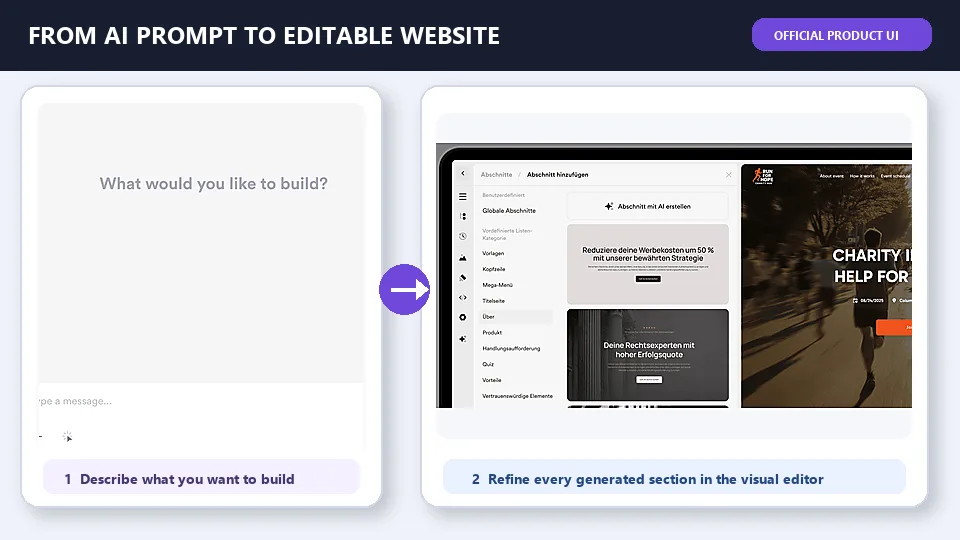
AI credits vary by plan, so high-volume users should review the current allowance and the price of additional credits before making AI generation central to their workflow.
2. Section-Based No-Code Editor
The visual editor is the foundation of the platform. Pages are assembled from sections that can be added, reordered, duplicated, and adapted. This structure is less intimidating than a completely free-form design canvas and can help inexperienced users keep spacing and alignment under control.
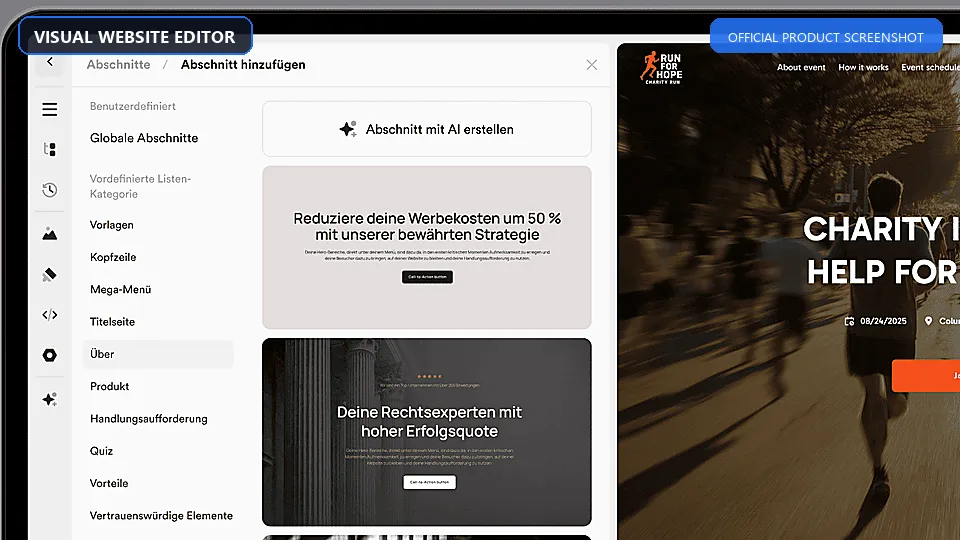
Templates and section blueprints reduce repetitive work, while global settings make it easier to apply consistent typography and colors. Users who need additional control can work with custom HTML, CSS, scripts, and more advanced editing options, although some advanced capabilities depend on the selected plan.
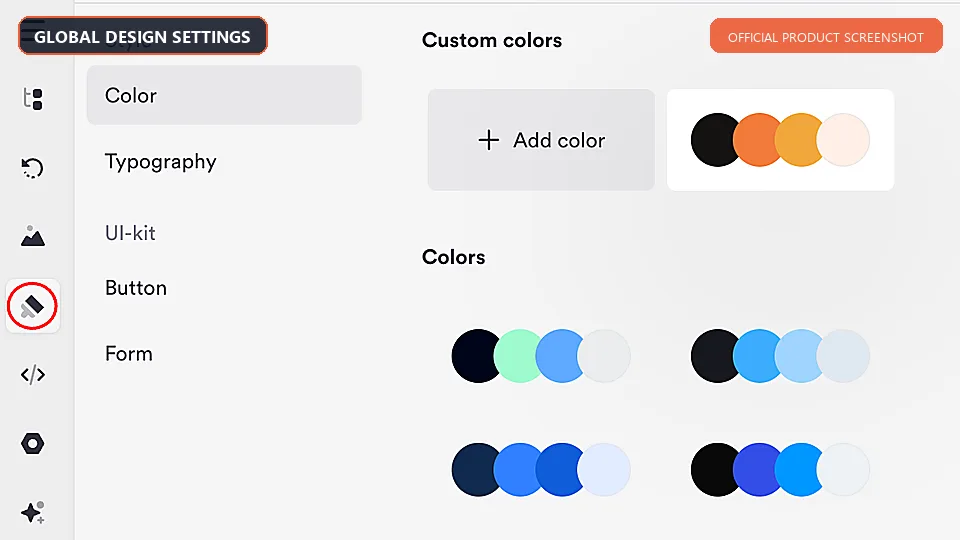
The tradeoff is familiar to most section-based builders: speed and consistency come at the cost of unrestricted layout freedom. Designers who want precise control over every breakpoint, interaction, and component relationship may find a tool such as Webflow or a coded framework more suitable.
3. Website and Landing Page Templates
Onepage provides templates and reusable blueprints for common business pages and campaign goals. These can help users avoid the “blank canvas” problem and establish a sensible hierarchy for headlines, benefits, proof, and calls to action.
A template is only a starting point. Businesses should replace generic claims, stock imagery, and placeholder testimonials with specific information. They should also verify mobile spacing, form labels, contrast, and button text before publishing. The strongest result will usually come from using a template for structure rather than treating it as a finished brand identity.
4. Forms, Quizzes, and Multi-Step Funnels
This is one of Onepage’s most compelling areas. Users can create conventional contact forms or divide a longer process into a sequence of manageable questions. A multi-step format is useful for quotations, applications, appointment qualification, lead magnets, surveys, and service recommendations.
Conditional logic allows the next step or outcome to change according to an earlier answer. That makes the tool more flexible than a simple form embedded at the bottom of a landing page. Onepage AI can also assist in generating a form or funnel from a prompt, after which the questions and logic can be refined manually.
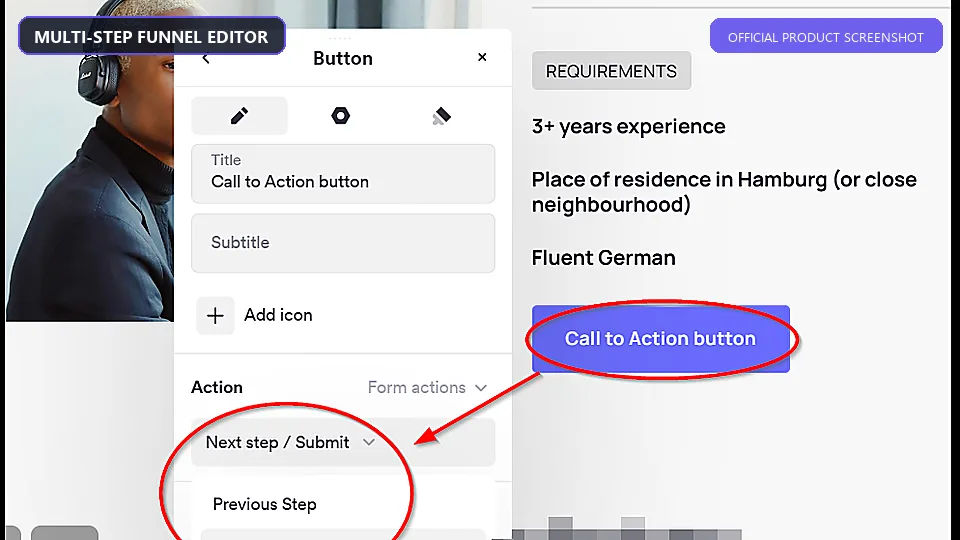
Forms can feed the built-in CRM, and funnel analytics can help teams identify where visitors abandon a process. However, Forms & Funnels is presented as a distinct product or add-on in parts of the Onepage offering. Buyers should confirm which funnel capabilities, submission limits, and analytics features are included in the exact subscription they select.
5. Built-In CRM and Lead Management
Onepage includes an internal CRM for collecting and organizing leads generated through its forms. Keeping page creation and lead capture in the same system can simplify setup for a small business that does not need a complex sales platform.
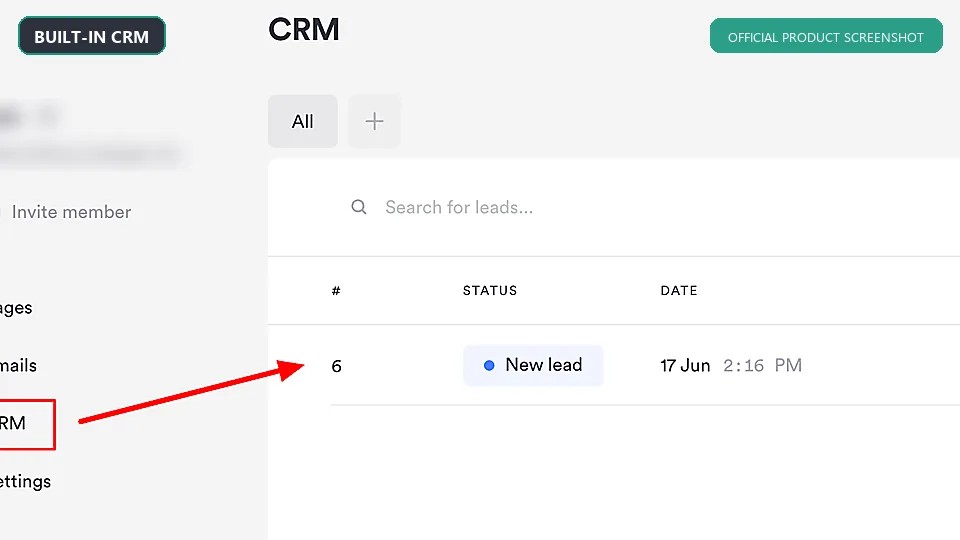
The CRM is best understood as a practical lead inbox and workflow component, not necessarily a replacement for a deeply customized enterprise CRM. Teams already using HubSpot or another sales platform can connect lead data through available integrations and webhooks. Onepage’s HubSpot documentation notes that direct field mapping has limits, so businesses with many custom properties should test the transfer carefully.
6. Integrations and Automation
The platform supports connections with services such as Zapier, Make, HubSpot, Telegram, KlickTipp, and Quentn, along with webhooks for custom data transfer. These options make it possible to trigger email sequences, notify sales staff, create records in another system, or route leads into an existing automation stack.
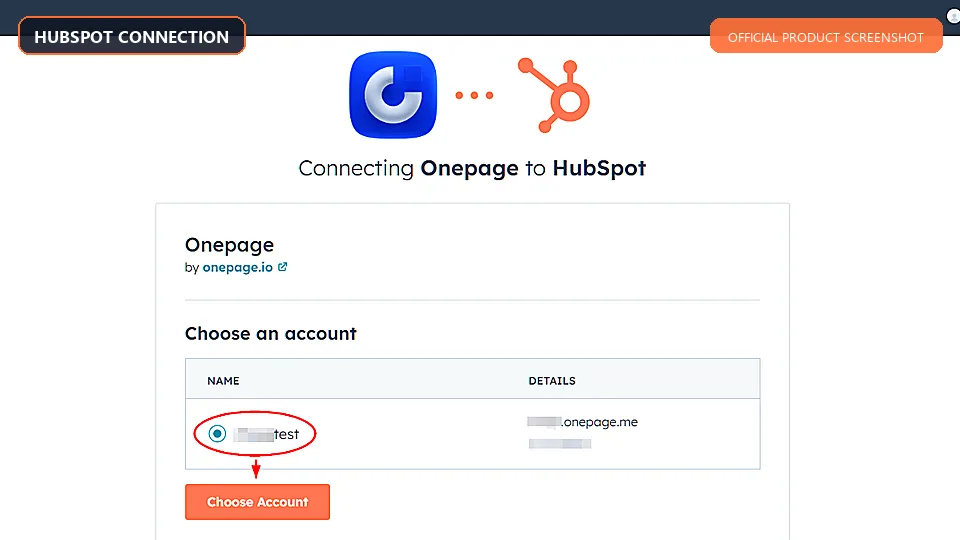
Webhooks are particularly useful when a direct integration is unavailable, but they require more technical configuration and monitoring. Before launch, test both successful and failed submissions, confirm field mapping, and ensure consent data is carried into the destination system where required.
7. SEO, Analytics, and Redirects
Onepage includes fundamental website controls such as custom domains, SSL, page-level SEO settings, tracking options, and redirects. URL and UTM parameters can support campaign attribution, while higher-level marketing features include options such as Conversion API support.
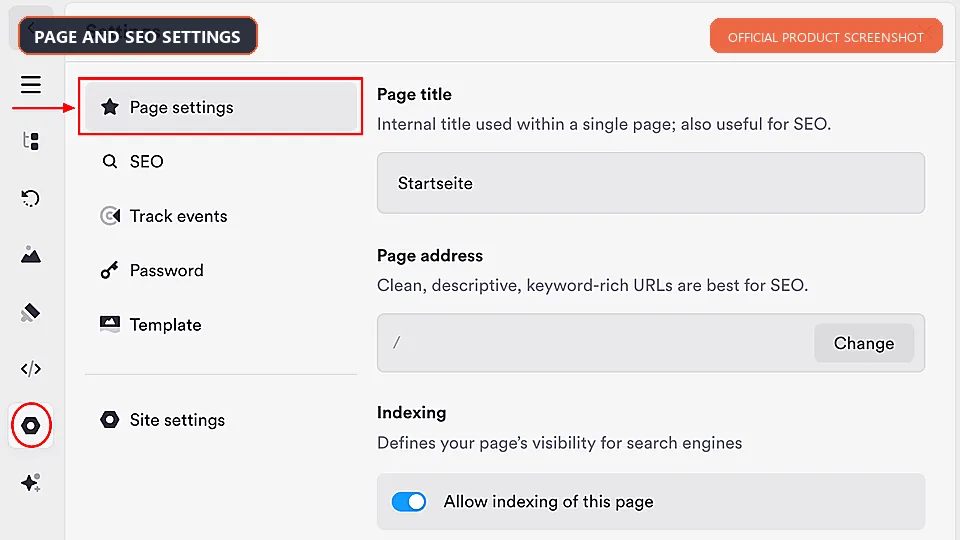
These tools are sufficient for a typical service website or paid campaign landing page, but tools alone do not create search visibility. Users still need a clear site structure, original content, descriptive titles, useful headings, image optimization, internal links, and technically sound mobile pages. Organizations planning a large publishing operation should compare Onepage’s content-management workflow with WordPress or another editorially focused CMS.
8. Privacy and Security Features
Onepage emphasizes European data protection, encrypted access, EU data storage, and consent-oriented features such as a cookie banner. This positioning will appeal to European businesses that want GDPR considerations built into their website workflow.
No website builder can make a business automatically compliant. The site owner remains responsible for selecting the correct consent categories, documenting third-party processors, configuring analytics and marketing scripts, writing an appropriate privacy policy, and handling data requests. Legal requirements also vary by country and business model.
9. Team and Agency Features
Higher plans increase the number of websites, pages, versions, redirects, subdomains, and collaborators. This tiered structure can work well for agencies that begin with a small client portfolio and expand over time. Version history and shared access are useful when several people review or maintain a project.
Agencies should calculate costs based on their real project count rather than the advertised entry price. A low-cost plan may be sufficient for one compact site but unsuitable for multiple client properties. It is also sensible to confirm ownership, billing, handoff, and export procedures before using any hosted builder as the long-term home for client work.
10. Native CMS and Blog
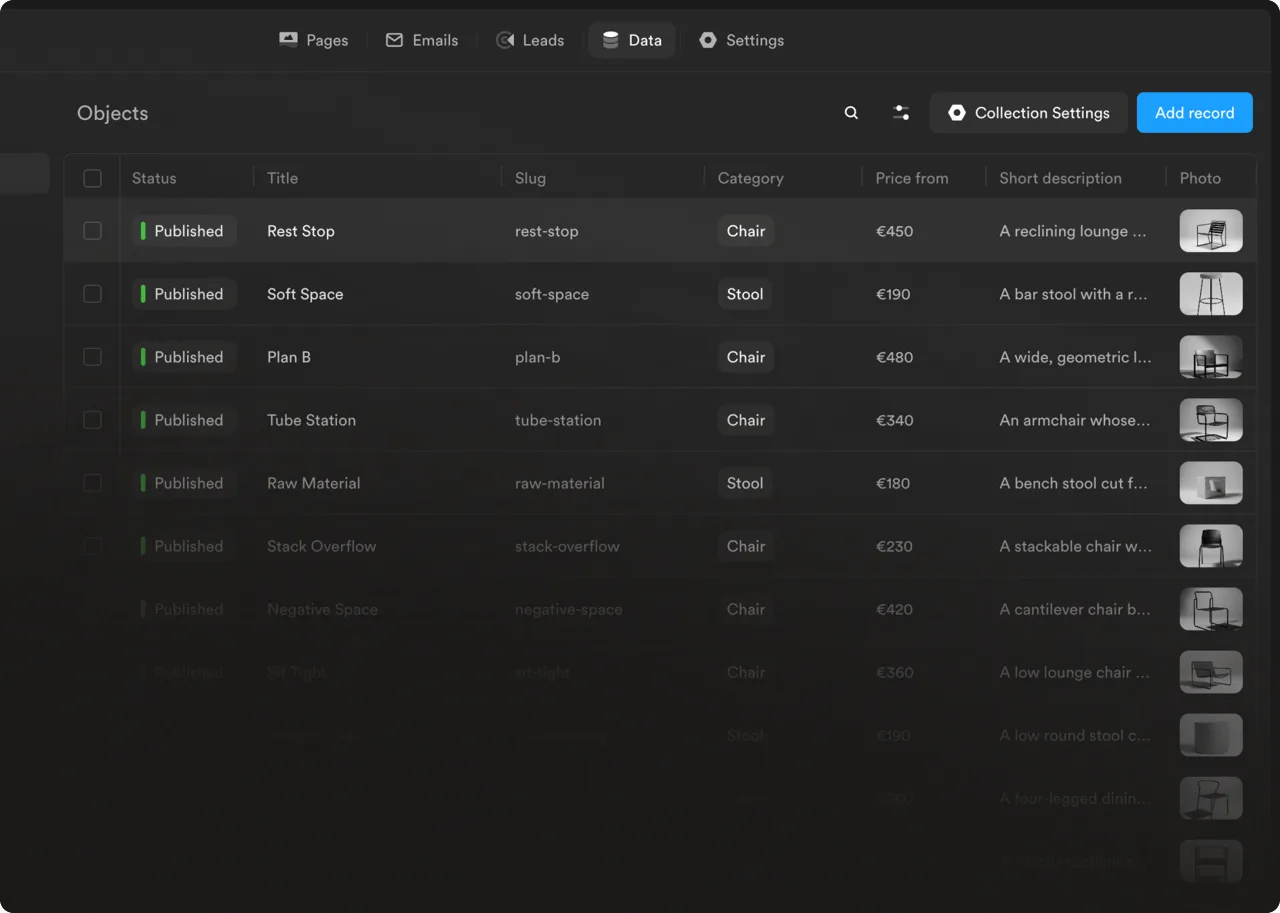
Onepage now includes a native CMS and blog. CMS collections can be used for structured content such as posts, catalogues, team pages or other repeatable content types, so routine publishing can stay in the same environment as the website.
11. Onepage Agent

The new Onepage Agent is designed to handle work across an account from a single chat: it can work with pages, CMS content, forms, settings and other platform features. For business-critical work, review the planned changes and the resulting site before publishing.
What the Onepage Workflow Is Like
Starting a Project
A new project can begin from a template, reusable section, or AI-generated draft. This makes the platform accessible to two kinds of users: those who prefer choosing a proven layout and those who prefer describing the desired result in a prompt.
The most efficient approach is to prepare the offer before opening the builder. Define the target customer, primary action, supporting proof, required form fields, and brand assets. AI can help arrange and phrase the material, but it cannot compensate for an unclear offer.
Editing the Page
Sections can be rearranged and customized inside the visual editor. Global settings provide a consistent base, while individual blocks can be adapted for specific content. The responsive structure is designed to reduce manual layout work, although mobile views should still be reviewed carefully.
For a lead-generation page, a sensible order is usually: problem or desired outcome, clear value proposition, benefits, process, proof, frequently asked questions, and a focused call to action. Onepage supplies the building blocks, but the relevance and credibility of those blocks determine whether the page converts.
Adding a Funnel and Lead Routing
Users can add a form or multi-step funnel, choose the necessary questions, apply logic, and decide where submissions should go. The internal CRM may be enough for a simple workflow. More mature sales teams can connect the form to a CRM or automation service and send notifications to the appropriate person.
This stage deserves careful testing. Check required fields, validation messages, conditional branches, confirmation pages, mobile keyboards, consent checkboxes, and integrations. A visually attractive page is not useful if leads disappear because one field is mapped incorrectly.
Publishing and Updating
Onepage separates editing from publishing. Changes do not automatically become public; users publish a new project or use the Update action to send later changes live. This provides useful control for teams that want to prepare edits before release, but it also means users must remember the final update step.
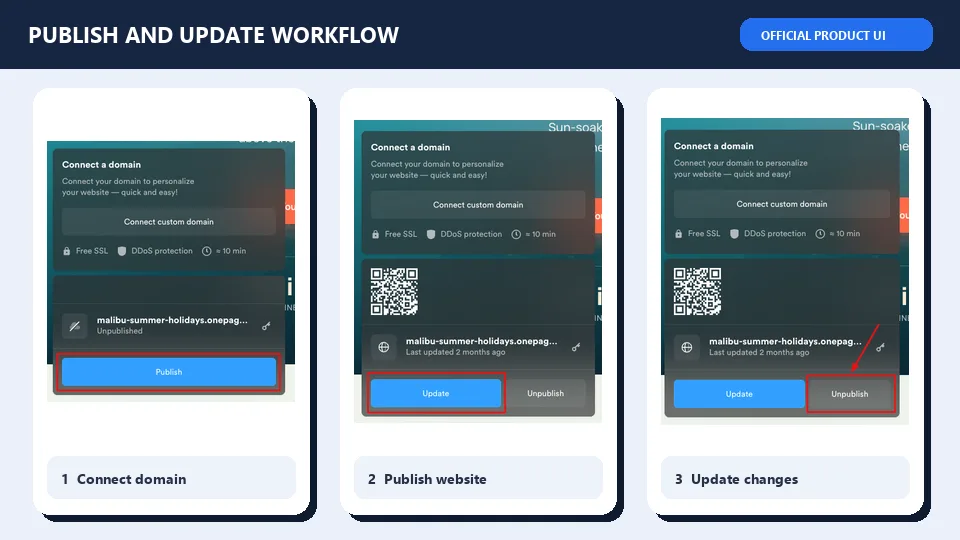
Before launch, connect the intended domain, confirm SSL, add SEO metadata and social sharing information, verify analytics consent, and test the final public URL on several screen sizes. Keep a pre-launch copy of important text and assets outside the platform as part of normal content governance.
How Good Is Onepage AI?
Based on its documented capabilities, Onepage AI is more ambitious than a simple headline writer. The ability to generate editable layouts, interactive sections, calculators, and conditional funnels can remove meaningful production work. “Vibe Coding” is especially useful for a marketer who can describe a desired interaction but cannot write JavaScript or build the logic manually.
Its greatest strength is that AI generation is connected to the normal editor. Users can modify the result rather than rebuilding it elsewhere. This makes it suitable for rapid prototyping, campaign variations, and small custom elements that would otherwise require a developer.
Its limits are equally important. AI output should be treated as a draft. It may produce generic copy, unnecessary sections, inconsistent brand language, weak accessibility labels, or logic that does not cover every edge case. Claims, legal wording, prices, contact details, and integrations require human review. Complex custom applications still need professional design and development.
In short, Onepage AI appears most valuable when it accelerates a clear brief. It is less likely to create a strong business strategy from an empty prompt.
SEO and Website Performance
Onepage provides the essentials needed to prepare a small site for search engines, including custom domains, SSL, SEO settings, and redirects. The section-based editor can also help users produce a logical heading and content structure if they configure it carefully.
Performance should be evaluated on a published page rather than inferred from a feature list. Large hero images, multiple tracking scripts, embedded services, custom fonts, animations, and third-party widgets can slow down a page on any platform. Before committing, publish a representative page and test it with tools such as PageSpeed Insights and Chrome Lighthouse on both mobile and desktop.
For a small service site, local campaign, or focused landing page, the available SEO controls are likely to cover the main requirements. For a multilingual publication with hundreds of articles, sophisticated schema needs, complex taxonomies, or a large internal-linking strategy, a dedicated CMS may offer a more mature workflow.
Onepage Pricing and Plans
At the time of review, Onepage lists five main website plans. The company also advertises a discount for annual billing. Prices and limits can change, and taxes may depend on location, so confirm the checkout total before subscribing.
| Plan | Listed Monthly Price | Suitable For | Selected Limits |
|---|---|---|---|
| Free | $0/month | Learning the editor and testing a small concept | 1 website and 5 pages |
| Essential | $19.90/month | A compact professional website | 1 website and 100 pages |
| Standard | $39.90/month | A growing business site or a small multi-project setup | 2 websites and 200 pages |
| Advanced | $69.90/month | Agencies and teams managing several sites | 5 websites and 500 pages |
| Expert | $179.90/month | Higher-volume professional use | 20 websites and unlimited pages |
Billing note: Onepage also offers 12- and 24-month terms. On a 24-month term, plans start at $9.90/month, billed upfront. Check the official pricing page for the current full allowance and tax treatment.
The free plan is useful because it is presented as an ongoing free option rather than a short trial. Its page and project limits make it better for evaluation than for a complete business presence. Essential may work for a tightly scoped site, while Standard is a more practical starting point for businesses that expect the content to grow.
Advanced is aimed more clearly at agencies and teams. Expert represents a substantial price increase and only makes sense when its higher allowances replace other tools or support revenue-generating client work.
Plan selection requires more than comparing website counts. Review page limits, version history, redirects, subdomains, editor seats, AI credits, advanced editing, integration needs, and any Forms & Funnels subscription or add-on. The right comparison is the total cost of the workflow, not just the headline website-builder price.
Onepage Pros and Cons
Pros
- Focused no-code workflow: The section-based editor should be approachable for marketers and small-business owners.
- Useful AI integration: AI-generated sections and interactive elements remain editable in the visual builder.
- Strong lead-generation tools: Forms, multi-step funnels, logic, analytics, and CRM features fit conversion-focused projects.
- Templates and reusable sections: These can speed up campaign and client production.
- Built-in CRM: Small teams can collect leads without immediately adding a separate sales system.
- Flexible connections: Direct integrations, automation platforms, and webhooks support more advanced workflows.
- European privacy positioning: EU hosting and consent features are relevant to GDPR-conscious businesses.
- Free entry point: Users can examine the core environment before paying.
Cons
- AI-credit planning matters: The higher page allowances reduce pressure for content-heavy sites, but agent and Vibe Coding usage should still be budgeted for larger workloads.
- Costs rise for agencies: The higher tiers are a meaningful recurring expense.
- Pricing can require careful reading: Websites, AI usage, and Forms & Funnels may involve separate allowances or add-ons.
- CMS workflow still needs a project check: Onepage now has native CMS collections and a blog, while unusually complex editorial requirements should still be tested against your workflow.
- No full native ecommerce engine: Selling products generally relies on integrations such as Shopify buttons or external payment tools.
- Less granular than advanced design platforms: Designers who need complete breakpoint and interaction control may feel constrained.
- AI still needs supervision: Generated copy, logic, accessibility, and legal content require human checks.
Independent user reviews broadly reinforce the usability story: reviewers frequently praise the approachable editor, professional-looking results, and customer support. The same feedback also contains recurring concerns about price, plan limits, and missing or limited features. As with any review platform, these reports should be treated as useful signals rather than a guarantee that every customer will have the same experience.
Who Should Use Onepage?
Onepage Is a Good Fit For
- Freelancers and consultants who need a polished service site and qualification form without coding.
- Local businesses that want appointment, quotation, or inquiry funnels connected to a simple lead workflow.
- Marketing teams creating campaign landing pages, lead magnets, quizzes, or paid-ad destinations.
- Small agencies that value templates, reusable sections, collaboration, and multiple client projects.
- Creators and coaches building focused offers, application funnels, webinar registrations, or link pages.
- European organizations that prefer an EU-oriented platform with privacy and consent tools.
Onepage May Not Be Ideal For
- Large publishers managing hundreds or thousands of articles, authors, categories, and editorial states.
- Complex online stores requiring native inventory, product variants, fulfillment, tax, and order-management functions.
- Developers building web applications with extensive backend logic or a custom deployment architecture.
- Design teams seeking unrestricted visual control over every component, breakpoint, and animation.
- Organizations requiring a specific self-hosted stack or full control over server infrastructure.
Best Onepage Alternatives
| Alternative | Choose It When… | Main Tradeoff Compared with Onepage |
|---|---|---|
| Wix | You want a broad all-purpose website ecosystem with many business apps. | The interface and feature set can feel heavier for a focused funnel project. |
| Framer | You prioritize modern visual design, responsive layouts, and rapid marketing-site creation. | Lead funnels and CRM workflows may require more external services. |
| Webflow | You need granular design control and a flexible visual development system. | It has a steeper learning curve for non-designers. |
| WordPress | You need content publishing, extensibility, and control over hosting and plugins. | Maintenance, security, compatibility, and funnel setup can require more work. |
| ClickFunnels | Your main priority is an extensive sales-funnel and offer-delivery ecosystem. | It may be excessive for a straightforward business website. |
| Systeme.io | You want funnels combined with email marketing, courses, and online-business tools. | Visual website design may feel less refined or flexible. |
The best alternative depends on the center of gravity of the project. Choose Onepage when the website and lead funnel should feel like one workflow. Choose WordPress for publishing depth, Webflow or Framer for design-led sites, an ecommerce platform for a serious store, or a dedicated funnel suite when the entire business runs through complex sales sequences.
Is Onepage Worth It? Final Verdict
Onepage is a convincing option for businesses that want more than a basic website builder but do not want to assemble a technical WordPress stack. Its clearest advantage is the combination of visual page creation, editable AI output, multi-step funnels, lead capture, and CRM functionality. That combination can simplify campaign production and reduce the number of disconnected services a small team needs to manage.
It is not the universal answer to website creation. Content-heavy publications, advanced ecommerce businesses, and teams that require unrestricted design or infrastructure control should look elsewhere. Pricing also needs careful evaluation because page limits, project counts, collaborators, AI credits, and funnel features can materially change the total cost.
For a freelancer, service business, local company, or small agency focused on generating leads, Onepage deserves a place on the shortlist. The free plan offers a sensible way to inspect the editor. Before upgrading, create a representative page, test the complete form-to-CRM workflow, review the mobile result, measure the published page, and confirm that the selected plan covers the next 12 months of expected growth.
Frequently Asked Questions
Is Onepage free?
Yes. Onepage offers a free plan that can be used to explore the platform and build a limited project. It includes fewer websites, pages, versions, redirects, and other resources than the paid plans, so it is best suited to evaluation or a very small project.
Is Onepage only for one-page websites?
No. The platform supports multi-page websites, although the number of pages depends on the plan. It also supports landing pages, link pages, forms, quizzes, and multi-step funnels.
Can Onepage create a website with AI?
Yes. Onepage AI can generate website and landing-page content as well as editable sections and interactive elements from natural-language instructions. The result should still be reviewed and adapted for the brand, audience, facts, accessibility, and legal requirements.
What is Onepage Vibe Coding?
Vibe Coding is Onepage’s prompt-based method for creating or changing page elements and functions. It can be used for sections, calculators, animations, forms, and funnel logic without manually writing all the code. Generated elements remain available for visual editing.
Does Onepage include a CRM?
Yes. Leads collected through Onepage forms can be managed in its internal CRM. Businesses that need a more advanced sales system can send data to supported services or use automation tools and webhooks.
Can I build multi-step forms and funnels?
Yes. Onepage supports multi-step forms, quizzes, conditional logic, funnel analytics, templates, and AI-assisted creation. Because Forms & Funnels may have its own subscription conditions or add-on structure, verify what is included in your chosen plan.
Is Onepage good for SEO?
It includes the basic controls needed for a small business website, such as SEO settings, custom domains, SSL, tracking, and redirects. Good rankings still depend on content quality, site structure, backlinks, user experience, and technical performance. A large content operation may benefit from a more specialized CMS.
Can I connect my own domain?
Paid plans support custom-domain use. Before publishing, configure the domain records, confirm SSL, choose the preferred domain version, and test redirects from any older URLs.
Can I use Onepage for ecommerce?
It can support product sales through integrations, including Shopify Buy Buttons and external payment tools. It is not primarily a native ecommerce platform, so stores with extensive catalogs, inventory rules, fulfillment processes, and order-management needs should compare dedicated ecommerce systems.
Is Onepage GDPR compliant?
Onepage provides EU-oriented infrastructure and consent features that can support a GDPR-conscious setup. Compliance also depends on how the site owner configures tracking, forms, cookies, processors, retention, privacy notices, and user requests. The platform alone cannot guarantee legal compliance.
Does Onepage work for agencies?
Yes, especially for agencies building lead-generation sites and landing pages. Higher plans offer more sites, pages, versions, subdomains, and team access. Agencies should compare the expected number of client projects and collaborators with the plan limits before subscribing.
What is the best alternative to Onepage?
It depends on the project. WordPress is stronger for content-heavy sites, Webflow and Framer suit design-led teams, Wix offers a broad small-business ecosystem, and dedicated funnel platforms may be better for complex sales automation. Onepage is most competitive when pages, forms, funnels, and lead management need to work together with minimal setup.
Pricing and product details were checked in September 2026. Software features and subscription terms may change; verify current limits on the official website before purchasing.
Latest Reviews
Top 6 Vendors for Zero-Day Protection in End-of-Life Open Source

GPU Unlock Review: NVIDIA Tensor Gains, Tools and Real Limits

5 Best AI Wallpaper Generators in 2026
Best 5 AI Meme Generators in 2026
Canva Craft Review: 2K Images, Wide Formats, Text and Editing Limits
HunyuanVideo 1.5 Review: Quality, VRAM, ComfyUI, Pricing and Limits