FLUX 3 Review: Image, Klein, Local Hardware and Real Editing Limits
FLUX 3 Image and Klein reviewed: image quality, editing, ComfyUI fixes, VRAM, API prices, LoRA, licensing and the limits behind the launch claims.


Updated October 22, 2026
FLUX 3 becomes most interesting when you need to change an existing image repeatedly, rather than simply generate another attractive picture. The Image models combine generation, reference-guided editing and box-based composition; the new Klein release makes those workflows available on local hardware. For product variants, campaign concepts and private image pipelines, that is a useful combination.
Our recommendation is to start with Klein Distilled for inexpensive experiments and ordinary editing, and choose Base when you need adaptation or LoRA training. Use the full hosted Image model as a separate quality candidate. The main caution is that the downloadable checkpoint, the prompt expansion stage and the hosted pixel-restoration service are different parts of the system: sharing a family name does not make their results or hardware requirements interchangeable.
Which FLUX 3 are you actually using?
Black Forest Labs introduced the FLUX 3 family in July; the October 15 Klein release is the important new development for local image users. Full FLUX 3 Image is available through the hosted service. Klein has downloadable Base and Distilled weights; neither makes the full Image model a public consumer checkpoint. FLUX 3 Video/Max concern video and audio, while Action concerns robot control. An 8GB Klein setup does not run the family’s video models. FLUX 3
Klein has a 5.6-billion-parameter image generator, with a separate Qwen3-VL text encoder and FLUX.2 VAE. The prompt upsampler, or PUP, is another model based on Qwen3.5 9B. Counting only the generator substantially understates the complete pipeline. Both Klein versions support text-to-image, editing, up to ten reference images and output up to 4K. Hugging Face
The current documented starting settings are Distilled: 16 steps, CFG 1; Base: 50 steps, CFG 3.5. The reference repository also shows a Base guidance setting of 4, so follow the defaults of the particular supported workflow rather than mixing settings across implementations. Distilled is the daily-production starting point; Base gives you the undistilled training target. Klein Docs
| Model | Steps / CFG | Use |
|---|---|---|
| Klein Distilled | 16 / 1 | Generation / editing |
| Klein Base | 50 / 3.5 | LoRA / research |
| FLUX 3 Image | API | Hosted quality candidate |
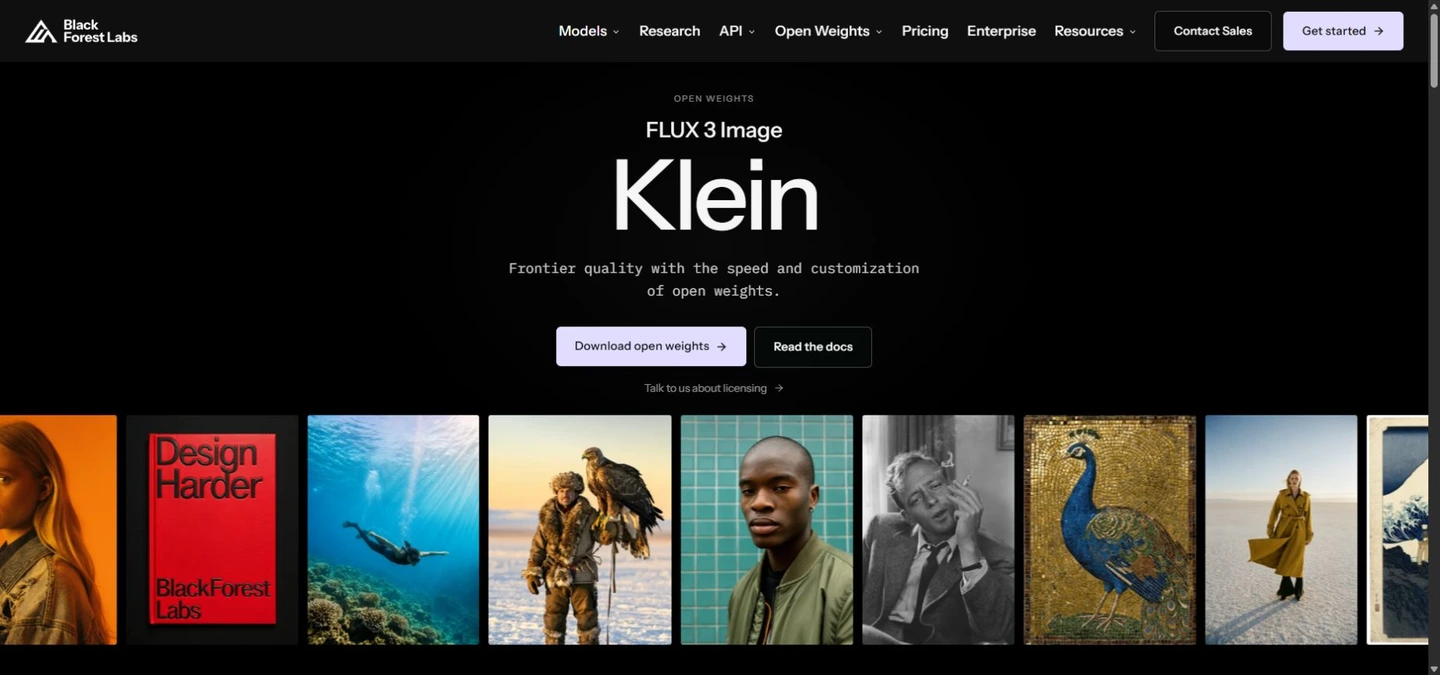
Image quality: useful detail, imperfect anatomy
The official examples show photography, illustration, typography and varied materials. They support a narrower conclusion than “best image model”: Klein can produce a broad range of polished outputs. They do not reveal the failed seeds, average success rate or time spent selecting examples. Attractive skin and fabric at thumbnail size should not substitute for checking hands, eyes, reflections, small props and clothing seams at full resolution. BFL GitHub
BFL’s internal preference charts favor Klein over the models included in those comparisons, including Qwen-Image 2.1 and Krea 2. These are vendor evaluations, and they do not establish superiority over every newer model or every task. In particular, do not turn a Krea 2 comparison into a Krea 3 result. BFL (2026-10-15)
Community reactions remain mixed even after workflow corrections. Anatomy, awkward poses and inconsistent small details recur in discussions. For marketing imagery, inspect contact points and product geometry before approving an asset. For comics or anime, test recurring characters, a full-body action pose and a repeated outfit; general illustration support does not establish specialist character knowledge or reliable artist-tag behavior.
Editing and references are the stronger reason to try it
A useful first job is a product shot: preserve the object and camera angle, change the surface material, then replace the background. Feed references with distinct roles—product identity, background and style—and state which details must stay. Ten supported inputs are a ceiling, not a recommendation to upload ten unrelated images. More references add memory and can introduce contradictory visual instructions.
A community twelve-task comparison found good basic edits and competitive identity preservation, with weaker pose changes, fine anatomy and some texture/style transfers. Its author selected the best of eight seeds and used Base plus a step-distillation LoRA, 20 steps, CFG 1 and INT8 at around 1.5MP. That is useful workflow evidence, not a standardized benchmark or the stock sixteen-step checkpoint’s score. Reddit: 12 tasks
The full Image API also offers web grounding, enabled by default in its documented workflow and switchable with grounding:false. This can help with current visual references, but it is hosted retrieval, not internet access built into local Klein weights. Verify logos, product details and factual diagram labels yourself. Image Docs
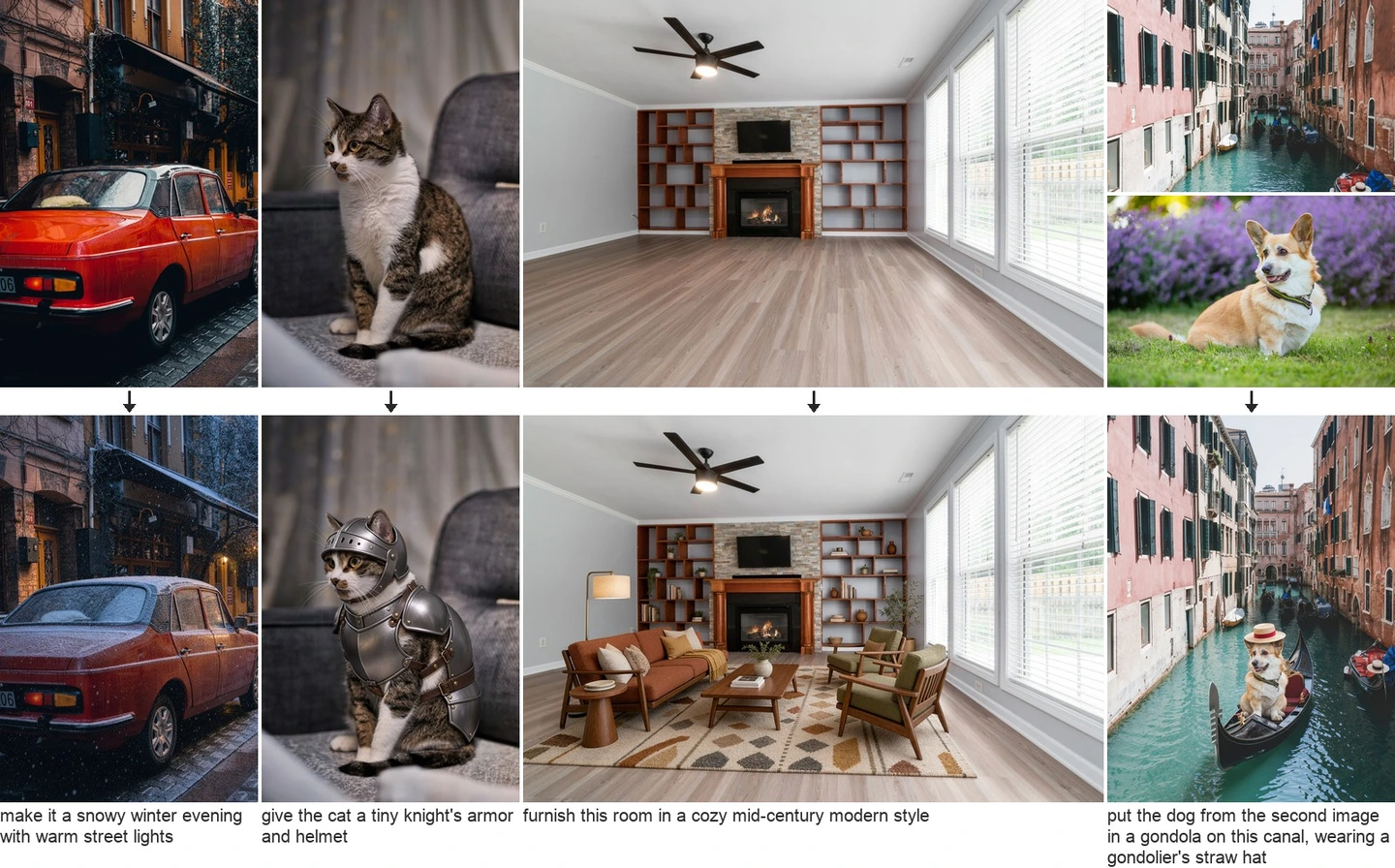
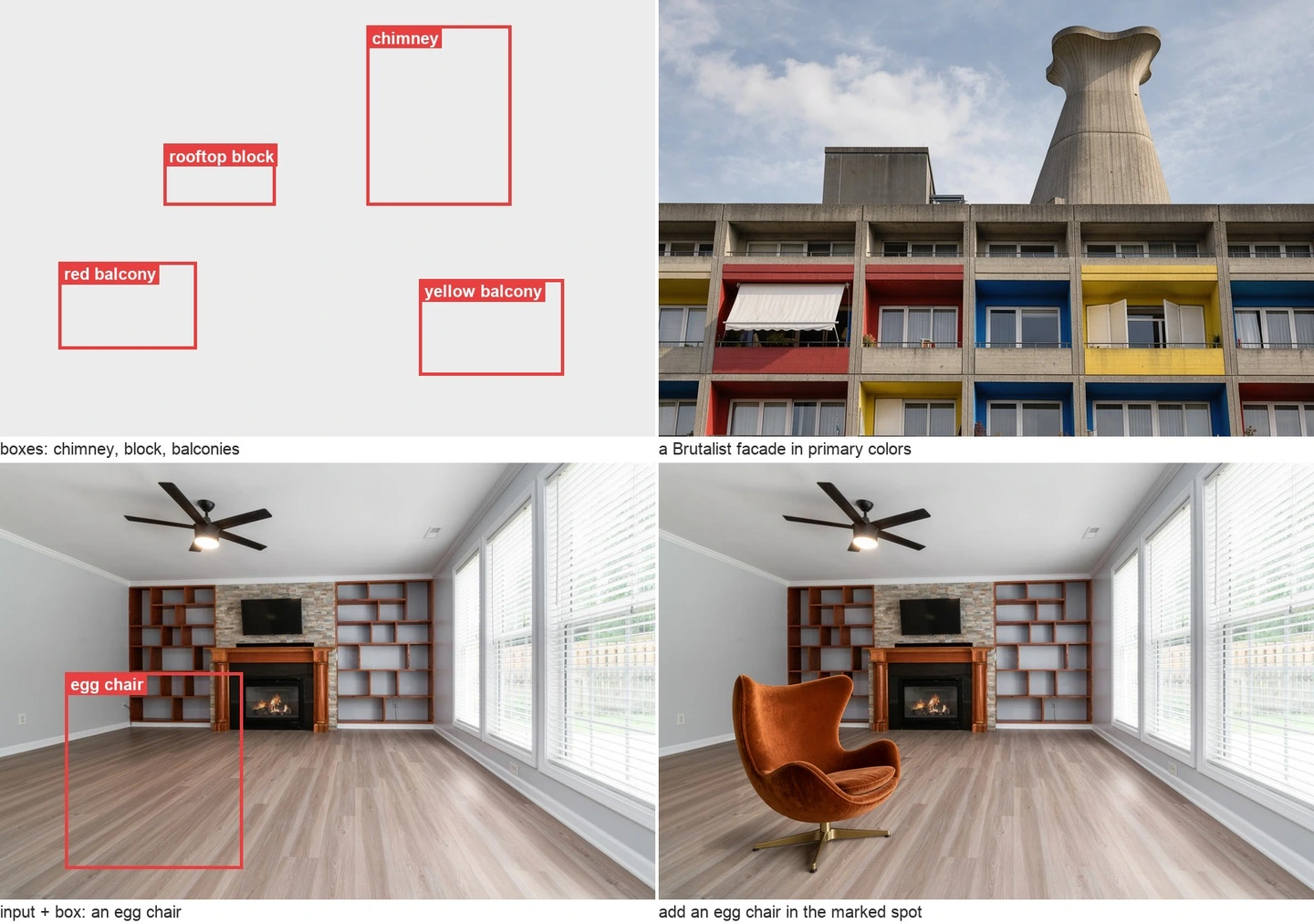
Bounding boxes: precise guidance is not a hard mask
For the hosted Image workflow, boxes are expressed in prompt JSON using [top, left, bottom, right], integers from 0 to 1000 with the origin at the top left. Identify each object and describe its appearance. A left-side subject and a right-side headline are easier to specify this way than through a long chain of relative-position phrases. Bounding Boxes
The hosted editing pipeline includes pixel restoration to preserve unedited areas. A box supplied to a local checkpoint is spatial guidance; it does not by itself guarantee that pixels outside the box stay identical. If a legal label, UI screenshot or exact product edge must remain unchanged, compare against the original or composite the accepted edit with a mask.
Diffusers uses a different representation for its boxes argument: normalized 0–1 floating-point coordinates in [ymin, xmin, ymax, xmax] order. Do not paste the API’s 0–1000 values directly into that argument. Also inspect the expanded caption: the language model can unintentionally add an object, rewrite text or change a material. Diffusers
PUP, language and the ComfyUI launch fix
PUP means prompt upsampling: it expands an instruction into a detailed scene caption. It does not upscale image pixels. Klein was trained around these captions, so a bare keyword list is a poor default. Describe framing, subject, material, lighting, background and what must remain unchanged. Keep exact visible text in quotation marks and separate the slogan from the visual description. Klein Docs
The Comfy team acknowledged suboptimal launch templates and shipped corrections in ComfyUI v0.41.3: restore PUP, use 50 Base steps and 16 Distilled steps, and add expansion to editing/box examples. Update the application and open a fresh template from the library; reopening an old saved JSON retains its old graph. This corrects the setup, not every anatomy failure. ComfyUI v0.41.3
PUP behavior is version-dependent. BFL’s example documentation describes running it separately in Diffusers, while the current Diffusers main documentation includes it in the modular pipeline. Pin the actual version and confirm the executed graph and returned caption. For English or localized text, test the exact wording before a batch; multilingual input support is not a guarantee that a long sentence, an accent or a Japanese glyph will be rendered accurately. Diffusers
VRAM, downloads and speed: read the conditions
The advertised 8GB entry point uses quantization and a memory-managed workflow; it is not an 8GB full-BF16 pipeline guarantee. Generator weights alone are about 11.2GB in BF16 or 5.6GB in FP8. The reference implementation reports much higher full-pipeline peaks on a B200 without PUP—roughly 31GB BF16, 26GB FP8 and 25GB NVFP4—and its full-precision PUP stage adds substantial memory. These are implementation measurements, not universal minimums. BFL GitHub
A practical ComfyUI download set is the 5.8GB INT8 generator, 4.9GB INT8 text encoder, 6.7GB W4A8 PUP and 0.3GB VAE: approximately 17.7GB of files, before software and caches. Download size is not simultaneous VRAM use. Use the official file names and template notes; NVFP4 targets Blackwell hardware and is not a generic four-bit option for every GPU. ComfyUI weights
NVIDIA’s published Distilled benchmark is about four seconds on RTX 5090 and 8.9 seconds on RTX 4070 at 1024×1024, sixteen steps, for GPU generation. It excludes prompt expansion and service overhead. BFL separately reports 1MP API medians of 4.54 seconds for generation and 7.18 seconds for editing, with different timing boundaries from competitors. Neither number predicts an offloaded 8GB run or a 4K multi-reference edit. BFL (2026-10-15)
Begin with one 1K image and one reference. Measure the full request, including cold loading, PUP, offload, save time and retries. Increase resolution only after the scene is acceptable; an impressive best-case GPU time is less useful than minutes per accepted deliverable.
API cost and the price of an accepted image
Klein API generation and editing have the same published per-output prices: 768×768 $0.008; 1K $0.009; 1.5K $0.011; 2K $0.014; 4K $0.036. Prices are USD, not a localized currency offer, and can change. A thousand 1K outputs therefore cost $9 before applicable taxes or other services; a thousand 4K outputs cost $36. These are Klein prices, not the full Image model’s tariff. API Pricing
If you generate four candidates per approved 1K asset, the image-generation component becomes $0.036 per accepted asset; at 4K it is $0.144. Human correction, storage and upstream processing can matter more than the nominal unit price. For full Image, consult the live calculator and the submitted job’s cost rather than applying Klein’s rate. Local weights remove per-image API billing, not GPU, electricity, maintenance or license obligations.
| Resolution | USD / output | USD / 1,000 |
|---|---|---|
| 768 × 768 | 0.008 | 8 |
| 1K | 0.009 | 9 |
| 1.5K | 0.011 | 11 |
| 2K | 0.014 | 14 |
| 4K | 0.036 | 36 |
LoRA, commercial rights, safety and privacy
Use Klein Base for training. Official support includes Diffusers, Ostris AI Toolkit and NVIDIA NeMo recipes. BFL documents using a Base-trained LoRA with Distilled because their architecture matches; retain sixteen inference steps and tune adapter strength, around 0.75 as a starting experiment. This does not establish compatibility with old FLUX.1/FLUX.2 LoRAs. Evaluate an unseen product angle or pose, not only training-like images. LoRA Docs
The weights use the FLUX Kommunity License. The qualifying-user threshold is gross annualized revenue below US$5 million, including affiliates; it is not profit, funding or one project’s budget. Larger commercial self-hosting deployments need another arrangement. The license treats outputs separately from model derivatives, but redistribution, serving, fine-tuning and synthetic-data training still require reading the actual clauses. Apache-2.0 inference code does not turn the weights into Apache-licensed weights. FLUX Kommunity License
Do not buy Klein expecting an unrestricted NSFW model. BFL describes training safeguards and the service has an acceptable-use policy, including prohibitions on sexual content involving minors and nonconsensual intimate imagery. The evidence here does not justify either a universal adult-content success claim or a blanket statement that every adult request is forbidden. Provider rules and technical refusals differ. Local operation helps confidentiality only when references, PUP and every other stage also stay local; check hosted retention and contractual terms for client images. BFL Usage Policy
The commercial exception specifically covers generating and using outputs for qualifying users; it is not unrestricted permission to sell or sublicense the model. Section 2.e also requires content filtering or review before distribution and AI disclosure where applicable law requires it. Hugging Face downloads are gated: an account and acceptance of the repository conditions are needed. Read those conditions before downloading. FLUX Kommunity License ComfyUI weights
Where it fits beside Krea, Qwen and MOSS
For a low-cost local editing pipeline, shortlist Klein Distilled and compare acceptance rate against your existing workflow. For a brand-specific model, shortlist Base. For a managed image service, compare full Image on your actual brief instead of assuming that a larger family member always fixes a Klein failure.
For broader context, see our localized reviews of Krea 3, Qwen-Image 2.1 and MOSS-Image. Compare the same product reference, a difficult human pose, exact local-language text and a second edit of the first result. Keep resolution, number of seeds and selection rules visible. A model that wins on a beautiful portrait can lose on a package label or a tiny hand.
Our practical verdict: FLUX 3’s appeal is the combination of editing, layout guidance and an adaptable local model. Klein is worth evaluating after correcting the workflow; it is not a reason to discard a reliable specialist model. Approve it for the jobs it repeatedly completes, with the actual pipeline and license you intend to deploy.
Frequently asked questions
Is FLUX 3 free and open source?
Klein weights are downloadable under Kommunity terms, with conditional commercial eligibility. Hosted inference is paid. The full Image service and the family’s other models have separate availability; “FLUX 3 is open source” is too broad.
Can an 8GB graphics card run Klein?
BFL supports an INT8 memory-managed path. Expect offloading and different latency from a high-end benchmark. Start at 1K and include the text encoder, PUP, RAM and storage when planning the setup.
Should I choose Base or Distilled?
Distilled is the starting point for fast generation/editing at sixteen steps and CFG 1. Base is the training/research option, commonly fifty steps and CFG 3.5 in current templates. Do not run Distilled at fifty steps just because a Base fix mentions fifty.
Why is my output worse than the launch examples?
Check checkpoint identity, template version, PUP execution and its caption, then the sampler settings and reference clarity. Official galleries are selected examples; persistent anatomical errors can remain after the setup is corrected.
Does a bounding box protect everything outside it?
Not by itself in a local checkpoint. The hosted service’s restoration stage is a separate feature. For exact preservation, perform a pixel comparison or use a mask/composite workflow.
Is Klein good for text and international campaigns?
It can generate typography, but proofread every character, diacritic and line break. For legal copy or repeated multilingual variants, keep text as a separately editable design layer rather than relying on raster generation.
Evidence and source notes
This is an evidence-based review of the release and published workflows, not an AirMore hands-on benchmark. Official samples shown are developer-selected outputs; the cover is an editorial illustration. Timing figures retain their original conditions, and forum reports are individual experiences. No universal score is assigned.
Primary references: BFL (2026-10-15) · Hugging Face · BFL GitHub · Klein Docs · Bounding Boxes · ComfyUI weights · FLUX Kommunity License. Community: ComfyUI v0.41.3 · Reddit: 12 tasks. Independent coverage: VentureBeat. Current documentation may change after the review date.
Related Reviews
GLM-5.3-Flash Review: Ox-Alpha, API Access, Benchmarks, and NSFW Limits

Nanosaur 2 Review: What a 670M Anime Image Model Can (and Can’t) Do

ERNIE-Image Review: Open-Source Image AI, LoRA, Local Setup and NSFW Policy
Pony XL Review: Prompts, LoRA, VRAM, Furry Strengths and NSFW Use
Hy4 Preview Review: Tencent Hunyuan 770B MoE, 1M Context, API, Local Hardware, and NSFW Limits
Best Local Anime AI Image Models Compared: LoRA, VRAM and NSFW Use