WorkBuddy Review: Desktop Automation, Pricing, Setup and NSFW Limits
Tencent WorkBuddy explained: current versions, international vs China pricing, file workflows, Computer Use, custom models, user reports, privacy and NSFW limits.

A folder of source documents is a better starting point for WorkBuddy than an open-ended chat. Give Tencent’s desktop agent a bounded job, a place to save the result and rules about what it may change, and it can work toward actual files. That is its attraction for research, spreadsheets and routine administration. The trade-off is that you must judge both the deliverable and the actions used to create it; a completed task indicator alone is not enough.
What WorkBuddy is, and which version this review covers
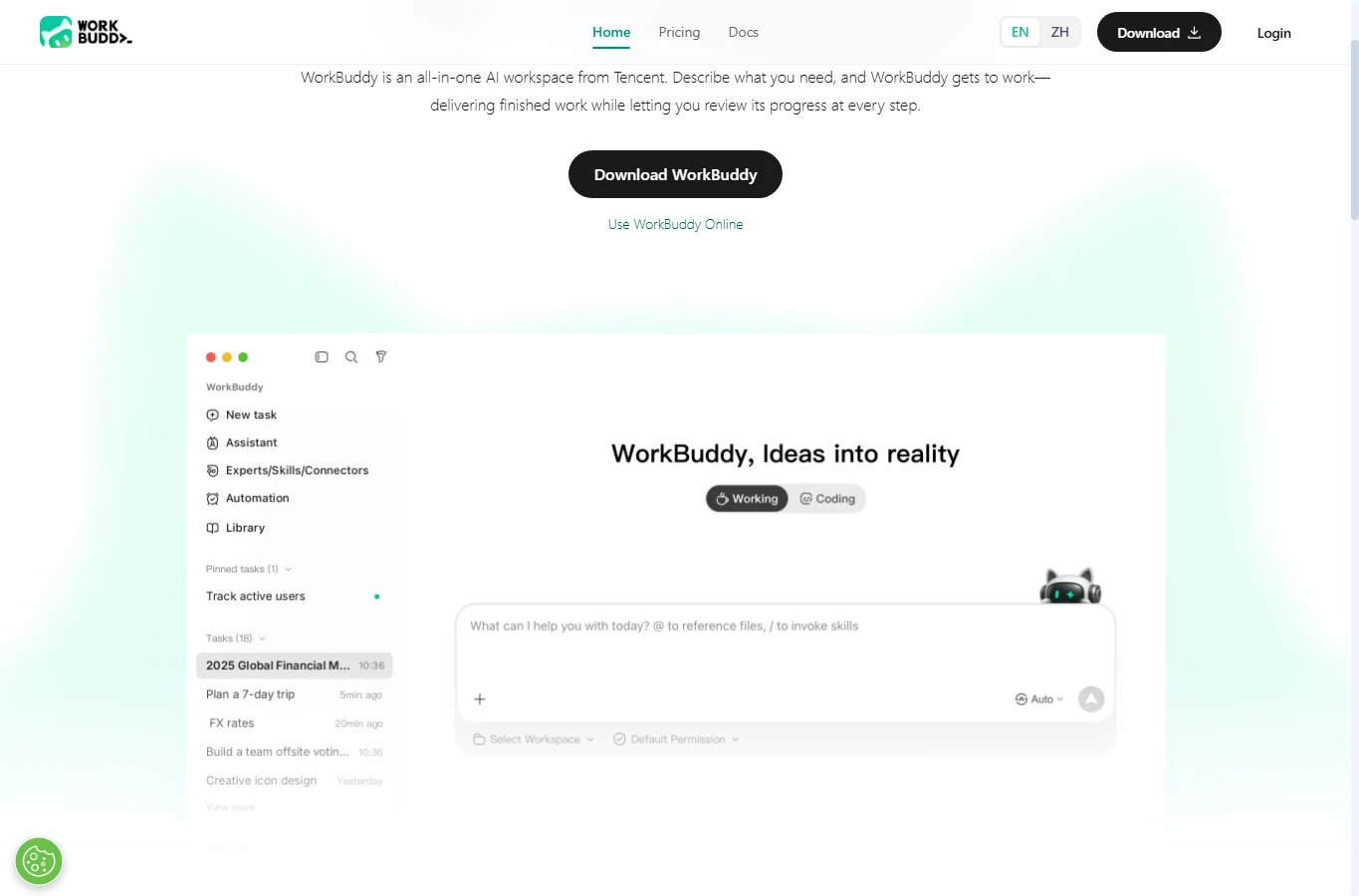
This is Tencent WorkBuddy, the AI workspace at workbuddy.ai, not an unrelated field-service product with the same name. It combines models with file operations, tools, Skills and connectors. It is not one downloadable model with a single parameter count or VRAM requirement. Hosted AI calls require internet access; selecting a local model is a separate configuration, not proof that the entire application works offline.
Checked November 25, 2026: the international public changelog lists 5.11.4, mainly fixes to task grouping, local history, cloud/local schedule lists and project tools. It gives no release date for that entry. The China changelog separately lists 5.11.3 dated November 15. Do not treat their version numbers, rollout timing or subscriptions as interchangeable. Update from Profile → Check for Updates and check the build actually installed.
Recent international changes also include Library, an integrated browser, Office editing and more UI languages. Japanese, French and European Spanish are documented in 5.9.4; Traditional Chinese and Brazilian Portuguese in 5.5.0. This documents interface support, not equal output quality in every language. A German interface was not verified. Older quick-start screenshots showing separate Office/Development/Design entrances can differ from the newer unified task layout.
Useful workflows and the limits of generated files
The practical advantage over a plain chatbot is a workspace where the agent can read permitted source files, plan a sequence, run tools and create artifacts. Useful first jobs include consolidating meeting notes, extracting a CSV summary, drafting a report, generating a presentation outline and renaming copied files from an approved mapping. Give it a small folder rather than unrestricted access to your home directory.
Files still need inspection. A .docx or .pptx extension does not guarantee preserved layout, sound arguments or correct charts. Check the exported file in a compatible editor, especially numbers, units, formulas, citations, slide overflow and font substitution. Scanned PDFs may need OCR; recognition mistakes become analysis mistakes. Ask for source pages and flag unreadable content instead of allowing invented values.
Library, project context and reusable Skills can reduce repetition. Connectors can retrieve cloud information and sometimes write or send it. Their presence in a catalog is not a blanket grant of access. Multi-tasking may improve throughput for independent jobs, but also shares CPU, memory, network and credit budgets; begin with one task and increase concurrency only after measuring your own workload.
Pricing: international plans, China plans and credits
The international documentation lists Free at 100 credits/month and Pro at US$10/month, or US$96/year billed annually. Eligible new users can see a US$7 first-month offer; renewal is not US$7. Pro currently lists 1,000 base plus 1,000 bonus credits/month. Daily activity rewards of 30/50 credits and temporarily raised task limits are promotional, not permanent allowances. Base/bonus quotas do not roll over, and subscribing does not add the Free quota on top.
International Team is US$40/seat/month with 1,000 credits per seat pooled for the team. A Pro top-up is US$15 for 500 credits with one-month validity. These published USD amounts are references, not guaranteed local tax-inclusive checkout prices. Model availability, resource queues and promotions can change. A credit is not one prompt or one completed file: model choice, context and tool work affect consumption.
China pricing is a different system: its page lists free access with 500 monthly base credits, and Standard/Advanced/Ultra at CNY99/199/999 monthly list price. It also displays discounted recurring subscriptions and promotional credit totals. Do not apply these CNY tiers or the China CodeBuddy shared pool to an international checkout without confirming its terms.
Check Usage before and after a small pilot. If your own representative job uses 40 credits, a 2,000-credit allowance would cover about 50 comparable runs before other consumption; that is arithmetic, not a measured WorkBuddy result. Failed or repeated attempts may consume budget too. Set a retry limit in the instruction and stop a loop rather than repeatedly sending the same large context.
Install it and finish a first task
The official desktop guides specify Windows 10 or later, or macOS 12 or later. Choose the offered installer for your system/architecture. The Windows guide labels its download x64 with ARM64 compatibility; do not infer that every optional tool is native on ARM. No fixed dedicated-GPU requirement is established for ordinary hosted-model use.
On Windows, run the downloaded installer and complete its setup. On Mac, open the .dmg and drag WorkBuddy into Applications. Launch it, choose Log In and finish the browser login using a method actually offered for that edition. Return to the client; do not mix international and mainland account/payment instructions. The desktop language selector is under Profile → Language.
The following first run uses copies of non-sensitive files and produces new outputs. The prompts are proposed templates, not results generated in this review. Keep the first job small enough that you can check every important result.
- Create a test workspace with an input folder holding copies of two or three small documents and a separate output folder. Keep originals elsewhere.
- Open New Task, select that workspace, keep Default Permissions and choose Auto or an eligible low-cost model. Attach/reference the files explicitly.
- Describe the deliverable, permitted inputs, output language and filename, plus forbidden operations. Ask for a short plan and unreadable/missing-data warnings first.
- Review requests for commands, network access or extra files. Allow only what this job needs; set a maximum number of retries and stop if it loops.
- Open the artifacts/results panel and the actual saved output. Compare figures with sources, confirm originals were unchanged, record credit consumption and save the accepted version.
First-task prompt templates
Read only the files in input. Create output/summary.md in English with five findings and a source filename/page for each important number. Mark missing or unreadable data. Do not overwrite, rename, delete, upload or send any source file. Show a plan first and ask before any external action.
Using input/sales.csv, create output/sales-clean.csv and output/checks.md. Keep currency and units unchanged. List duplicate and missing rows without silently filling values. Report the row count before/after and explain each transformation. Stop after two failed attempts instead of retrying indefinitely.
Models, Skills and connectors without guesswork
Start with Auto or a built-in model available to your account. Pick image understanding for screenshots and tool calling for operations; a model that answers text is not necessarily a reliable agent. Image input and image generation are different capabilities. Neither a screenshot of a model menu nor a model’s self-description establishes a fixed context limit or a permanent list of included providers.
For your own service, open Avatar → System Settings → Models → Add, choose the matching provider/preset, enter its exact model ID, compatible endpoint and API key, then Test Connection. Save it and explicitly select it in the conversation. Current custom integration expects OpenAI-compatible Chat Completions; an endpoint that only implements another API is not automatically compatible. A successful connection test still needs a small tool-calling trial. Provider charges and API permissions are separate from a WorkBuddy subscription.
Ollama is an optional local-inference route: install it separately, download an appropriate model and keep its local service running, then choose the Ollama preset and test. Its preset does not require an API key. Hardware needs depend on that model and quantization; no universal low-VRAM promise follows. Local inference does not automatically stop connectors, searches or other cloud features from communicating.
Use / for available Skills and @ for file references where supported. Install only the Skill/tool needed for the task, inspect its permissions and grant a connector the smallest useful scope. Custom Skills and MCP servers can execute code or send information; they are not just harmless prompt templates. Keep a sending or publishing action separate from drafting and review its destination.
Computer Use, remote control and scheduled work
Computer Use lets an agent interpret a desktop interface and click, type or scroll when no connector/API is available. November 20 reporting describes a Windows/macOS public beta requiring 5.11.0 or later and system authorization. The international changelog already mentions Computer Use in older releases, so this is not proof that the capability first existed everywhere on November 20. Availability and exact controls depend on your build.
For a supervised trial, update the client, open Settings → Agent and locate Computer Use if offered. Enable only the required capability. On macOS, follow prompts for Accessibility and Screen Recording in Privacy & Security; on Windows follow the application’s prompts. Use a test application with harmless data, ask it to read one visible value and return it without submitting anything, and watch the progress window. Avoid manipulating the same target window while it works; stop if the target, record or action differs from the instruction.
A phone-to-PC remote connection is different: you supervise or take control from another device, while the desktop remains the executor. Assistant integrations through messaging platforms are another way to dispatch a task, not a guarantee that a local job survives shutdown. TechNode’s October remote-control report is feature coverage, not a desktop task-accuracy benchmark.
For recurring work, open Automation, name the task, specify the source folder, instruction, output path and schedule, then run once manually before enabling recurrence. Confirm the displayed time zone and inspect run history, output and credit use. Local automation requires the computer awake, the client running and network available when needed. A cloud task is a separate execution context; do not assume it can access local paths or that a missed trigger means a completed report. Pause recurring tasks before changing source files or credentials.
What outside reports and users actually show
A November 22 Enzo Journal walkthrough describes successful WeChat desktop tasks, but also slower visual operation and occasional misclicks with many windows. It is one person’s demonstration, not a completion-rate study, and its claim of account-ban immunity is not a guarantee we adopt. Platform rules and approval before messaging still matter.
A recent V2EX post by wisefree describes an international Pro model task waiting/retrying while credits were consumed. The Tencent support account requested the task time, model and logs for investigation. That establishes a specific complaint, not a proven service-wide failure rate or automatic refund. A September LINUX DO thread also mixes native-client resource complaints with a third-party gateway problem later identified by one participant; those are different causes and older versions.
IT Home’s November 9 report on Tencent’s apology over a changed DeepSeek discount reinforces why trial promotions should not anchor a long-term budget. Vendor demos, sponsored walkthroughs and user posts are useful leads, but a reproducible independent 5.11.4 success-rate/latency benchmark was not established. This is documentary analysis with AI-assisted drafting/localization, not a hands-on paid-account test.
Permissions, backups and data privacy
Leave Default Permissions on for the first project. The permission control beneath the input box and Security Center govern access; Full Access weakens or bypasses sandbox/confirmation restrictions and is not an NSFW switch. The documented China Security Center allows separate read/write/delete rules by path, command and domain rules, tool controls and backup settings. Labels and availability can differ by edition. A written “do not delete” instruction complements, rather than replaces, those controls.
Automatic backups are not a complete recovery plan. The documentation says existing files are snapshotted before modification, with shared storage limited to 3,000MB and old snapshots removed as space fills. Deletion protection can use the recycle bin but has exceptions such as oversized files or special deletion commands. Keep your own untouched source copy; if a result is wrong, stop further writes, inspect changes and restore into a separate folder before resuming.
A local workspace is not the same as local-only processing. The international personal privacy policy says inputs can be processed by third-party models, data is stored on servers in Singapore and support access may involve other jurisdictions including China. It states training is off by default; if previously enabled, disable Experience Optimization Program under System Settings for subsequent inputs/outputs. This is not zero retention. An own-model API exception does not override that provider’s terms. Enterprise contracts are separate.
NSFW support and who should use WorkBuddy
WorkBuddy’s international Acceptable Use Policy expressly prohibits pornographic/sexually explicit generation and erotic interactions. A paid tier, a different hosted model, a Skill or Full Access does not remove that rule. The product is not an unrestricted roleplay or adult-image generator. We did not perform NSFW probes or measure multilingual refusal rates; a local-model connection does not establish an official uncensored mode.
Work-related discussion of sensitive material and explicit erotic generation are different use cases, but no blanket acceptance guarantee was verified. Do not upload intimate or identifiable material just to test a filter. File permissions protect data and system access; they do not tell you what sexual content a model or service allows.
Choose WorkBuddy for repeatable, inspectable file-and-tool work if you can define the inputs, output and stopping point. Start with one report or copied spreadsheet, measure credits plus correction time and only then add a connector, desktop control or recurrence. If you primarily want a conversational companion, guaranteed offline processing or unattended high-stakes actions, its desktop-agent design is a poor match.
Related Reviews
Build a Cloud GPU AI Workstation: Images, Video, LLMs & NSFW Limits (2026)

YuE2-3B Review: Local AI Music, Suno Comparison & ComfyUI
Best 5 Fitness and Workout Apps in 2026
Best 5 SEO Tools in 2026: Detailed Features, Use Cases, Pros and Cons

Best 4 AI Influencer Generators in 2026

8 Best AI Presentation Makers in 2026