YuE2-3B Review: Local AI Music, Suno Comparison & ComfyUI
YuE2-3B reviewed: editable scores, real user reports, GPU requirements, local setup, ComfyUI workflows, music samples and a careful Suno comparison.

YuE2-3B is most interesting when you want to change the composition, not simply reroll a finished song. It can turn lyrics and a style description into vocals and accompaniment, while exposing a melody-and-chord score you can inspect and edit. That makes it a promising local tool for non-commercial songwriting experiments, arrangement studies and music-generation research.
It is not an uncomplicated “free Suno.” The model weights have a non-commercial license, the official installation targets a 24 GB NVIDIA GPU, and community listening reports remain mixed. Its strongest benchmark result also depends on selecting among eight candidates. Start with the listening examples before buying hardware.
Updated September 16, 2026. This is a research-based review of the released model, documented workflows and attributed community tests; it is not an AirMore hands-on audio benchmark.
What YuE2-3B actually does
The official YuE2 repository describes a 3B-class music generator that combines symbolic planning with audio synthesis. In the default mode it first produces an ABC composition containing melody and chords, then generates the recording. The standard pipeline outputs 48 kHz stereo. A separate decoder is part of the installation; “3B” does not describe the entire runtime memory footprint.

| Control | What it means in practice |
|---|---|
cot="full" | Plan melody and chords. Start here for a new song or explicit harmony control. |
cot="melody" | Use melody as the anchor while allowing the accompaniment to change. Useful for covers. |
cot="off" | Generate directly from style and lyrics, without a symbolic plan. |
abc=... | Supply an existing or edited ABC score in full or melody mode. |
ABC is text notation, not a promise to understand any photograph, PDF score or arbitrary MIDI file. The generation guide documents the supported representation and intermediate outputs. The result is a stereo mix; isolated stems require a separate separation step. A rendered song can still deviate from the intended score.
Compared with the first YuE, the useful upgrade is an explicit composition layer and a staged editing pipeline. Editing an ABC plan creates a new complete recording: it does not guarantee that audio outside the requested change stays identical. This matters if you need to repair two bars without disturbing a finished vocal take.
Where to listen or generate online
| Destination | Official or community? | What you can do |
|---|---|---|
| YuE2 official demo | Official project | Listen to songs; inspect lyrics, style prompts and scores; compare cover and editing examples. It is a showcase, not a hosted generation subscription. |
| m-a-p/YuE2-3B on Hugging Face | Official weights | Download the model and read its model card. A model page is not itself an always-on inference API. |
| mrfakename/YuE2-3B Space | Community-hosted | Browser-based generation UI. Service availability and ZeroGPU quota vary; this endpoint was unavailable on September 16. Do not rely on it for a deadline. |
| audio.cpp WebUI | Community, self-hosted | Generate through a browser after installing the runtime and weights on your own machine. This still consumes your local hardware. |
For a no-install first look, use the official listening page. For interactive generation, the community Space is a useful address to keep, but it is not a guaranteed free hosted service or an official M·A·P API. Similar-looking websites using “YuE2” in their domain should not be assumed to be operated by the research team.
If a hosted interface is available, begin with a short original verse and chorus, a clear language choice and a modest style description. Save the prompt, seed and resulting score together. Avoid uploading private recordings to a public demo unless its handling of uploads is suitable for your needs.
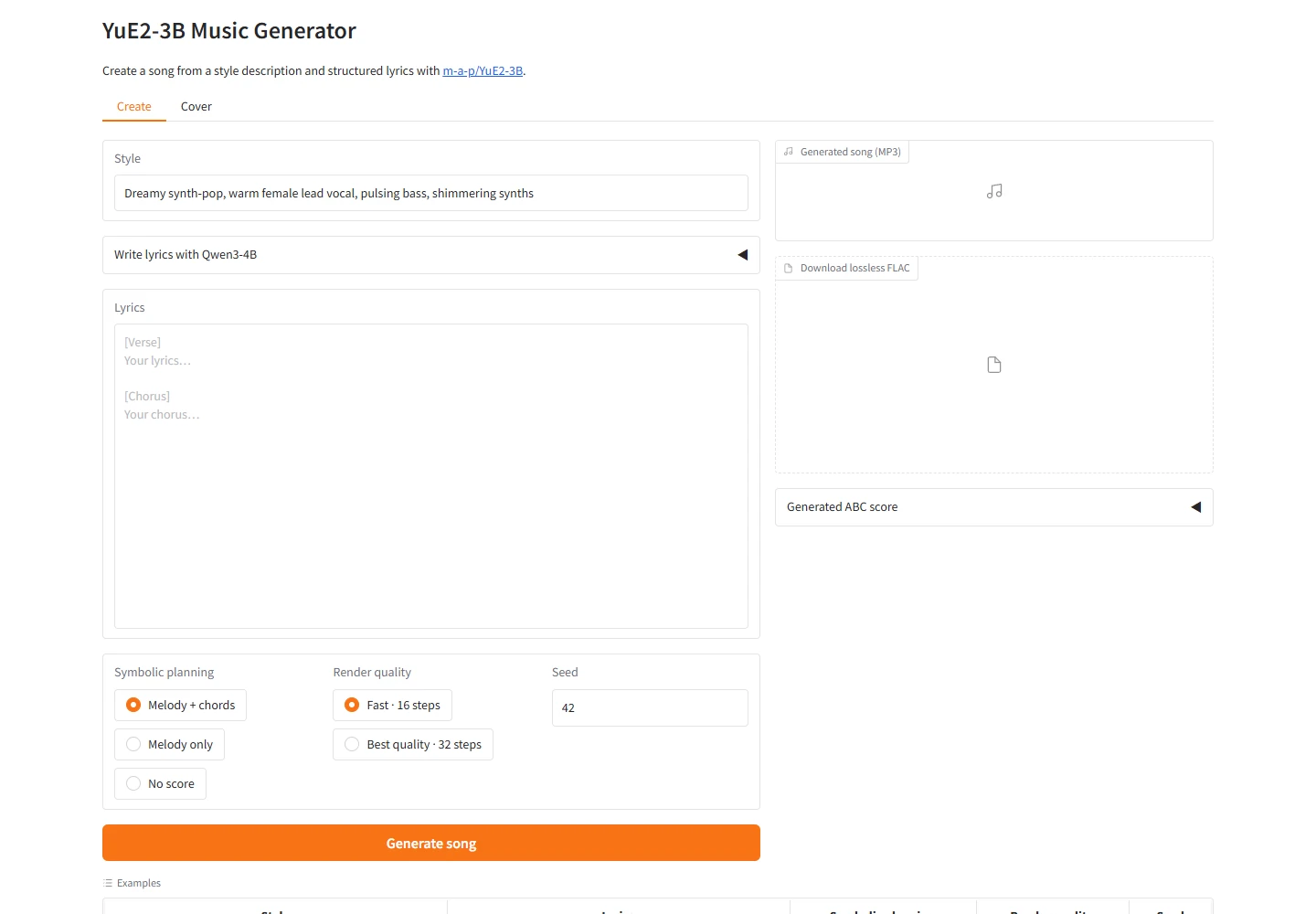
Open the levibrg community demo directly for another browser-based entry point. Its Create/Cover interface exposes style, lyrics, planning mode, render quality and seed, with MP3 and FLAC output controls. The interface was accessible on September 16; successful generation and remaining GPU quota are not guaranteed by that availability.
Does it really match Suno? Read the selection rules
The team’s WildSongBench evaluation uses 192 prompts. These are automatic evaluation results, not an independent blind listening survey. Higher SongBench Avg is better; lower phoneme error rate (PER) indicates better lyric alignment in that protocol.
| Model / setting | SongBench Avg ↑ | PER ↓ |
|---|---|---|
| YuE2, best-of-8 | 6.9632 | 9.79% |
| Suno v5 | 6.8721 | 8.10% |
| YuE2, standard / 2 candidates | 6.7316 | 8.44% |
| Suno v6 | 6.5562 | — |
| MiniMax Music 3 | 6.2830 | 6.27% |
| ACE-Step 1.5 | 6.0118 | 7.46% |
| YuE 1 | 4.9165 | 36.38% |
The standard YuE2 row already selects from two candidates. Best-of-8 selects from eight. One normal pipeline call produces one candidate; the selection stage is separate. Calling the standard row “best-of-1” is therefore incorrect. An eight-candidate result also costs more generation time than a single try, before any human listening and editing.
Both reported YuE2 settings use YuE2-Vae-legacy; the normal listening decoder is YuE2-Vae. The project says these decoders trade benchmark musicality against perceptual quality. Keep the decoder, prompt set, candidate count and sampling settings consistent before drawing conclusions from comparisons.
The table supports the narrower statement that YuE2 is competitive in this particular evaluation. It does not prove that its vocals, guitars or arrangement are better in every genre. Nor does a lower average for a newer commercial model mean it is universally worse: metrics, prompts and model-specific features can pull in different directions.
Real user reports: encouraging results, audible tradeoffs
Developer kun432’s Japanese Zenn test is useful because it includes Colab L4 setup, generation logs and playable output links. The writer reports roughly four minutes of generation and about 9 GB peak VRAM in that particular setup. The Japanese example has pronunciation or reading mistakes; the author explicitly says they have not tested Suno, so this is not a Suno head-to-head review.

asfdrwe’s Qiita notes describe running a Q4 model with audio.cpp on Fedora 44 and a Radeon RX 7800 XT, including HIP build options and a Japanese idol-pop example. This is evidence for a specific AMD community route, not blanket official ROCm support. The notes also record changing model options, which explains why early tutorials may stop working after runtime updates.
The initial StableDiffusion discussion illustrates the disagreement: GreyScope reports running the model on a 4090, while martinerous hears granular “AI sand” artifacts in the demos. Sindre_Lovvold criticizes heavy-rock/metal guitars and genre fidelity. Conversely, a later community cover discussion is enthusiastic about the model’s usefulness. These are individual experiences, with different styles, runtimes and selection habits—not a representative success-rate survey.
The practical test is your own target style. Check sustained vowels, consonants, guitar attacks, cymbal tails, section transitions and the final ending. For background music, listen for unwanted lead vocals; for songs, check every lyric. A convincing brass phrase or chorus does not establish that the entire four-minute arrangement will hold together.
Independent developer posts currently offer more concrete evidence than broad launch coverage. There is not yet a well-established mainstream-media listening consensus to turn into a universal rating. The reasonable verdict is promising local control, with quality that still needs screening song by song.
Hardware requirements, VRAM and generation speed
| Route | What is documented | How to interpret it |
|---|---|---|
| Official PyTorch / BF16 | Linux, Python 3.12, BF16-capable NVIDIA GPU with 24 GB VRAM; model card recommends 24 GB host RAM. | The supported starting point, not a claim that every request consumes all 24 GB. |
| Official RTX 4090 test | Full planning: 71.04 seconds for 214.85 seconds of audio; 11.18 GiB peak VRAM. | Warm measurements with a specified stack; initial download, setup and output saving are not the same timing budget. |
| Longer-context official test | 14.08 GiB peak VRAM reported in the model card. | Leave headroom for context, decoder and other applications. |
| Community GGUF | Q8 and Q4 packages plus a separate VAE and sidecar files. | Potentially lower VRAM; use that runtime’s instructions, not the official Python commands. |
The official resource table separates warm generation measurements from the recommended system. The main model plus default VAE is about 7.8 GB of weights, but environments, caches and generated audio need more storage. As a practical planning allowance rather than an official minimum, reserve at least 20–30 GB of free SSD space and prefer 32 GB system RAM for a new workstation.
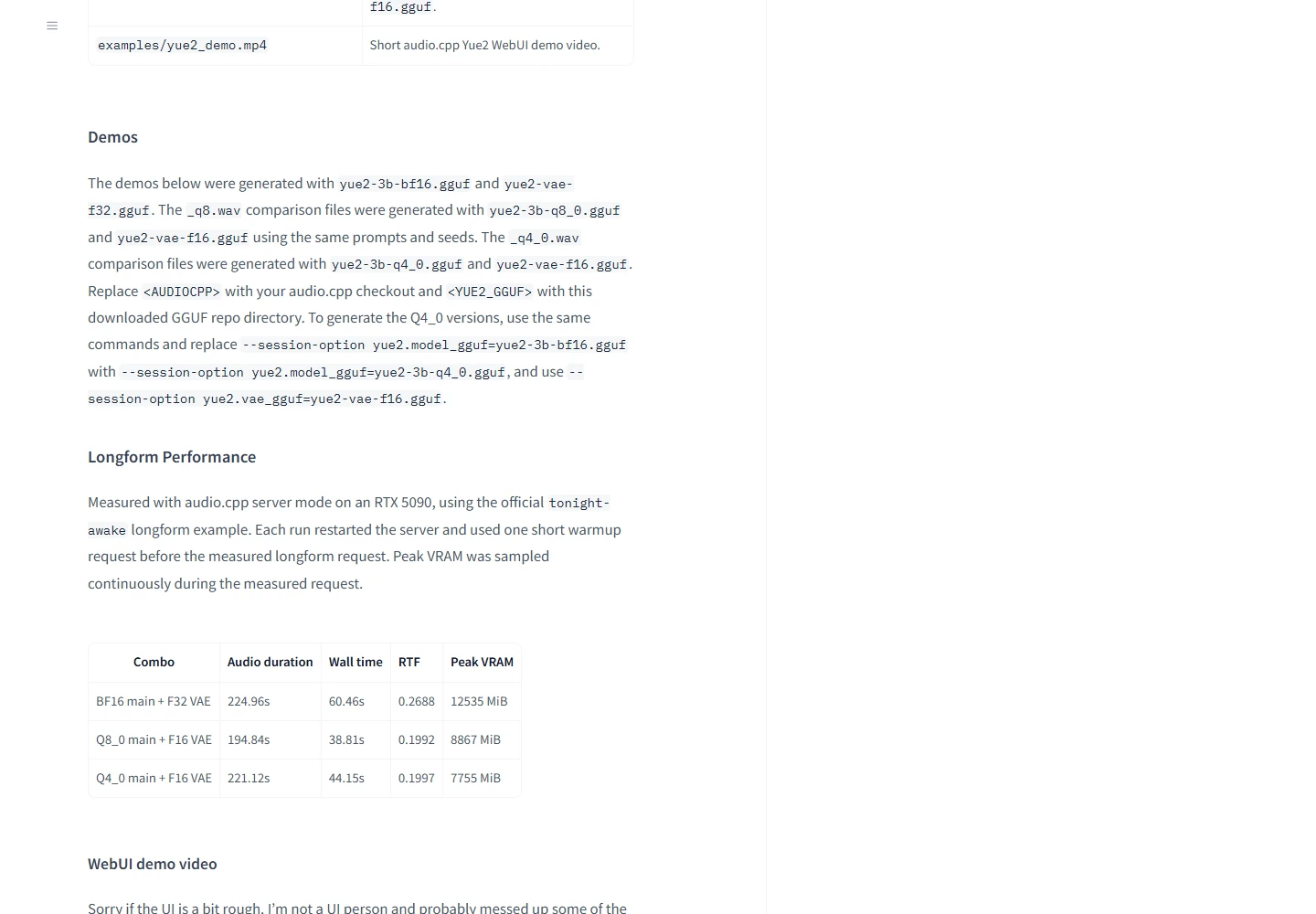
The low-VRAM figures are measurements on an RTX 5090
| audio.cpp configuration | Generated audio | Wall time | Peak VRAM |
|---|---|---|---|
| BF16 + F32 VAE | 224.96 s | 60.46 s | 12,535 MiB |
| Q8_0 + F16 VAE | 194.84 s | 38.81 s | 8,867 MiB |
| Q4_0 + F16 VAE | 221.12 s | 44.15 s | 7,755 MiB |
Source: audio.cpp maintainer’s long-form test. Each server run received a short warmup before the measured request. Output lengths differ, so these are not identical recordings. The Q4 figure is encouraging, but 7,755 MiB on a 5090 is not a guarantee that any 8 GB GPU can complete the same job. Card speed, backend support and free memory still matter.
If you already own a suitable GPU, local inference has no per-song service credit. If you need to buy one solely for occasional songs, include the computer, power, maintenance and retries in the decision. Eight candidates mean more compute even when the model download is free; a subscription can be cheaper for light use.
Local deployment: official Python and community GGUF
Official Linux / NVIDIA quick start
Use the current repository quick start in a clean Python 3.12 environment. These commands install the project and run its included example; they are documentation-based instructions, not a claim that AirMore executed model inference on every GPU.
git clone https://github.com/multimodal-art-projection/YuE.git cd YuE python3.12 -m venv .venv source .venv/bin/activate python -m pip install --upgrade pip python -m pip install . python examples/generate.py --output outputs/first-songThe first run downloads weights. Play outputs/first-song/audio.flac and retain the whole output folder. To supply your own song, save the following as my_song.py in the activated environment and run python my_song.py. The short original lyric is a starting example, not a proven optimum prompt.
from yue2 import YuE2Pipeline with YuE2Pipeline.from_pretrained("m-a-p/YuE2-3B", device="cuda") as pipe: song = pipe( style="English, warm piano pop, 96 BPM, clear lead vocal, " "soft drums, restrained verse, wider final chorus", lyrics="[Verse]\nThe station lights are fading slow\n" "I keep a little hope to go\n\n" "[Chorus]\nOne more morning, one more mile\n" "Carry me home with a quiet smile", cot="full", seed=42, ) song.save_artifacts("outputs/my-song") print(song.truncated)Check song.truncated and the saved result.json. Playable audio can still have hit a token limit. Keep the score, settings and model/VAE revisions so you can reproduce or diagnose a result. For score edits, use the official editing guide; for a recording-to-cover workflow, use SheetSage2 transcription followed by YuE2. Ordinary text-to-song generation does not need an extra MERT2 download.
GGUF and AMD: use the current audio.cpp release
audio.cpp v0.8.0, released September 15, merges YuE2 and SheetSage2 into the main branch. Earlier “dev branch only” posts are historical. Choose a release build for your operating system and backend, then download the matching GGUF package: the main Q8 or Q4 model, its VAE and required configuration/tokenizer sidecars must stay together.
The runtime provides a CLI and local WebUI. Follow its current model-loading instructions, because early examples used directory-based model options that subsequently changed. Windows CUDA packages also require the matching runtime archive. AMD users should follow the HIP/ROCm build or distribution notes; the Fedora/7800 XT report above is a useful reference, not a compatibility guarantee for another Radeon.
For a first failure, distinguish missing sidecars, unsupported GPU kernels and out-of-memory errors. Re-downloading the same weight file will not fix a Torch mismatch. Keep ComfyUI’s Python separate from the official installation, and start with a short generation before attempting a long song.
ComfyUI workflow: editable score to finished audio
FL YuE2 for ComfyUI supplies a piano-roll editor and a staged workflow. Its maintainer validates the integration on Windows, Python 3.12, Torch 2.11 and an RTX PRO 6000 Blackwell; the README explicitly says other devices and 24 GB configurations have not been validated for this integration. Do not transfer the official Python hardware recommendation into a promise for every custom node.
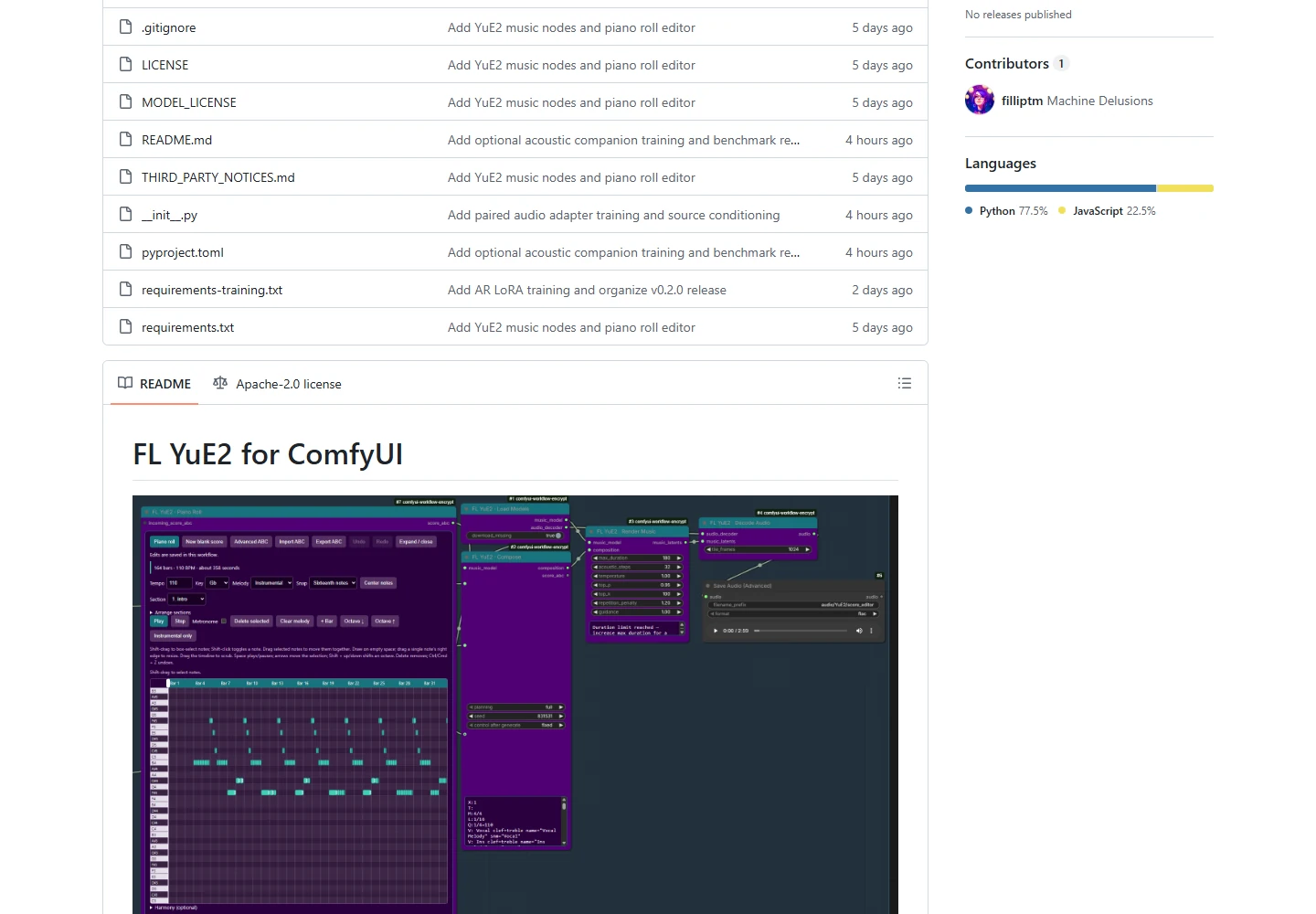
Download the maintainer’s score_editor_to_song.json workflow (raw JSON). Install the node pack through ComfyUI Manager, or run the following with the Python interpreter that runs ComfyUI, then restart it. On a portable install, replace plain python with that installation’s embedded interpreter.
cd ComfyUI/custom_nodes git clone https://github.com/filliptm/ComfyUI-FL-YuE2.git cd ComfyUI-FL-YuE2 python -m pip install -r requirements.txt- Import the JSON. Drag it onto ComfyUI. Resolve missing nodes before queueing.
- Load Models. The first queued load downloads the model and decoder to
ComfyUI/models/yue2/; the documented download is about 7.8 GB. - Choose the composition. Keep the supplied eight-bar instrumental score for a first test. To create a fresh song, disconnect that score input, add style and lyrics in Compose, and retain
fullplanning. - Render and decode. The chain is
Piano Roll → Compose → Render Music → Decode Audio → Preview/Save, with a shared loader. The supplied example has a 45-second upper limit; it does not request an exact 45-second output. - Save and revise. Files go under
output/audio/YuE2/. Edit the score or prompt and render another version. Keep the previous take for comparison.
For instrumental work, leave lyrics blank and describe the instrumentation. The maintainer documents acoustic_steps=32 for the released solver. A smaller decoder tile_frames can reduce decoder memory, but it is not a cure for every out-of-memory error. The score input is not an audio-transcription node: SheetSage2 is a separate upstream environment for this pack.
ComfyUI’s own YuE2 model packaging is another route, available at Comfy-Org/YuE2. Use the workflow and model files from one integration together; do not assume native nodes and third-party FL nodes accept interchangeable checkpoints or identical settings.
Music samples worth comparing
Listen to several full tracks rather than a single impressive hook. The links below distinguish research-team demonstrations from community-generated results. They are playback sources, not automatic permission to reuse someone else’s music.
| Sample set | Who made it | What to listen for |
|---|---|---|
| Official score-to-song examples | YuE2 team | Compare the melody/ABC view with the audio. The page includes multiple genres and languages. |
| The Last Train: 9 steps, 14 versions | YuE2 team | Follow the progression from Mandarin pop to English jazz; inspect changed lyrics, harmony and arrangement. |
| kun432: Japanese generated song | Independent developer | Japanese pronunciation and lyric reading; see the linked Zenn notes for context. |
| kun432: Japanese cover experiment | Independent developer | Compare arrangement changes against the original generation. |
| audio.cpp Demo 2: full planning | Community runtime maintainer | Compare BF16, Q8 and Q4 outputs from the same published prompts and seeds. |
For your own comparison, use one original lyric and one style prompt, generate the same number of candidates with each tool, and keep failures. Listen at similar loudness. Score vocal clarity, lyric accuracy, section contrast, instrument realism and artifacts separately; a single “sounds good” score hides the reason a track succeeds or fails.
YuE2 vs Suno, MiniMax Music 3 and ACE-Step
| Option | Best fit | Cost / rights | Main tradeoff |
|---|---|---|---|
| YuE2-3B | Editable melody/harmony, local non-commercial experiments | No per-song model fee; hardware costs; CC BY-NC 4.0 weights | Setup and quality screening; composition edits re-render the recording. |
| Suno v6 family | Browser-first songwriting and integrated editing | Free tier; Pro and Premier subscriptions; export quotas and plan terms apply | Convenient service, but cloud dependence and download limits. |
| MiniMax Music 3 | Alternative open-weight full-song generator | Downloadable weights; custom Community License permits commercial use subject to conditions | Larger multi-component stack; do not judge total size from one HF tensor badge. |
| ACE-Step 1.5 / XL | Fast local iteration, editing and a broader hardware ecosystem | MIT-licensed project; local hardware cost | Standard and XL have different quality/memory profiles. |
Suno: the easier hosted workflow, with changed download rules

Suno’s September 9 release notes introduce v6, v6-wild and free-access v6-mini. Its pricing page shows Pro at US$8/month and Premier at US$24/month when billed annually, before taxes. The regional page captured here shows ¥1,200 and ¥3,600 per month on annual billing. These are annual-plan monthly equivalents, not month-to-month charges.
The September download policy gives free accounts up to seven lifetime trial downloads, Pro 20 song downloads/month and Premier 60/month; Suno describes a separate Studio workflow exception. Streaming and link sharing remain available. “Free users can never download” is too broad. Check credits, downloads and commercial-use terms separately: they are different limits.
MiniMax Music 3: larger architecture, different commercial terms
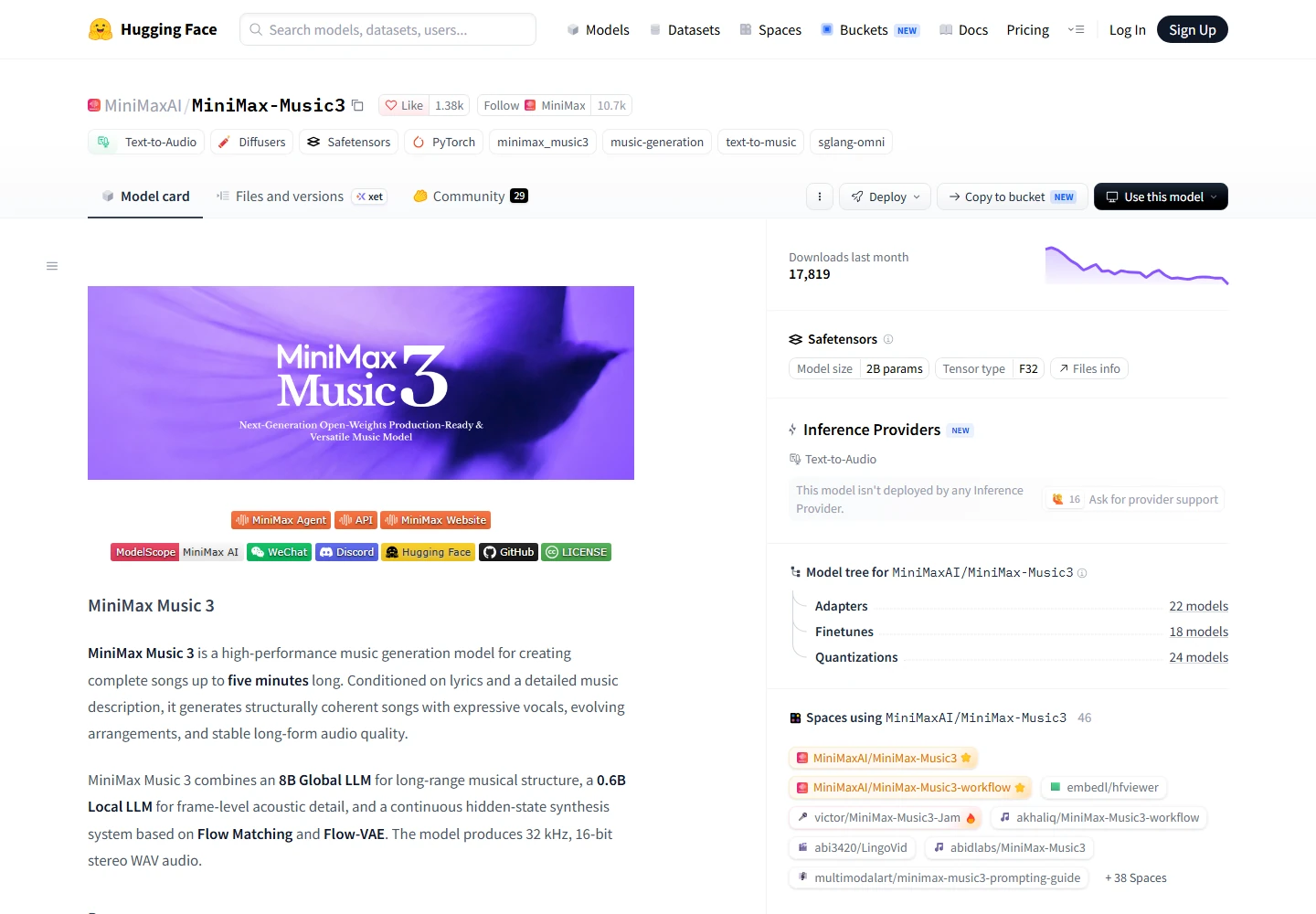
MiniMax Music 3 describes an 8B global language model, a 0.6B local language model and additional synthesis components, producing up to five minutes of 32 kHz stereo audio. YuE2’s 3B-class backbone is smaller, but parameter labels alone do not predict peak VRAM or best listening quality. Its lower score in YuE2’s benchmark is not a universal listening verdict.
MiniMax publishes an official Music 3 Space. For local or commercial integration, read the Music3 Community License: it includes naming, safeguards and an additional authorization threshold for covered annual revenue above US$20 million. It is not the same license as YuE2. More deployment detail is in our MiniMax Music3 review.
ACE-Step: consider it when iteration and hardware flexibility matter

The ACE-Step 1.5 project offers local generation, cover and repainting workflows under an MIT license, with platform-specific setup paths. Its installation guide distinguishes a roughly 4 GB DiT-only route from at least 6 GB for LM plus DiT. The newer XL variants use a 4B DiT and list at least 12 GB with offloading/quantization, with 20 GB recommended. Do not apply the smallest configuration’s memory requirement to XL.
Choose YuE2 when the editable composition is the reason to experiment. Try ACE-Step when you want many local revisions or another editing approach. Choose a hosted service when setup time and integrated tools matter more than running your own pipeline. Commercial projects must be decided by the applicable license as well as sound quality.
Frequently asked questions
Is YuE2 completely open source and free for commercial use?
The current repository’s first-party code and documentation are Apache 2.0, but the weights are CC BY-NC 4.0. Earlier release archives retain their bundled licenses. Downloadable weights do not grant unrestricted commercial use; do not assume a paid music service or client project is covered.
Can I use an 8 GB graphics card?
The Q4 runtime measurement is close to an 8 GB budget, but was taken on a 5090. It is a useful experiment for existing hardware, not a purchasing guarantee. The official NVIDIA quick start still recommends 24 GB. Other models may be a better first choice if memory is tight.
Can it sing Japanese?
Japanese examples exist on the official demo and in kun432’s test. That establishes practical examples, not flawless pronunciation. Begin with short lines, listen for kanji misreadings and unstable vowels, and revise difficult wording before generating a long piece.
Does score editing preserve the singer and everything outside the edit?
No such guarantee is documented. The score controls composition, while synthesis produces a new recording. A consistent score can still yield different timing, timbre or accompaniment. Keep the original audio if a finished take matters.
Why do demos sound better than my first result?
Candidate selection, genre, prompt, decoder and inference settings can all differ. Compare several candidates without discarding failures from your evaluation. The published Best-of-8 result is not a promise about the first output of a normal API call.
Does it have NSFW or explicit-lyrics support?
The release does not provide a clear, universal NSFW-support guarantee. Local execution is not evidence of an “uncensored mode”; hosted demos can also impose their own rules. Treat explicit-lyric behavior as unverified rather than a deciding advertised feature.
Verdict: a composition tool worth testing, with limits
YuE2’s strongest reason to exist is the ability to make melody and harmony inspectable before audio is finalized. For hobby songwriting, non-commercial arrangement exploration or research, that is a meaningful addition to a local toolkit. The official examples and community outputs make it worth auditioning.
For commercial releases, a beginner who only wants an instant song, or a job requiring clean first-take vocals, it is harder to recommend as the default. Start by listening to the Japanese and genre-specific samples, then try a short prompt on hardware you already own. Keep the first experiment small; expand to ComfyUI or score editing only after the sound meets your needs.
Related Reviews
Wan 3.0 Review: 30s AI Video, Open Source Status and NSFW Limits

Top 10 AI Models in 2026: Arena Rankings, Prices and Best Uses
MiniMax-Music3 Review: Open-Weight AI Music Model for 5-Minute Songs
MiniMax H3 Image Studio Review: ComfyUI Images, Reference Editing & Video Workflow
MiniMax M3.1 Flash Review: Coding, API Cost, Open Weights and Limits
8 Best Audio to Text Converters (Free & Paid Tools)
