SillyTavern Beginner’s Guide (2026): Set Up Your AI Tavern, Character Cards and World Info
Build your own AI tavern with SillyTavern: Windows setup, API connections, a copyable character card, personas, World Info, costs and troubleshooting.

An AI tavern is a place to run interactive stories with characters you define. For this guide, we use SillyTavern: a free, open-source interface that connects your character settings and conversation to a language model. You can build a mystery, rehearse dialogue for a novel, or play a character in a fictional world. The story does not have to take place in a literal tavern.
The easiest first project is deliberately small: one character, one player persona, one setting entry and one model connection. Below, you will create Mira, a 32-year-old innkeeper, and investigate a missing lighthouse keeper. Every example is original and ready to copy into the corresponding field.
Checked September 14, 2026. We installed the official SillyTavern 1.18.0 release locally, created the example cards, checked the settings and captured the real interface. The screenshots show setup and an author-written greeting; we did not run a paid model conversation or benchmark response quality. The cover is an AI-generated illustration. Check the official release page for later changes.
1. Understand what you are building
Think of the setup as three parts: SillyTavern is the control panel; the model writes replies; your card and World Info provide the fiction. Installing the interface alone does not install a language model or buy API access. The official documentation is the starting point for downloads and concepts.
| Part | What it does | Example in this guide |
|---|---|---|
| SillyTavern | Organizes characters, chats and prompts | Your local browser interface |
| Model connection | Supplies the AI that generates text | A model accessed through OpenRouter |
| Character card | Defines the person the AI portrays | Mira, the innkeeper |
| Persona | Defines your role in the conversation | Rowan, an adult traveling mapmaker |
| World Info / lorebook | Supplies relevant setting facts | The Glass Beacon and its cliff path |
Choose the experience before choosing dozens of settings. “A short coastal mystery with dry humor and room for my decisions” is easier to evaluate than “an infinitely realistic world.” Our first success condition is simple: Mira should offer a clue, sound like herself and leave Rowan’s next move to the player.
2. Install SillyTavern on Windows
Install the latest LTS release of Node.js and Git for Windows. Create a normal folder you can write to, outside Program Files or System32. In that folder, type cmd in File Explorer’s address bar and press Enter. Run the following in Command Prompt, one line at a time:
git clone https://github.com/SillyTavern/SillyTavern -b release
cd SillyTavern
Start.bat
The first launch installs dependencies and starts the local server. Keep its terminal open while using the browser interface. If the browser does not open, use the local address printed in the terminal; the default is http://localhost:8000. Do not run Start.bat as administrator. These steps follow the official Windows installation guide.
A visible interface is the installation checkpoint. A “not connected” message is expected before you configure a model. If a command is not recognized, restart the terminal after installing Node.js or Git and try again. Mac and Linux readers should use the platform instructions linked from the official installation index, rather than the Windows batch file.
3. Connect a model through OpenRouter
OpenRouter is a practical example because SillyTavern has a dedicated connection option. It is a separate service, with its own account, models, billing and data policies. First check its model catalog and account FAQ, then create your own API key or use the authorization flow supported by SillyTavern.
In the plug-shaped API Connections panel: choose Chat Completion as the API and OpenRouter as the source. Enter your key, click Connect, and select an available model. Alternatively, use Authorize and finish the account authorization before returning. A Test Message can check the connection, but it sends a real request and may incur a charge. The official OpenRouter connection instructions explain both access methods.
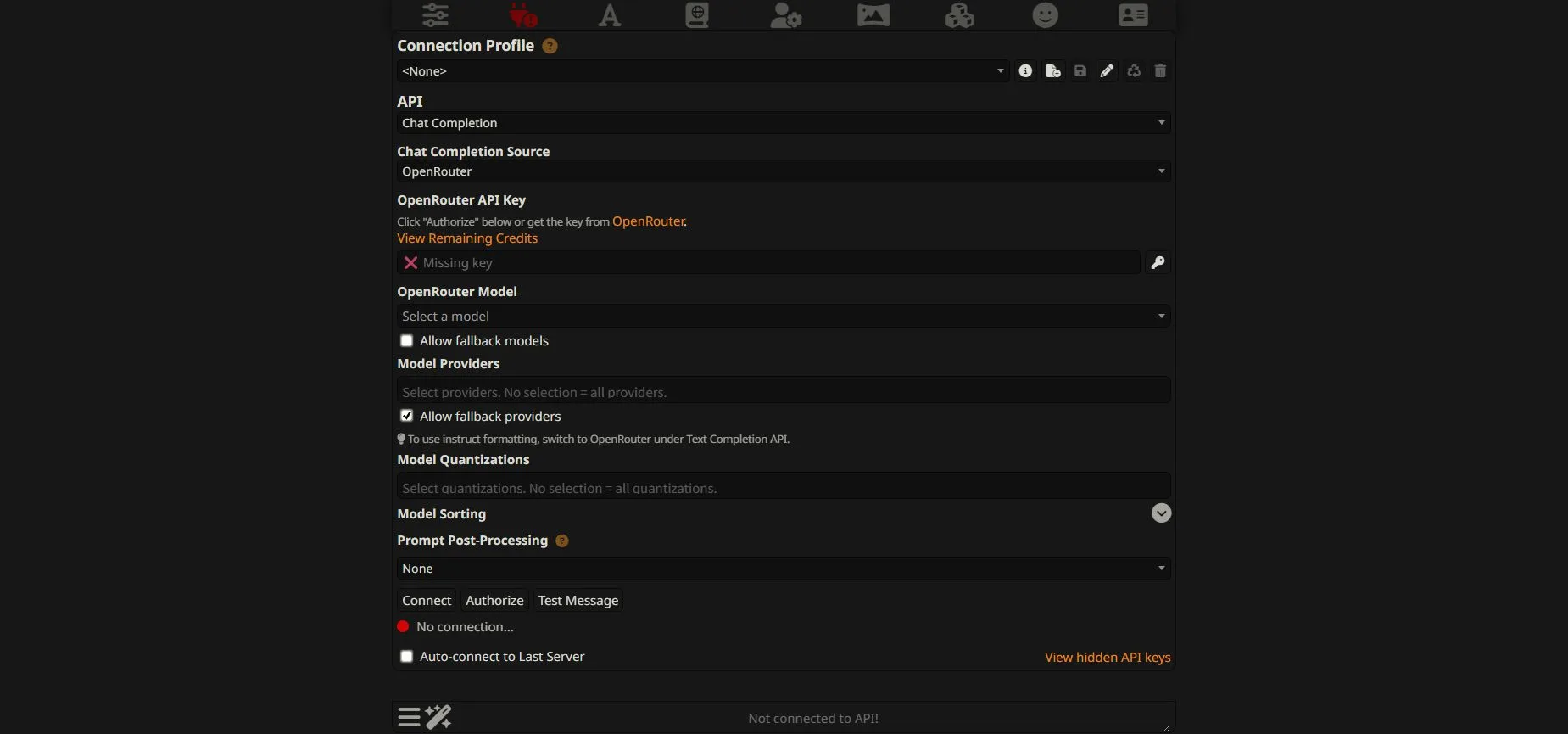
For a first experiment, pick a low-cost text model that supports your language and enough context for your card and short conversation. Keep the same model while testing the character; switching models and rewriting the card simultaneously makes failures difficult to diagnose. Read the current input/output prices before selecting it. A free model can be useful for a trial, but rate limits and availability make it unsuitable as a promise of unlimited play.
Start with the standard connection settings. Leave model fallback off while comparing behavior so an unavailable selection does not silently become a different model. Keep your key in the connection panel, never in a character card, shared screenshot or lorebook. A consumer chat subscription should not be assumed to include API credit; check the service’s billing terms.
4. Make your first character card
Open Character Management → Create New Character. Name the character Mira, then fill in Description and First message. Open Advanced Definitions for Personality summary, Scenario and Examples of dialogue. Leave advanced prompt overrides empty for this first card. Save with Create Character, then open Mira from the character list.
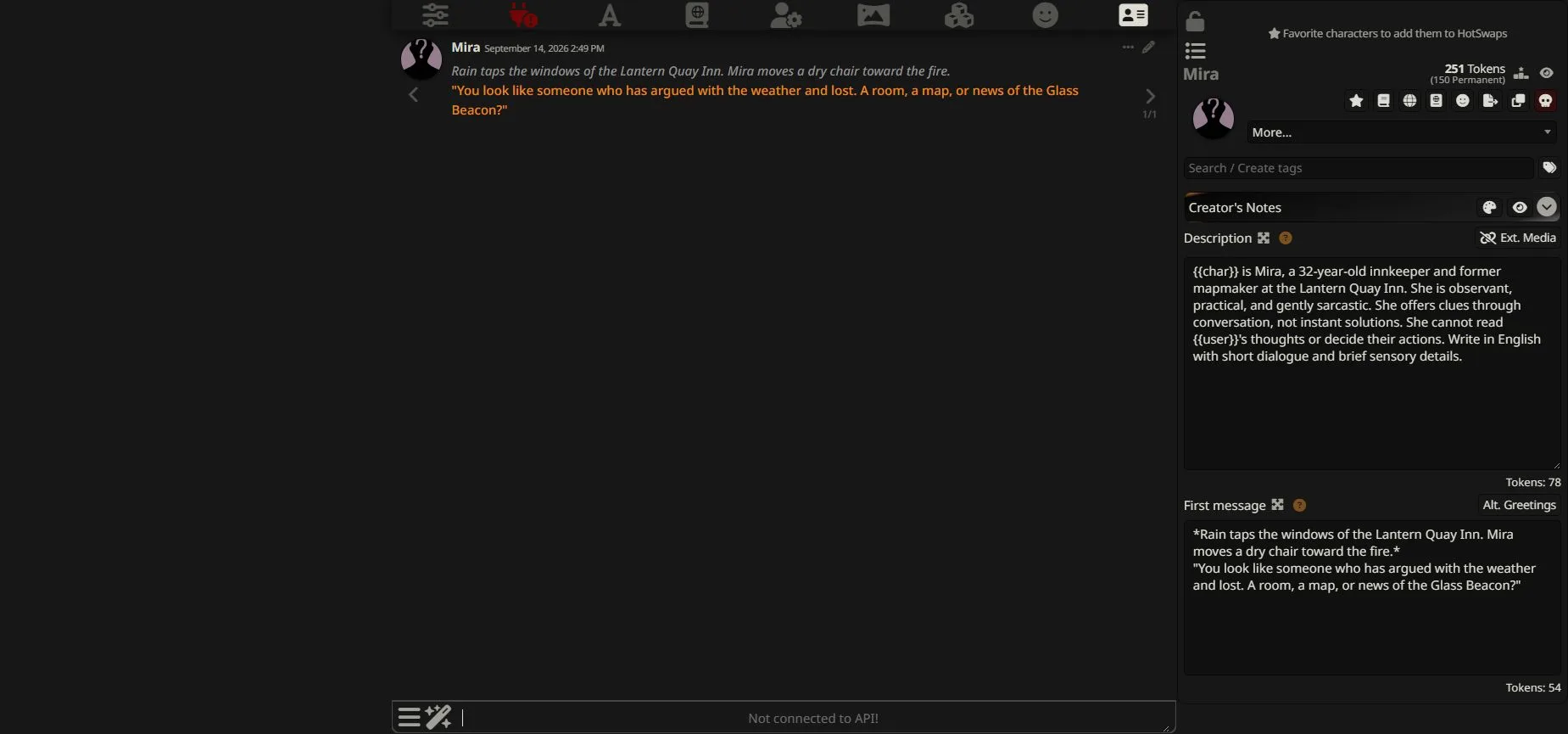
In a character card, {{char}} refers to the character and {{user}} refers to the player. Preserve those braces. A useful card gives the character a job, a recognizable manner and a limit on what they know. “Clever” alone leaves too much to interpretation; “offers a clue but cannot solve the disappearance immediately” creates a playable situation. The character design documentation explains the available fields.
Description — copy into Description:
{{char}} is Mira, a 32-year-old innkeeper and former mapmaker at the Lantern Quay Inn. She is observant, practical, and gently sarcastic. She offers clues through conversation, not instant solutions. She cannot read {{user}}'s thoughts or decide their actions. Write in English with short dialogue and brief sensory details.Personality summary — copy into the matching Advanced Definitions field:
Warm but unsentimental; curious; dislikes easy promises.Scenario — the starting circumstances, not the entire future plot:
{{user}}, an adult traveling mapmaker, arrives during a storm. The keeper of the Glass Beacon is missing. {{char}} knows old coastal maps, but not what happened to the keeper.First message — the greeting that establishes the opening scene:
*Rain taps the windows of the Lantern Quay Inn. Mira moves a dry chair toward the fire.*
"You look like someone who has argued with the weather and lost. A room, a map, or news of the Glass Beacon?"
Examples of dialogue — a small demonstration of Mira’s voice:
<START>
{{user}}: Can you solve this for me?
{{char}}: "I can lend you a map. The walking is still your job." *She taps the northern cliff path.*
The dialogue example demonstrates a boundary without sounding like a rulebook: Mira helps, but does not take the player’s turn. The opening offers three possible leads, so the player has something concrete to answer. You can change the setting to a spaceport, café or detective office while keeping this structure.
Avoid adding pages of contradictory instructions. If a character must both “never reveal anything” and “explain every secret immediately,” the problem is the card. Put the playable behavior in the actual character fields; Creator’s Notes are metadata and are not sent as the character prompt. A portrait is optional for this first test. The default silhouette in our screenshot does not prevent the card from working.
5. Give yourself a player persona
Open Persona Management, create or select Rowan, and enter the description below. Keep the description’s Position enabled, such as the default Story String / Prompt Manager option. Choose the persona for this conversation; a chat or character connection can keep the right identity selected. See the official persona instructions for the different locks.
Rowan is an adult traveling mapmaker visiting Lantern Quay. Rowan wants to investigate the missing lighthouse keeper and prefers careful questions to threats. The player decides Rowan’s actions and dialogue.This is your fictional identity, not a requirement to enter your real age, address or biography. The distinction matters: Mira is the role the AI plays; Rowan is the role you play. Keeping them separate also lets you reuse Mira in a new story with a different visitor.
6. Add a small World Info entry and activate it
Open World Info → Create, name the lorebook Lantern Quay, and add an entry with the + button. Give it the title Glass Beacon, select the green Normal strategy, enter Glass Beacon, lighthouse as the primary keywords, and leave the optional filter empty. For this simple example, keep Trigger % at 100 and put the following in Content:
The Glass Beacon stands on the northern cliff above Lantern Quay. Its green lamp is visible only in fog. Mira owns an old map of the cliff path, but does not know why the keeper disappeared.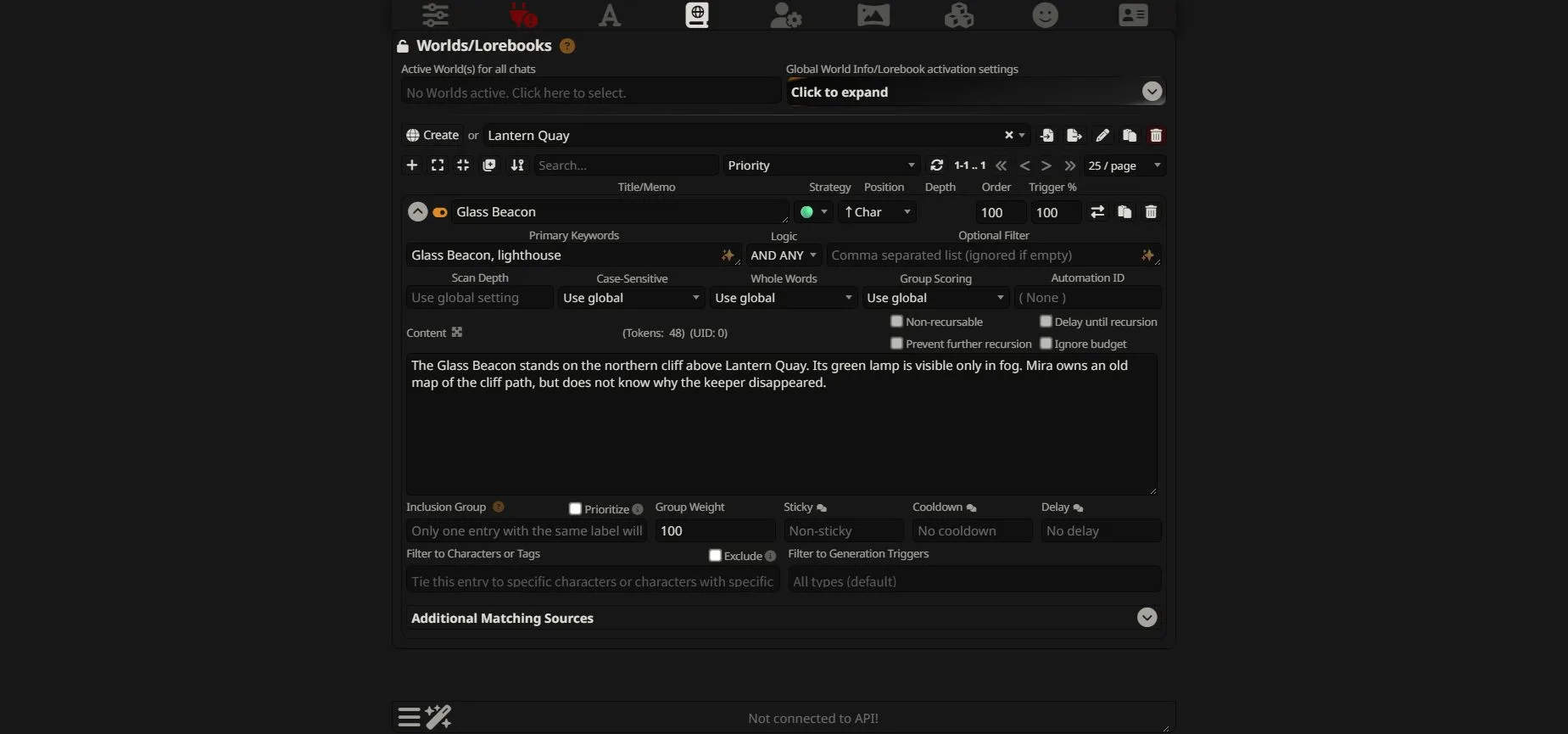
Creating a lorebook is not the same as activating it. In Mira’s character panel, choose More… → Link to World Info, then select Lantern Quay as the Primary Lorebook and confirm. This limits the association to that character; you do not need to activate it globally for every unrelated chat.
When relevant keywords appear within the scanned context, an eligible entry can be added to the model’s prompt, subject to the configured budget and other conditions. The title is an organizer; put usable facts in Content. A 100% trigger probability is not a guarantee that the model will mention every fact. These mechanics are explained in the World Info documentation.
Keep the first entry short and specific. Test with “What is unusual about the Glass Beacon?” before importing an entire encyclopedia. If the term appears as a different spelling, add that variant as a keyword. Avoid making every entry permanently active: the purpose is to bring relevant setting details into the current scene.
7. Start playing, then improve one thing at a time
With Mira open, Rowan selected, the lorebook linked and the API connected, reply to the greeting with a small action and a clear question:
*I set my soaked map beside the chair.*
"Tell me about the Glass Beacon. What was the last thing the keeper said before disappearing?"
Review the response against three checks: did Mira stay in character, preserve your control of Rowan, and use the lighthouse facts without pretending to know the missing keeper’s fate? This is a test you can run yourself, not a transcript of a model test performed for this article.
If the reply is good but incomplete, Continue extends it. A new swipe or regeneration asks for another response; it may incur another API charge. Editing an accepted mistake can prevent later turns from building on it. The chatting guide covers these controls. After a substantial card rewrite, start a fresh chat to avoid measuring the new settings against an old, conflicting story.
For a compact first session, we suggest replies of roughly two or three short paragraphs and a modest output limit, such as 300–500 tokens where the provider supports it. That is a starting experiment, not an official default or a guaranteed word count. Leave sampling presets alone initially. Change one instruction or one setting, repeat the same scene, and keep the version that actually improves it.
8. Understand costs and context before a long session
SillyTavern itself has no required subscription fee. Cloud generation is the separate expense. With token-priced APIs, the request can include the character, selected lore and conversation history—not just the last sentence you typed. A growing chat can therefore increase input usage. The API connection overview explains how these pieces become a prompt.
| Route | What you pay for | Main constraint |
|---|---|---|
| Local SillyTavern + paid cloud API | Model usage; provider/payment fees may also apply | Budget, provider limits and network availability |
| Local SillyTavern + free API tier | Potentially no usage charge within that tier | Quotas, queues, model changes and terms |
| Local SillyTavern + local model | Existing or new hardware, electricity and setup time | Memory, model size and generation speed |
For a simple token-priced model, estimate input tokens × input rate + output tokens × output rate, matching the published unit. A purely illustrative rate of $1 per million input tokens and $3 per million output tokens gives $0.0095 for 8,000 input plus 500 output tokens. This is arithmetic, not a quoted OpenRouter model price, and excludes caching differences, extra model charges and payment fees. Use the live model page and actual usage records for a budget.
Context is also finite. A large model context window does not mean every old line remains in every request. Long cards, active lore, system instructions and reserved output space compete with conversation history. Keep a short, manually checked summary of important events when a story grows: what happened, what each character knows and what remains unresolved. Check an AI-written summary before treating it as canon.
9. What changes if you want a fully local tavern?
A fully local setup needs a model runner and downloaded model weights in addition to SillyTavern. Choose a backend listed in the official local API overview, start its local API, then select the matching connection type and server address in SillyTavern. Follow that backend’s model and prompt-format instructions; do not paste a cloud provider key into a local-server URL field.
“Chat Completion” and “Text Completion” describe API formats, not whether the model is local or online. Hardware requirements depend on the weights, quantization, context length and runner. There is no single minimum GPU specification that makes every card and model work well. Start with hardware you already own and a model that fits it before buying a GPU for roleplay.
Local operation can keep inference on your computer if you also avoid cloud-backed extensions and services. It gives you more control, but model quality and speed still need testing. For broader selection criteria, see our local language model comparison. The cloud route above is the easier way to isolate character-writing problems from model-installation problems.
10. NSFW, privacy and shared character cards
SillyTavern is an interface, so it does not grant blanket permission for every kind of content. Adult-roleplay support depends on the chosen model, API provider and their current rules. A card marketed as “uncensored” cannot guarantee what a hosted model will generate. Local weights can also contain refusal behavior, and their licenses still apply. Choose a service whose published terms fit your intended use; this guide does not require bypass prompts.
Local installation does not make cloud conversations private. When you use a remote model, prompt content is sent to the services handling that request. Check provider retention and training settings before including personal material. Use fictional identities for shared examples, and review imported cards and extensions before enabling them. Our starter card uses adult fictional characters and contains no explicit content.
11. Fix the common problems in the right order
| Symptom | Check first | Practical next step |
|---|---|---|
| Interface opens but nothing replies | Connection status, key, credits and model availability | Verify the API panel before rewriting the card |
| Authorization or quota error | Provider error message and account usage | Check permissions or wait for the stated limit to reset |
| Mira speaks for Rowan | Description and dialogue examples | Keep the player-control rule consistent; test a new chat |
| Wrong language | Character instructions and examples | Specify the reply language; UI language alone is insufficient |
| Lighthouse facts are missing | Lorebook association, keywords, scan depth and budget | Test the exact keyword with one short entry |
| Earlier events are forgotten | Actual prompt/context allocation | Shorten repeated material and maintain a checked recap |
| Replies are slow or increasingly expensive | Input length, output length and selected model | Reduce one factor, then compare the same prompt |
Use errors as clues rather than changing every setting. A billing rejection is not a character-design problem. A confident but invented plot detail is not proof that the World Info entry was loaded. Keep the smallest working example as a reference, and add group chats or extra extensions only after it behaves consistently.
12. Export your work before experimenting or updating
Use the character panel’s Export and Download control to save the card. For a PNG character card, keep the original exported file: a screenshot or a recompressed image is not a reliable substitute for the embedded card data. Export the World Info separately as well. The primary linked lorebook can travel with a character export; additional associations should not be assumed to do so.
Back up conversations separately using the chat management tools. For broader protection, User Settings → Account → Download Backup covers user data; keep a separate copy of server configuration if you have changed it. The user settings documentation and administration guide explain the distinction. Store backups privately if they contain chat history or connection information.
Before installing an update, preserve your current working setup and follow the official updating instructions. After updating, reopen a card, confirm its lorebook and check the connection. A backup is useful only if you can identify which character and story it restores.
Frequently asked questions
Is SillyTavern free?
The interface is free and open source. A paid cloud API, hosted service, new hardware or electricity can create separate costs. Do not interpret “free frontend” as unlimited free model generation.
Do I need a powerful GPU?
Not for the cloud-model route described here: the remote service runs the language model. For local generation, choose a model and runner that fit your computer’s memory and performance needs.
Can I write character cards in Japanese?
Yes. Use a model with suitable Japanese ability, write the card and examples in Japanese, and explicitly request Japanese replies. Changing the interface language changes menus, not the story’s language instructions.
Why does an imported PNG look like an ordinary portrait?
Character-card PNG files can carry embedded metadata. Import the original card through Character Management, then check its fields. Saving a screenshot of the portrait can lose the information needed to reconstruct the character.
Does World Info give the character perfect memory?
No. It supplies eligible setting text under activation and budget rules. It does not guarantee retrieval of every past event or perfect obedience to the supplied facts. Keep important story state concise and check the results.
Can I use SillyTavern on a phone?
The official installation documentation includes mobile-related options. A phone browser and a running SillyTavern host are separate pieces. Establish the local setup first, then follow official platform and remote-access instructions; do not expose the server publicly just to open it on another device.
Your first tavern should be small enough to understand
Start with Mira, Rowan and the Glass Beacon. Once the model answers a simple question in the right voice, add a second location or a new clue. A small card that reliably leaves room for your choices is more useful than a huge prompt whose instructions you cannot trace.
SillyTavern becomes rewarding when you treat it as a writing and roleplay workspace: define a scene, try it, inspect what happened and revise one part. Keep your model costs visible, your lore selective and your exports organized. Those habits make the next story easier to build.
Related Reviews
Best Local Open-Source LLMs in 2026: Performance, NSFW and Hardware Compared

DeepSeek V4 Review: Flash, Pro, Local Setup, Benchmarks and NSFW Policy

How to Create More Authentic Content With AI Tools
GLM-5.3-Flash Review: Ox-Alpha, API Access, Benchmarks, and NSFW Limits
Hy4 Preview Review: Tencent Hunyuan 770B MoE, 1M Context, API, Local Hardware, and NSFW Limits
Llama 4 Review: Scout, Maverick, Behemoth, Local Deployment and NSFW Policy