

Reading a long PDF is rarely the hard part. The hard part is finding the exact answer, checking where it came from, and deciding whether you can trust it. That is why an AI PDF reader has become useful for students, researchers, office workers, legal teams, and anyone who deals with dense documents every week.
The best AI PDF readers can summarize a PDF, answer questions about the file, extract key points, explain difficult paragraphs, compare sections, and point you back to the original page. Some tools are built for research papers. Some are better for business reports. Others work like a document chatbot for contracts, manuals, and training materials.
This guide compares the best AI PDF reader tools in 2026 and explains how to choose the right one for your workflow.
Table of Contents
- Quick Comparison
- What Is an AI PDF Reader?
- What Makes a Good AI PDF Reader?
- Best AI PDF Readers
- 1. Jotform AI PDF Summarizer
- 2. ChatPDF
- 3. AskYourPDF
- 4. PDF.ai
- 5. UPDF AI
- 6. SciSpace
- 7. Humata
- 8. NotebookLM
- 9. Unriddle
- 10. Smallpdf AI PDF Tools
- How to Choose the Best AI PDF Reader
- Tips for Using AI PDF Readers Safely
- FAQ
Quick Comparison
| Tool | Best For | Key Strength | Good Fit |
|---|---|---|---|
| Jotform AI PDF Summarizer | Everyday PDF work | review long PDFs Easily | Business users, students, office documents |
| ChatPDF | Fast document Q&A | Simple chat with uploaded PDFs | Students, casual users, quick summaries |
| AskYourPDF | Chat and document management | PDF Q&A plus browser and integrations | Research, business, multi-document workflows |
| PDF.ai | Clean PDF chat experience | Easy summaries and cited answers | Reports, ebooks, manuals |
| UPDF AI | Reading and editing PDFs | AI features inside a PDF editor | Users who also annotate, edit, and convert PDFs |
| SciSpace | Research papers | Academic explanations and paper discovery | Students, researchers, literature review |
| Humata | Long technical documents | Document Q&A for dense files | Legal, technical, and business teams |
| NotebookLM | Source-grounded research | Multi-source notes and summaries | Research, study, content planning |
| Unriddle | Research and writing workflow | Reading, notes, and writing support | Students, writers, academics |
| Smallpdf AI Tools | Simple PDF tasks | Quick summaries and PDF utilities | Users who need light PDF help |
What Is an AI PDF Reader?
An AI PDF reader is a tool that uses artificial intelligence to understand, summarize, and answer questions about PDF documents. Instead of manually scanning dozens or hundreds of pages, you can ask questions like:
- What is this report about?
- Summarize the main findings.
- What does the author say about pricing?
- Find the section about data privacy.
- Explain this paragraph in simple terms.
- Compare Chapter 2 and Chapter 5.
- Give me the key takeaways with page references.
The simplest AI PDF readers work like a chat box attached to one file. More advanced tools can handle multiple PDFs, show citations, create notes, generate study guides, or work inside a full PDF editor.
What Makes a Good AI PDF Reader?
The best AI PDF reader is not just the one that gives the fastest answer. Speed helps, but accuracy matters more.
A good AI PDF reader should:
- Give answers based on the uploaded document, not random web knowledge.
- Show page references, citations, or highlighted source text.
- Handle long PDFs without losing context too quickly.
- Summarize clearly without deleting important details.
- Let you ask follow-up questions.
- Work with scanned PDFs or OCR when needed.
- Respect privacy, especially for contracts, financial files, research data, and internal documents.
If a tool cannot show where an answer came from, be careful. AI can sound confident even when it is wrong. For school, research, law, finance, or medical documents, always check the source pages before using the answer.
Best AI PDF Readers
Below are the best AI PDF readers for different needs, from casual PDF summaries to academic research and business document review.
1. Jotform AI PDF Summarizer
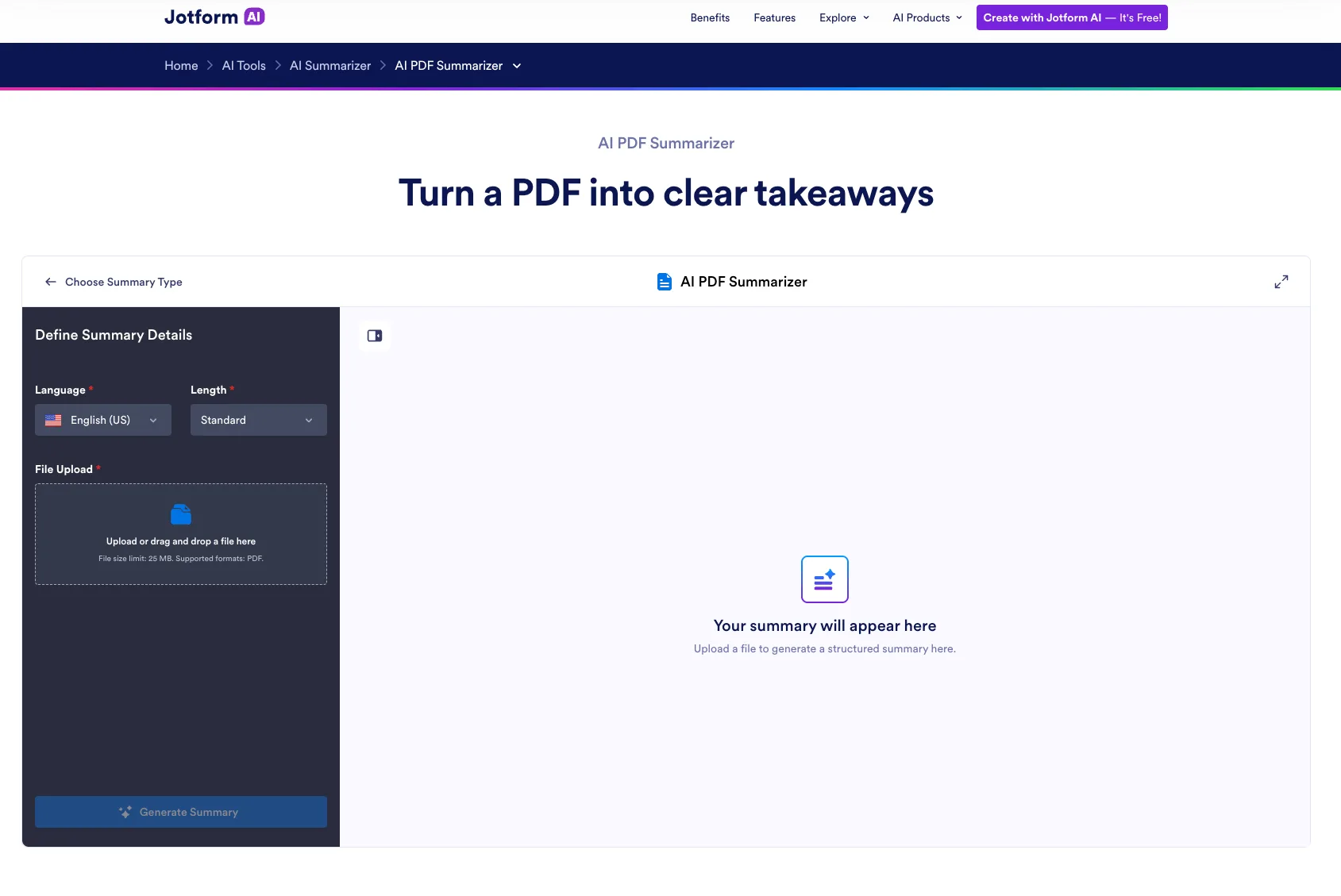
Jotform AI PDF Summarizer helps users review long PDFs by turning them into concise summaries of the core details. After uploading a document, users can choose their preferred language and summary length, then generate a more readable overview without manually searching through every page.
The tool can identify key takeaways, main themes, and important sections while keeping the original PDF visible for reference. Users can also ask questions about the document, request simpler explanations, or focus the summary on specific details such as conclusions, requirements, risks, or next steps.
Generated content can be refined using options such as Regenerate, Expand Summary, Shorten Summary, and Translate. Users can also copy the result for sharing or turn dense PDF content into clearer, structured notes. Text-based PDFs work best, while scanned documents may produce less accurate results when their text is embedded in images.
Best for: quick PDF summaries, extracting key points, reviewing long text-based documents
Not ideal for: scanned or image-heavy PDFs that require precise text recognition
Keyword fit: AI PDF summarizer, AI PDF reader, PDF summary tool
2. ChatPDF

ChatPDF is one of the easiest tools for chatting with a PDF. Upload a file, ask a question, and get answers in a conversational format. That simplicity is the main reason people like it.
It works well for students, casual readers, and anyone who needs a quick explanation of a document. You can use it for lecture notes, ebooks, manuals, research papers, reports, and other text-heavy PDFs.
The main limitation is that simple tools may not be enough for complex research or sensitive business workflows. If you need strong citation control, multi-document analysis, team collaboration, or enterprise privacy settings, you may want a more advanced platform. But for quick PDF Q&A, ChatPDF is still one of the most convenient AI PDF readers.
Best for: quick summaries, student reading, simple chat with PDF
Not ideal for: enterprise review or highly sensitive documents
Keyword fit: chat with PDF, AI PDF reader, AI PDF summarizer
3. AskYourPDF

AskYourPDF is built around the idea of turning documents into conversations. It can help you upload PDFs, ask questions, summarize content, and interact with document text more quickly than manual reading.
It is a good fit for people who handle multiple documents and want a dedicated PDF AI reader rather than a general chatbot. The tool can be useful for research files, business documents, ebooks, policy papers, and training materials.
AskYourPDF is especially appealing if you want an AI PDF reader that feels more like a document workspace than a one-off summarizer. As with any AI document reader, the quality of the result depends on the file structure, length, and clarity of the original PDF.
Best for: document Q&A, research files, multi-document reading
Not ideal for: users who only need a built-in PDF editor
Keyword fit: AI PDF reader, chat with PDF, AI document reader
4. PDF.ai

PDF.ai focuses on a clean chat-with-PDF experience. You upload a PDF and ask questions about it. It can summarize, explain, and help you find information without manually searching every page.
This type of tool is helpful when the document is long but the questions are specific. For example, you might ask for the refund policy in a contract, the methodology in a research paper, or the main risks in a business report.
PDF.ai is a solid option for users who want a straightforward AI PDF tool without a heavy learning curve. It is best for people who need answers from individual files and prefer a simple interface.
Best for: clean PDF chat, reports, ebooks, manuals
Not ideal for: advanced academic literature review or full PDF editing
Keyword fit: PDF AI reader, chat with PDF, AI PDF tool
5. UPDF AI

UPDF AI is useful because it sits inside a broader PDF editor. Many users do not only want to summarize a PDF. They also want to highlight, annotate, convert, organize pages, add comments, or edit the file.
That makes UPDF AI a practical choice for people who still need traditional PDF tools. You can read and work on the document while using AI to summarize, translate, explain, or answer questions.
If your workflow includes both PDF editing and AI reading, UPDF AI may be more efficient than switching between a PDF editor and a separate AI chatbot. It is especially useful for students, office workers, and professionals who actively mark up documents.
Best for: PDF editing plus AI reading, annotation, document workflow
Not ideal for: users who want only a lightweight free chatbot
Keyword fit: AI PDF reader, AI PDF tool, AI PDF summarizer
6. SciSpace

SciSpace is one of the best options for academic papers. It is designed for students and researchers who need help understanding dense scientific language, methods, equations, tables, and citations.
Instead of treating every PDF like a generic document, SciSpace focuses on research reading. It can help explain confusing paragraphs, summarize papers, and make academic content easier to digest. This is useful for literature reviews, thesis research, and reading papers outside your core field.
SciSpace is not the best AI PDF reader for contracts or office manuals. Its strength is academic context. If your main goal is to read research papers faster, it deserves a close look.
Best for: research papers, literature reviews, academic reading
Not ideal for: general business PDFs or legal documents
Keyword fit: AI PDF reader for research, AI research paper reader, AI PDF summarizer
7. Humata

Humata is built for asking questions across long and complex documents. It is often used for technical documents, legal files, reports, and business materials where readers need fast answers without losing the original source context.
The tool is helpful when you need more than a short summary. For example, you might ask it to compare clauses, extract risks, explain a technical section, or locate details inside a long document.
Humata is a better fit for professional and team use than for casual one-page PDF summaries. If you work with dense files regularly, it may be worth comparing with other AI document reader platforms.
Best for: long documents, technical files, legal and business review
Not ideal for: casual users with occasional short PDFs
Keyword fit: AI document reader, AI PDF reader, chat with PDF
8. NotebookLM

NotebookLM is not only an AI PDF reader, but it is very useful for reading and working with sources. You can add PDFs and other materials, then ask questions, generate summaries, create study guides, and organize ideas based on your uploaded sources.
Its biggest advantage is source-grounded research. Instead of simply chatting with one PDF, NotebookLM works well when you are building understanding across several files. This makes it useful for students, writers, researchers, analysts, and content planners.
NotebookLM is a good option if you want to combine PDF reading with note-taking and source synthesis. It may not replace a full PDF editor, but it can become a strong research companion.
Best for: multi-source research, study guides, notes, source-based summaries
Not ideal for: users who need traditional PDF editing or signing tools
Keyword fit: AI document reader, AI PDF reader, AI research assistant
9. Unriddle

Unriddle is designed for reading, research, and writing workflows. It can help users understand documents, ask questions, summarize information, and turn source material into notes or writing drafts.
This makes it useful for students, researchers, writers, and professionals who need to move from reading to writing. If your workflow is not just “summarize this PDF” but “help me understand this source and use it in my work,” Unriddle is worth considering.
It is especially useful when paired with academic or long-form reading. The value comes from reducing the friction between reading a PDF and producing useful notes, outlines, or explanations.
Best for: research notes, writing support, academic reading
Not ideal for: users who only need basic PDF conversion or editing
Keyword fit: AI PDF reader, AI document reader, AI PDF summarizer
10. Smallpdf AI PDF Tools

Smallpdf is known for simple PDF utilities, and its AI features can help users summarize or interact with PDF content without needing a complex setup. It is a practical choice for people who already use online PDF tools for compression, conversion, merging, or signing.
The advantage is convenience. If you only need light AI PDF help and basic PDF utilities in one place, Smallpdf can be enough. It is not the deepest research assistant or enterprise document analysis system, but it is easy to understand.
Smallpdf works best for quick tasks: summarizing a document, extracting the main idea, or handling common PDF actions around the same workflow.
Best for: simple PDF tasks, quick summaries, casual users
Not ideal for: deep academic research or complex multi-document analysis
Keyword fit: AI PDF summarizer, AI PDF tool, PDF AI reader
How to Choose the Best AI PDF Reader
The right AI PDF reader depends on the kind of documents you read.
If you mostly read school papers, choose a tool that explains academic language and supports citations. SciSpace, NotebookLM, and Unriddle are strong options here.
If you read business reports, manuals, and internal documents, choose a tool with clear summaries, document Q&A, and reliable source references. Jotform AI PDF Summarizer, AskYourPDF, Humata, and PDF.ai are good starting points.
If you also edit PDFs, choose an AI PDF tool inside a full PDF editor. UPDF AI and Adobe Acrobat AI Assistant make sense when you need to annotate, organize, convert, or manage the file after reading it.
If you only need quick answers, ChatPDF, PDF.ai, and Smallpdf are easier to start with. They are good for casual use, but you should still check the original pages before trusting important answers.
Tips for Using AI PDF Readers Safely
AI PDF readers can save time, but they should not replace careful reading when the stakes are high.
First, always ask for page references or citations. A useful answer should point back to the document. If the AI cannot show where the information came from, treat the answer as a draft.
Second, avoid uploading sensitive files unless you understand the tool’s privacy policy. Contracts, medical documents, financial reports, unpublished research, and internal company files should be handled carefully.
Third, use specific questions. “Summarize this PDF” is fine for a first pass, but better questions get better answers. Try asking: “What are the top three risks mentioned in this report?” or “Which section explains the methodology?”
Fourth, compare answers with the source text. AI can miss nuance, especially in legal, scientific, or technical documents. Use it to move faster, not to skip verification.
Finally, build a workflow. A good AI PDF reader can help you preview, question, summarize, annotate, and review a document. The best results come when you use it as a reading assistant instead of a one-click replacement for thinking.
FAQ
What is the best AI PDF reader?
The best AI PDF reader depends on your use case. Jotform AI PDF Summarizer is strong for everyday PDF work, ChatPDF is easy for quick Q&A, SciSpace is better for research papers, and NotebookLM is useful for multi-source study and research.
Can AI read a PDF and answer questions?
Yes. Many AI PDF readers let you upload a PDF and ask questions about the content. The best tools also provide citations, page references, or highlighted source text so you can verify the answer.
What is the best free AI PDF reader?
ChatPDF, Smallpdf, PDF.ai, UPDF AI, and NotebookLM may offer free access or free tiers, depending on usage limits and region. Free plans often limit file size, number of questions, exports, or advanced features.
Is an AI PDF reader accurate?
An AI PDF reader can be accurate for summaries and basic questions, but it can still make mistakes. For legal, academic, financial, or medical documents, always check the cited page or original source text.
Can an AI PDF reader summarize research papers?
Yes. Tools like Jotform AI PDF Summarizer, SciSpace, NotebookLM, Unriddle, and ChatPDF can help summarize research papers. For academic work, choose tools that explain methods, show citations, and help you verify claims.
Is it safe to upload PDFs to AI tools?
It depends on the tool and the document. Avoid uploading sensitive or confidential PDFs unless you have reviewed the platform’s privacy policy, data retention rules, and security settings.
Related
LoRA Training Guide 2026: SDXL, Anima, FLUX, Qwen, Krea 2 and Video Models

AI Thumbnail Generator: Best Tools to Create Click-Worthy Thumbnails

AI Audio Enhancer: Best Tools to Improve Sound Quality
Best 5 PDF Watermark Remover Tools
Virtual Try-On in 2025: The AI Tools Changing How We Shop
Best AI Flyer Generators for Small Businesses and Events