

Creating engaging assessments used to take hours of manual drafting, blending multiple question types, and worrying about plausible distractors. Whether you are an educator flipping a classroom, a corporate trainer onboarding a new team, or a content creator looking to gamify your social media presence, the process can feel like a bottleneck.
Thankfully, the rise of specialized artificial intelligence has changed the game. Today, using an ai quiz generator allows you to transform static PDFs, messy lecture notes, or even YouTube links into interactive, high-quality tests within seconds.
In this comprehensive roundup, we will dive into the top ai quiz maker online solutions available right now, highlighting their core features, pricing, and how they optimize the learning experience.
Why You Should Switch to an Automated Question Generator
Traditional test-making is moving too slowly for modern environments. Leveraging an ai question generator from text or external files offers distinct advantages:
- Lightning-Fast Workflows: What used to take an entire afternoon now takes less than 90 seconds.
- Diverse Question Structures: Easily mix multiple-choice, true/false, fill-in-the-blank, and open-ended questions.
- Pedagogical Alignment: Advanced tools now ground their generation in pedagogical frameworks like Bloom’s Taxonomy, ensuring you are testing true comprehension rather than rote memorization.
- Instant Explanations: The best platforms don’t just tell students they are wrong; they provide an ai powered quiz experience complete with localized, multi-language feedback for active recall.
Top 7 AI Quiz Generator Platforms of the Year
1. ProProfs Quiz Maker
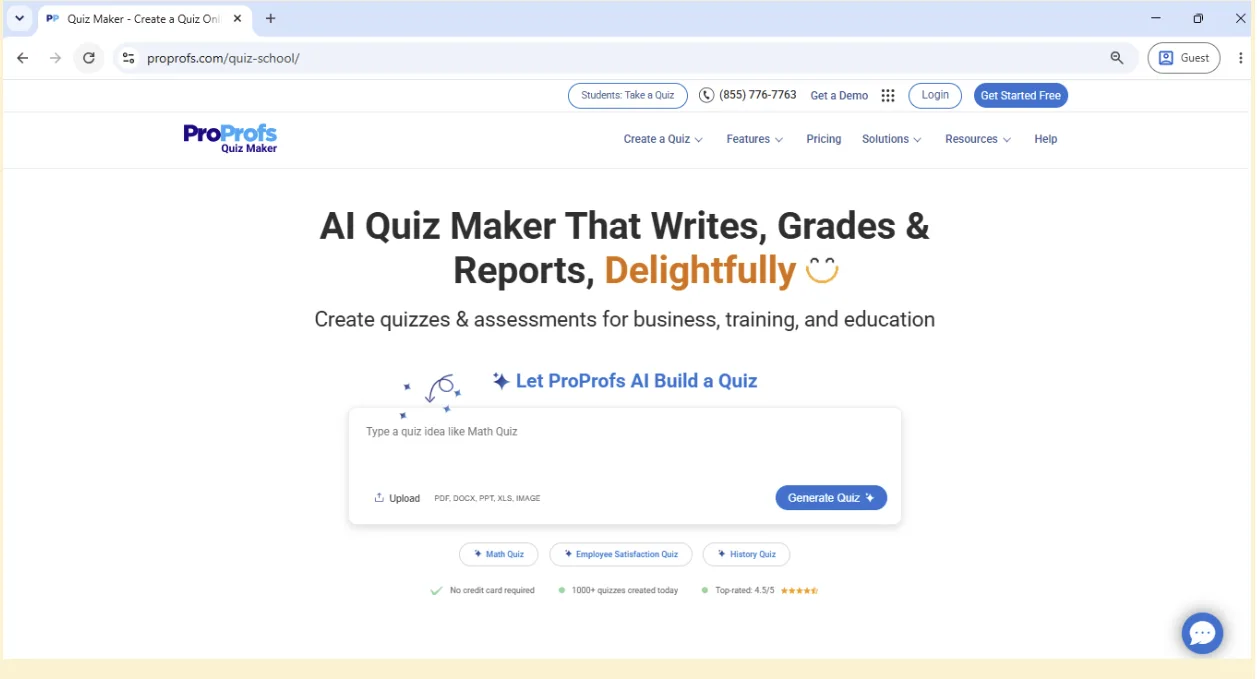
ProProfs Quiz Maker combines AI-powered quiz creation with secure online assessments in one easy-to-use platform. It can generate quizzes from prompts or transform PDFs, DOCs, PPTs, webpages, and YouTube videos into ready-to-use assessments in minutes, making it a strong choice for educators and trainers alike.
Best For: Educators, trainers, and businesses creating AI-powered quizzes, assessments, and certification exams.
Key Feature: Supports 20+ question types, AI quiz generation, reusable question banks, and secure assessments with browser lockdown and automated proctoring.
2. Mentimeter (Menti AI Creator)

If you need to run a live, competitive assessment during a corporate workshop or a live lecture, Mentimeter is the gold standard. It creates interactive presentations alongside your questions.
- Best For: Live events, team-building sessions, and real-time interactive training.
- Key Feature: Real-time leaderboards and direct smartphone voting without requiring app installations.
3. Revisely’s Quiz Maker

Revisely offers a highly intuitive ai quiz generator from pdf and scanned image notes. Powered by advanced optical character recognition (OCR), it can read handwritten notes or textbook scans seamlessly.
- Best For: High school and university students preparing for midterms or finals.
- Key Feature: Seamless exporting options to flashcard apps like Anki, or LMS platforms like Canvas and Blackboard.
4. Atlas AI

Atlas acts as a dedicated ai practice quiz generator meant to help students “set the curve.” It focuses purely on high-accuracy academic preparation by combining multiple file types into a single cohesive exam.
- Best For: Self-study and aggressive exam prep.
- Key Feature: Tailored difficulty toggles (Easy, Medium, Hard) that adjust the complexity of the generated distractors.
5. Jotform AI Quiz Generator

For businesses looking to integrate assessments directly into their websites or lead generation funnels, Jotform offers an incredible automation flow.
- Best For: Lead generation, employee onboarding, and compliance checks.
- Key Feature: Fully customizable form layouts that allow you to brand the quiz interface instantly.
6. Quizizz AI

A staple in K-12 education, Quizizz has fully integrated generative AI to help teachers enhance existing question banks or build fresh, gamified quizzes out of state curriculum standards.
- Best For: K-12 teachers aiming to keep engagement high.
- Key Feature: Fun power-ups, avatars, and adaptive learning paths for struggling students.
7. PrepAI

PrepAI is a professional-grade test generator popular among certification bodies and HR departments. It specializes in digesting dense technical documentation and outputting rigorous descriptive or analytical questions.
- Best For: Professional certifications and technical training.
- Key Feature: Detailed analytics on question performance and user completion metrics.
Feature Comparison Table
| Platform | Primary Input Method | Best Use Case | Free Tier Available? |
|---|---|---|---|
| ProProfs Quiz Maker | AI Prompt, PDF, DOC, PPT, Webpage, YouTube | AI-powered quizzes & secure online assessments | Yes (1 quiz/day) |
| Mentimeter | Text Prompt, Document | Live Interactive Presentations | Yes (Up to 50 users/mo) |
| Revisely | PDF, Text, Images (OCR) | Anki/LMS Exports & Exam Prep | Yes (Basic access) |
| Atlas AI | Multi-file Uploads, Links | Academic Practice Tests | Yes (Free for students) |
| Jotform AI | Prompts & Documents | Web Forms & Business Workflows | Yes |
Step-by-Step Guide: How to Generate a Quiz Using AI
Deploying an ai test generator is incredibly straightforward. Here is the general workflow you can expect across most modern platforms:
- Upload Your Source Material: Input your raw content. This can be a text prompt, a uploaded textbook chapter (PDF/Word), or even an educational video link.
- Configure the Parameters: Choose your preferred question types (e.g., multiple-choice, true/false), set the target number of questions, and select the difficulty tier.
- Review and Edit: AI is incredibly accurate, but a human-in-the-loop approach ensures context safety. Tweak the phrasing, adjust any distractors, or add custom graphics.
- Export or Publish: Send your quiz directly to your Learning Management System (LMS), print it as a structured PDF, or share an active link for instant participation.
Related
AI Slide Generator: Best Tools to Create Presentations Faster

AI Cover Letter Generator: Best Tools to Write Better Job Applications Faster

Best AI PDF Readers to Summarize, Search, and Chat With Documents
Best Ways to Remove Shadows from Picture
AI Phone Guide 2026: Best AI Assistant and AI Agent Tools
Top 7 Best AI Photo Enhancer Tools in 2026