

In this new era of artificial intelligence, content creation has become easier than ever. With solutions like ChatGPT, Jasper, Copy.ai and others, millions of pieces of content are generated daily from blog posts, social media post captions, and complete ebooks! However, while AI-generated content can be fast and inexpensive to produce, it frequently lacks the natural tone, emotion and nuance imparted by a real human writer! This is where the AI humanizer can help.
In this 2026 guide, we’ll cover:
- What an ai humanizer is
- Why it matters for content creators and businesses
- How it works
- The best AI Humanizer tools in the market
- Use cases and practical tips
Let’s dive in.
What Is an AI Humanizer?
An AI Humanizer is a software or tool that takes AI-generated content and rewrites or rephrases it to sound more like it was written by a real human. These tools aim to improve tone, remove robotic phrasing, and make content more relatable to human readers.
It’s not just about grammar. AI Humanizers focus on:
- Natural sentence flow
- Colloquial and conversational language
- Personality and voice
- Idiomatic expressions
- Emotional tone
Some AI humanizers are built as standalone apps, while others are features inside larger AI writing platforms.
Why Do You Need an AI Humanizer?
1. Avoiding AI Detection
Many websites and academic platforms use AI content detectors (like Originality.ai, Turnitin, or GPTZero) to flag AI-written text. Humanizing your content reduces the risk of being penalized for low originality or robotic tone.
2. Improving Engagement
People don’t like reading content that “feels” like it was written by a robot. If your content lacks personality, readers bounce. Humanized content:
- Keeps readers engaged longer
- Increases conversion rates
- Builds trust
3. SEO Benefits
Google’s update rewards human-written content. AI content that gets a human touch fits this rule better, so it’s more likely to show up higher in search.
4. Tone & Voice Control
Want your AI content to sound like a Gen Z TikToker? A seasoned medical expert? A sarcastic Twitter thread? Humanizer tools allow tone adjustments that generic AI outputs often miss.
How Does an AI Humanizer Work?
Most AI humanizers use a mix of:
- Large language models like GPT-4 or Claude
- Style training datasets based on real human-written content
- Tone & voice control algorithms
Here’s a simplified workflow:
- You paste in AI-generated text
- Choose a tone (e.g., professional, friendly, witty)
- The tool rephrases content to match the tone
- You review and edit the result (if needed)
Some tools also offer:
- AI detection score reduction
- Content length control
- Multilingual support
- SEO keyword integration
Best AI Humanizer Tools in 2026
1. AirMore AI Humanizer
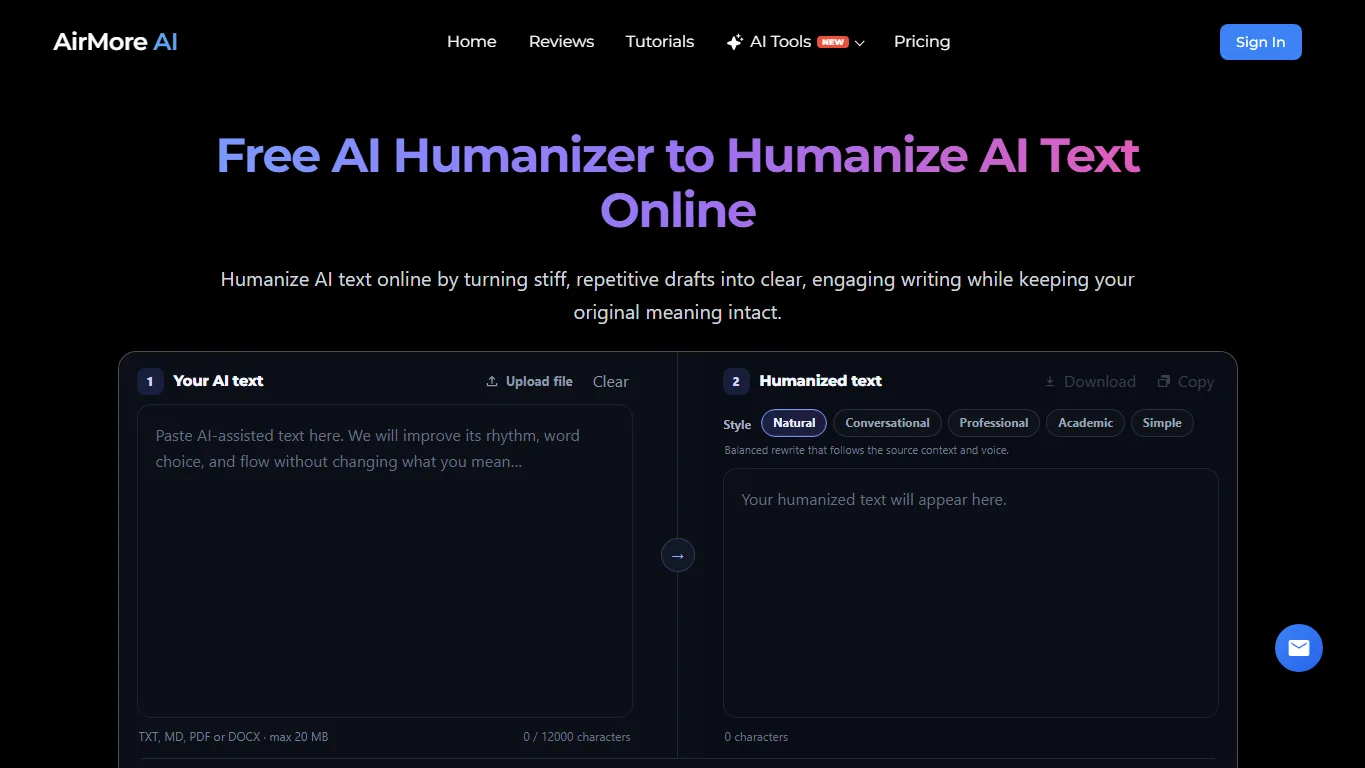
Overview: AirMore AI Humanizer is a clean browser-based tool for rewriting AI-assisted text into more natural, readable copy while keeping the original meaning intact. It supports direct text input and document uploads, including TXT, MD, PDF, and DOCX files, so it works for emails, blog drafts, study notes, product copy, and longer documents.
The style controls make it practical for everyday editing. You can choose Natural, Conversational, Professional, Academic, or Simple depending on where the text will be used. That makes AirMore a good first option when you want smoother flow and less repetitive AI phrasing without turning the task into a complex prompt-engineering session.
Pros:
- Simple online workflow with no complex editor
- Supports pasted text and common document uploads
- Multiple writing styles for different use cases
- Good fit for polishing AI-assisted drafts before human review
Cons:
- It improves readability but does not guarantee that every AI detector will classify the text as human-written
- Important facts, claims, and tone should still be checked manually before publishing
2. HIX.AI Humanizer

Overview: HIX.AI offers a dedicated humanizer tool that rephrases robotic content into human-friendly language. It supports multiple tones and removes detection markers common in AI-generated text.
Pros:
- Easy-to-use UI
- Supports bulk content
- Helps bypass AI detectors
Cons:
- Requires login
- Limited free usage
3. Undetectable.AI
Overview: One of the most popular tools focused entirely on evading AI detection. It turns GPT content into “undetectable” copy while maintaining logic and structure.
Pros:
- Specifically tuned to AI detectors like GPTZero and Turnitin
- Various rewrite styles
Cons:
- Pricing tiers can be confusing
- Some text may lose creativity
4. Humanize AI Text by Writesonic

Overview: Writesonic’s humanizer tool is fast and simple, great for marketers and bloggers. It helps you make the content sound more natural and adjust the style for your readers.
Pros:
- Built into the Writesonic suite
- Good for quick edits
Cons:
- Lacks deep tone customization
5. QuillBot AI Humanizer

Overview: A new feature from the popular paraphrasing tool, QuillBot’s AI Humanizer rewrites AI content to make it sound more authentic and natural. It builds on QuillBot’s trusted paraphrasing engine with advanced AI detection evasion.
Pros:
- Trusted brand with proven rewriting engine
- Built-in AI detection testing
- Easy tone customization
Cons:
- Requires subscription for full features
- Slightly slower for long-form content
AI Humanizer Tools Comparison Table
| Tool | Tone Control | AI Detector Evasion | Integration | Best For |
|---|---|---|---|---|
| AirMore AI Humanizer | ✔️ Strong | Not guaranteed; readability-first | Web only | Fast rewriting, document uploads, everyday polishing |
| HIX.AI Humanizer | ✔️ Medium | ✔️ Strong | Web only | Bulk rewriting, blog content |
| Undetectable.AI | ✔️ Basic | ✔️ Very Strong | Web only | AI detector evasion |
| Writesonic Humanizer | ✔️ Good | ⚠️ Moderate | Within Writesonic | Quick content polishing |
| QuillBot AI Humanizer | ✔️ Good | ✔️ Good | Web + Extension | Balanced rephrasing and tone |
Use Cases for AI Humanizer Tools
- Blog Writers: Add tone and personality to articles
- Students: Make AI summaries sound more original
- Social Media Managers: Add humor or emotion to AI-generated captions
- Email Marketing: Sound less robotic and more personal
- Script Writers: Give dialogue a human rhythm and character
- Job Seekers: Rewrite resumes and cover letters more naturally
Best Practices When Using AI Humanizers
- Always Review the Output: Even the best tools can create awkward phrasing. A human review ensures quality.
- Adjust the Tone: Choose the right tone for your audience. Friendly for blogs, formal for reports.
- Blend AI + Human Touch: Use AI humanizers as a first step, then layer your own insights.
- Use Multiple Tools If Needed: Some tools do better in specific contexts (e.g., business vs. creative).
- Stay Updated: AI detectors and SEO algorithms change. Make sure your tool evolves with them.
Conclusion
AI content is everywhere, but it does not have to sound clunky. AirMore AI Humanizer is now a useful first stop when you want a simple online rewrite, while HIX.AI, Undetectable.AI, Writesonic, and QuillBot remain strong choices for more specialized humanizing workflows.
For students, marketers, and writers, this means creating work that’s not only fast, but also genuine and engaging. And remember: it’s not about hiding AI. It’s about making it work with you, not instead of you.
Related
How to Enhance Christmas Photos Online

Best AI Product Photo Generators for Ecommerce
7 Best AI Quiz Generator Tools to Streamline Your Assessments in 2026
Best AI Tarot Websites for Online Tarot Readings
10 Best Wireframe Tools in 2026 (Tested by Designers)
Best AI Infographic Generators to Turn Ideas into Visual Content